插件中文资料库
中文说明、玩家点评、适用场景和替代推荐,方便快速判断是否适合你。
- 副本、团队本和大秘境战斗提醒
- 背包、银行和物品整理
- 界面布局、头像框、姓名板和动作条优化
- 伤害、治疗、仇恨和战斗数据统计
 Details! Mythic+ Scoreboard
 BagSync
 GroupFinder
ApplicantScout: LFG & Party Overlay 插件下载与使用指南
本页整理了 ApplicantScout: LFG & Party Overlay 的功能用途、适用人群、安装方法和常见问题,方便玩家快速判断是否需要安装。
适合谁用
ApplicantScout: LFG & Party Overlay 是一款 数据导出 / 其他插件 / 坦克 / 治疗 / 输出 类插件,适合需要优化界面、提升操作效率或补充游戏信息提示的魔兽世界玩家。
基本信息
- 插件作者:antrakt92
- 插件分类:数据导出 / 其他插件 / 坦克 / 治疗 / 输出
- 适配版本:12.1.5
- 累计下载:37
安装方法
- 点击上方下载按钮获取 ApplicantScout: LFG & Party Overlay插件文件。
- 解压后将插件文件夹放入 World of Warcraft/_retail_/Interface/AddOns 目录。
- 重启游戏或在角色界面点击插件,确认 ApplicantScout: LFG & Party Overlay 已启用。
- 如果插件不生效,请检查版本是否匹配,或关闭同类冲突插件后重试。
使用建议
ApplicantScout: LFG & Party Overlay 安装后建议先在角色界面确认已启用,进入游戏后根据插件提供的命令、小地图按钮或设置面板进行调整。如遇到报错,可先单独启用该插件排查冲突。
ApplicantScout: LFG & Party Overlay 常见问题
ApplicantScout: LFG & Party Overlay 适合需要 数据导出 / 其他插件 / 坦克 / 治疗 / 输出 类功能的玩家,特别是希望提升游戏便利性、界面管理或战斗信息获取效率的用户。
下载后解压到 Interface/AddOns 目录,然后重启游戏并在角色界面启用插件。
常见原因是目录多套一层、游戏版本不匹配、依赖插件缺失或同类插件冲突。
可以查看本页的替代插件推荐和相关插件区域,按下载量和分类选择同类工具。
插件 AI 问答
可以问:这个插件正式服能用吗、和 DBM 冲突吗、怎么设置、有没有替代插件。
ApplicantScout: LFG & Party Overlay 是一款魔兽世界插件,主要用于伤害统计、输出循环或战斗表现分析、背包、银行、专业制造或物品整理、副本、团本、大秘境或钥石辅助。建议根据自己的版本和插件环境先测试兼容性。
插件用途
ApplicantScout: LFG & Party Overlay 主要面向需要输出功能的玩家,用来改善游戏体验、减少重复操作或补充默认界面没有直接提供的信息。
适用场景
- 伤害统计、输出循环或战斗表现分析
- 背包、银行、专业制造或物品整理
- 副本、团本、大秘境或钥石辅助
使用建议
安装后建议先在角色选择界面或插件管理器中确认已启用,再进入游戏测试是否与现有整合包、WA 和其他插件冲突。如遇报错,可以先禁用同类插件排查。
ApplicantScout
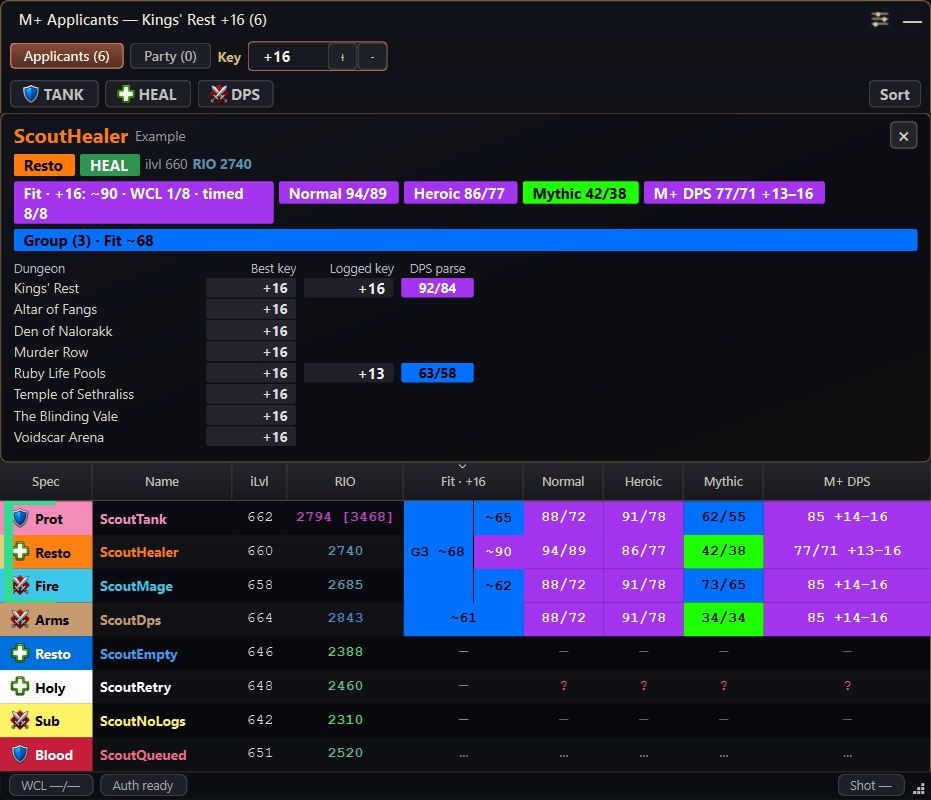
Compare Warcraft Logs results, RaiderIO scores and experience for Mythic+ and raid applicants, or check the players already in your group.
Requires both the WoW addon and the free Windows Companion. The Companion displays the overlay; keep it running while you use the addon.
What you can check
- Applicants: WCL results for the applying specialization, RaiderIO score, role and item level.
- Grouped applications: each player's results and the group's combined Fit estimate.
- Your party or raid: review players after inviting them or joining a group.
- Experience: dungeon history, raid progress and available past-season RaiderIO ratings. Local RaiderIO data is optional.
Click a column heading to sort. Grouped applicants stay together.
Getting started
- Install the addon and type
/apscoutfor the built-in setup guide. - Install the Windows Companion from the link above. Choose
ApplicantScoutCompanionSetup-*.exeon the release page. - Follow the illustrated guide to create a free Warcraft Logs API client. Enter its Client ID/Secret in Companion Settings and click Test WCL.
- Select your active WoW
_retail_\Screenshotsfolder in Companion Settings. - Host a Mythic+ or raid listing, or join a group and select Party. Click the small Companion window to expand the results.
For WoW Retail: Midnight; Classic is unsupported. Keep both parts updated.
Reading Fit
Fit, shown as ~65, estimates how a player's recorded results fit your listing.
For M+, it uses WCL damage results near the target key and verified timed runs. For raids, it uses available WCL results.
- It is not an overall skill rating or a success probability.
- Missing data stays unknown; incomplete groups show
partial. Hover for sources and sample counts. - M+ WCL values measure damage for every role, including tanks and healers. They do not measure healing, survival or utility.
How it works
The addon briefly shows a QR image and takes a WoW screenshot. The Companion reads it, fetches WCL results and updates the overlay. Capture pauses in combat, during active Mythic+ runs and raid boss encounters.
Screenshot quality and format are restored after capture. Use /apscout off or /reload if capture was interrupted. QR screenshots may remain if the Companion is stopped or watching the wrong folder; avoid sharing them before cleanup.
Settings and help
/apscoutopens setup and settings;/apscout helplists commands.- No overlay? Keep the Companion running, check its Screenshots folder and use
/apscout statusoutside combat. - No WCL results? Click Test WCL in Companion Settings.
The addon can default new M+ listings to Competitive. Change the playstyle or turn this off in settings. Greetings are optional.
Languages
The in-game setup guide and addon settings support all current Retail client languages. Auto (WoW) follows your client; choose another language in the guide’s selector. Your choice is saved across characters and reloads.






The Companion and browser guide use English field names such as Test WCL.
Privacy and downloads
- WCL credentials stay on your computer. No Blizzard password, memory reading, code injection or automated gameplay; this is not an official Blizzard app.
- Current Windows builds are unsigned, so SmartScreen may warn. Download from the linked GitHub release. Checksums verify file integrity, not publisher identity.
- Usage sharing stays off until you opt in. Reports contain a random installation ID, version and daily milestones, excluding names, screenshots and credentials. Privacy details.
Remove credentials and player details before sharing logs or QR screenshots.
Code & credits
Free to use. Public forks, ports and substantial reuse of my original code require credit and a link to ApplicantScout. If the derivative earns CurseForge Reward Points, allocate a positive share of that project's points to antrakt92. You choose the share entirely at your discretion, considering the extent and significance of my work in your project; there is no fixed minimum percentage. One share covers all my works reused in it; each separate derivative shares its own points.
Permission is automatic: no contact, prior approval or negotiation is required, including approval of your chosen share. Contact is optional. No points earned means no payment. The share concerns only the derivative project's CurseForge points, not account earnings, other projects, donations or other revenue. A pending CurseForge member invitation does not block use; enable the share when accepted and available. The same self-selected share satisfies my earlier custom licenses: I waive their fixed minimum percentages.
More by antrakt92
- StatsPro — character stats and gear information on screen.
- Do You Need It? — compare group loot and ask for items.
- Dungeon Pro — dungeon quests, prerequisite chains and quest-giver navigation for WoW Forever.
You can also find my Cyberpunk 2077 and Assassin's Creed Unity mods on Nexus Mods.
⭐ If you enjoy the addon, add it to your favorites.
🔔 Follow ApplicantScout on CurseForge to keep up with updates.
☕ You can also support my work on Ko-fi.
CurseForge: https://www.curseforge.com/wow/addons/applicantscout-lfg-overlay用户评价
暂无 / 5,0 条评价相关推荐
继续看看这些内容
