插件中文资料库
中文说明、玩家点评、适用场景和替代推荐,方便快速判断是否适合你。
- 日常任务、练级和满级玩法辅助
- 界面体验优化和信息展示增强
- 副本前先测试兼容性,确认不报错后再长期使用
 BagSync
 GroupFinder
 TankMD Misdirect
SlickCast 插件下载与使用指南
本页整理了 SlickCast 的功能用途、适用人群、安装方法和常见问题,方便玩家快速判断是否需要安装。
适合谁用
SlickCast 是一款 HUD界面 / 其他插件 / 治疗 / 施法职业 类插件,适合需要优化界面、提升操作效率或补充游戏信息提示的魔兽世界玩家。
基本信息
- 插件作者:WizardsPotion
- 插件分类:HUD界面 / 其他插件 / 治疗 / 施法职业
- 适配版本:12.1.5
- 累计下载:41
安装方法
- 点击上方下载按钮获取 SlickCast插件文件。
- 解压后将插件文件夹放入 World of Warcraft/_retail_/Interface/AddOns 目录。
- 重启游戏或在角色界面点击插件,确认 SlickCast 已启用。
- 如果插件不生效,请检查版本是否匹配,或关闭同类冲突插件后重试。
使用建议
SlickCast 安装后建议先在角色界面确认已启用,进入游戏后根据插件提供的命令、小地图按钮或设置面板进行调整。如遇到报错,可先单独启用该插件排查冲突。
SlickCast 常见问题
SlickCast 适合需要 HUD界面 / 其他插件 / 治疗 / 施法职业 类功能的玩家,特别是希望提升游戏便利性、界面管理或战斗信息获取效率的用户。
下载后解压到 Interface/AddOns 目录,然后重启游戏并在角色界面启用插件。
常见原因是目录多套一层、游戏版本不匹配、依赖插件缺失或同类插件冲突。
可以查看本页的替代插件推荐和相关插件区域,按下载量和分类选择同类工具。
插件 AI 问答
可以问:这个插件正式服能用吗、和 DBM 冲突吗、怎么设置、有没有替代插件。
SlickCast (AzCastBar Reborn) 是一款魔兽世界插件,主要用于地图、区域、任务路线或交通提醒、坐骑、宠物或击杀记录,适合对应经典服或周年服版本使用。建议根据自己的版本和插件环境先测试兼容性。
插件用途
SlickCast (AzCastBar Reborn) 主要面向需要施法职业功能的玩家,用来改善游戏体验、减少重复操作或补充默认界面没有直接提供的信息。
适用场景
- 地图、区域、任务路线或交通提醒
- 坐骑、宠物或击杀记录
使用建议
安装后建议先在角色选择界面或插件管理器中确认已启用,再进入游戏测试是否与现有整合包、WA 和其他插件冲突。如遇报错,可以先禁用同类插件排查。
SlickCast
See every cast. Shape every bar.
SlickCast is a modern, lightweight castbar replacement for World of Warcraft. It brings Player, Target, Focus, Pet, and Mirror timers into one polished, highly customizable system with empowered-spell support, responsive previews, profiles, and clear cast feedback.


One polished castbar system
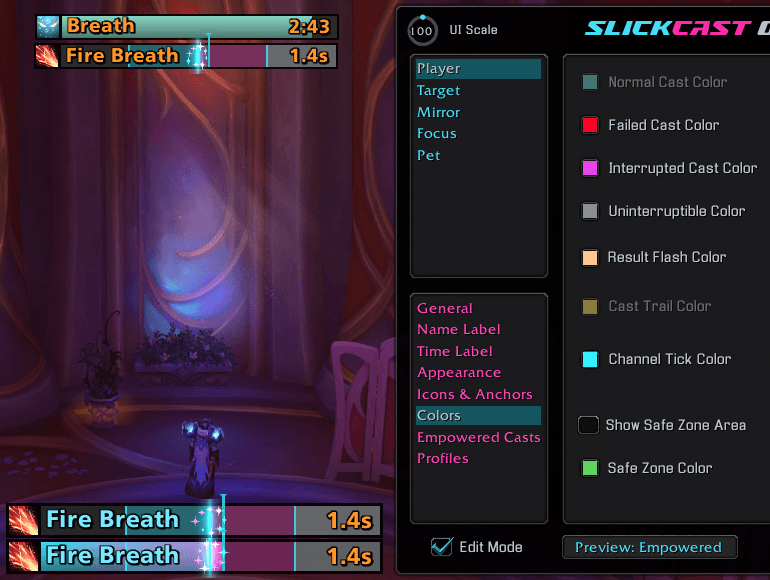
Replace Blizzard's Player, Target, Focus, Pet, and Mirror timer bars with a consistent SlickCast layout. Every bar has independent settings, while Edit Mode lets you preview realistic casting states and position everything before returning to the action.
🎯 Complete cast coverage
- Customize Player, Target, Focus, Pet, and Mirror bars independently.
- Suppress the matching Blizzard castbars and mirror timers for a clean replacement.
- Preview normal, channeled, empowered, interrupted, failed, uninterruptible, and mirror-timer states in Edit Mode.
- Keep protected interrupt coloring accurate through Blizzard's native renderer.
⚡ Feedback when it matters
- Show optional channel tick markers with brief glow flashes as supported ticks pass.
- Add interrupted and failed-cast shake, result text, and slash-flash feedback.
- Display an optional latency safe zone on Player casts.
- Reverse bar growth and keep supported cast-trail effects aligned with the active direction.
Empowered casts at a glance
See empowered spells as colored charge sections with clear stage markers and release feedback. Choose a traditional filling bar or a focused moving marker; Target and Focus empowered casts keep that marker animated even when WoW protects their timing data.
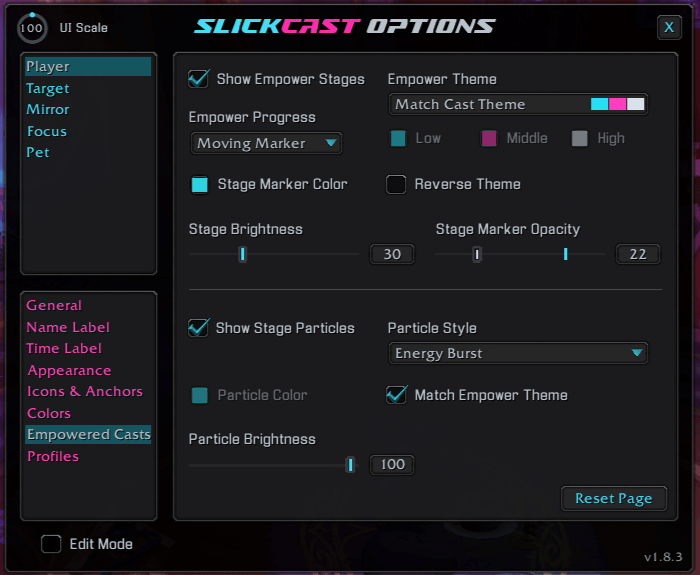
- Choose Fill Bar or Moving Marker progress.
- Match the active cast theme or build a custom three-color Empower Theme.
- Reverse theme colors and adjust stage brightness, marker color, and marker opacity.
- Highlight attained stages cumulatively when the release stage is available.
- Add stage-completion particles with eight distinct styles, adjustable brightness, a custom color, or a balanced mix of the selected theme colors.
Built to match your interface
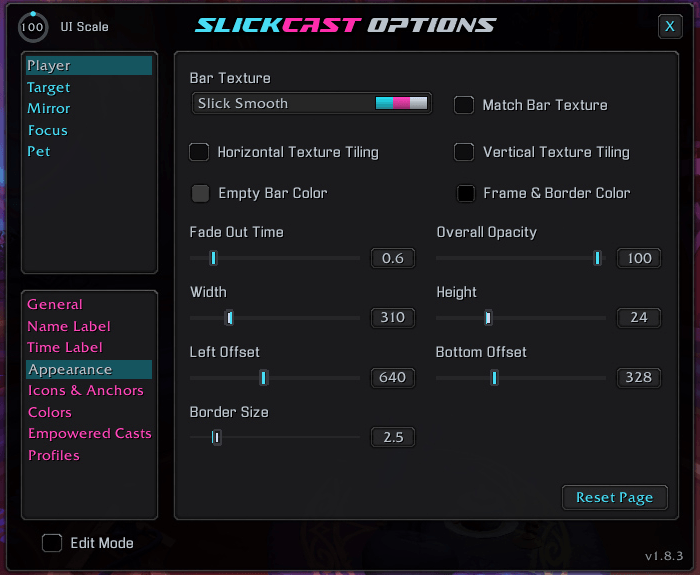
SlickCast gives each bar the same deep appearance controls without forcing every bar to look alike. Start with a built-in theme or shape the layout from texture to typography.
🎨 Appearance and layout
- Choose built-in cast themes or customize start, middle, and end gradient colors.
- Select bar textures, horizontal or vertical texture tiling, fonts, colors, labels, timers, borders, opacity, icon placement, and fade timing.
- Configure cast trails, empty-bar color, frame and border color, bar dimensions, offsets, and anchors.
- Size spell icons independently, match them to bar height, and adjust their X/Y offsets. Turn off Reserve Icon Space for a full-width bar with a detached icon.
- Copy settings between bars or apply quick layout templates.
💾 Profiles that travel
- Save and load account-wide profiles.
- Import and export profile strings for sharing or backup.
- Keep each character's active live layout separate while reusing shared profiles when wanted.
Make it yours
- Tune every supported bar independently or copy a finished setup to another bar.
- Use built-in themes and layouts as starting points, then refine colors, textures, fonts, dimensions, anchors, icons, and effects.
- Toggle Edit Mode to preview all bars, test representative cast states, and drag bars into place.
- Right-click an Edit Mode bar to return it to the center before saving a new position.
- Save the finished setup as a profile or export it as a shareable string.
Type /sc to open SlickCast's Options & Customization panel.
Commands
| Command | Action |
|---|---|
/sc |
Open the Options & Customization panel. |
/scast |
Open the Options & Customization panel. |
/slickcast |
Open the Options & Customization panel. |
/slcast |
Open the Options & Customization panel. |
/scast wipeconfig |
Reset all bars and settings to their defaults. |
Latest update
1.8.6 - 2026-10-16
- New: Target and Focus Cast Target pages now offer cast-target names with independent font, color, and positioning controls.
- New: Chat notifications now alert you when another player reports a newer SlickCast release.
1.8.5 - 2026-10-16
- New: Target and Focus General pages now offer Highlight Important Casts with a pulsing outline and a customizable Highlight Color on the Colors page.
- Improved: Result Flash is now brighter for interrupted and failed casts.
- Fixed: Name Label and Time Label color pickers now restore their original colors without errors when canceled.
Support and more from WizardsPotion
Like knobs to turn, buttons to push, and pretty lights on things?
Explore the rest of the Slick Family of World of Warcraft addons from WizardsPotion.
If SlickCast makes every cast easier to read and every bar feel like yours, you can help support its continued development by buying me a coffee. Every bit is appreciated, but never expected.

用户评价
暂无 / 5,0 条评价相关推荐
继续看看这些内容
