插件中文资料库
中文说明、玩家点评、适用场景和替代推荐,方便快速判断是否适合你。
- 界面布局、头像框、姓名板和动作条优化
 BagSync
 TankMD Misdirect
 GroupFinder
SlickFPS 插件下载与使用指南
本页整理了 SlickFPS 的功能用途、适用人群、安装方法和常见问题,方便玩家快速判断是否需要安装。
适合谁用
SlickFPS 是一款 战斗 / HUD界面 / 其他插件 / 插件扩展 类插件,适合需要优化界面、提升操作效率或补充游戏信息提示的魔兽世界玩家。
基本信息
- 插件作者:WizardsPotion
- 插件分类:战斗 / HUD界面 / 其他插件 / 插件扩展
- 适配版本:12.1.5
- 累计下载:42
安装方法
- 点击上方下载按钮获取 SlickFPS插件文件。
- 解压后将插件文件夹放入 World of Warcraft/_retail_/Interface/AddOns 目录。
- 重启游戏或在角色界面点击插件,确认 SlickFPS 已启用。
- 如果插件不生效,请检查版本是否匹配,或关闭同类冲突插件后重试。
使用建议
SlickFPS 安装后建议先在角色界面确认已启用,进入游戏后根据插件提供的命令、小地图按钮或设置面板进行调整。如遇到报错,可先单独启用该插件排查冲突。
SlickFPS 常见问题
SlickFPS 适合需要 战斗 / HUD界面 / 其他插件 / 插件扩展 类功能的玩家,特别是希望提升游戏便利性、界面管理或战斗信息获取效率的用户。
下载后解压到 Interface/AddOns 目录,然后重启游戏并在角色界面启用插件。
常见原因是目录多套一层、游戏版本不匹配、依赖插件缺失或同类插件冲突。
可以查看本页的替代插件推荐和相关插件区域,按下载量和分类选择同类工具。
插件 AI 问答
可以问:这个插件正式服能用吗、和 DBM 冲突吗、怎么设置、有没有替代插件。
SlickFPS 是一款魔兽世界插件,主要用于界面框架、头像、动作条或冷却显示优化。建议根据自己的版本和插件环境先测试兼容性。
插件用途
SlickFPS 主要面向需要HUD界面功能的玩家,用来改善游戏体验、减少重复操作或补充默认界面没有直接提供的信息。
适用场景
- 界面框架、头像、动作条或冷却显示优化
使用建议
安装后建议先在角色选择界面或插件管理器中确认已启用,再进入游戏测试是否与现有整合包、WA 和其他插件冲突。如遇报错,可以先禁用同类插件排查。
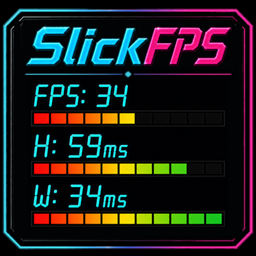
SlickFPS
Live FPS and latency, styled to fit your UI
SlickFPS is a lightweight, draggable performance HUD for World of Warcraft. It keeps your current FPS, Home latency, and World latency visible through responsive status bars, then gives you the styles, themes, fonts, profiles, and layout controls to make the display feel at home in your interface.


Read performance at a glance
See live frame rate and both latency paths without opening another window. Each row combines a clear numeric value with a status bar that changes color and fill as performance changes.
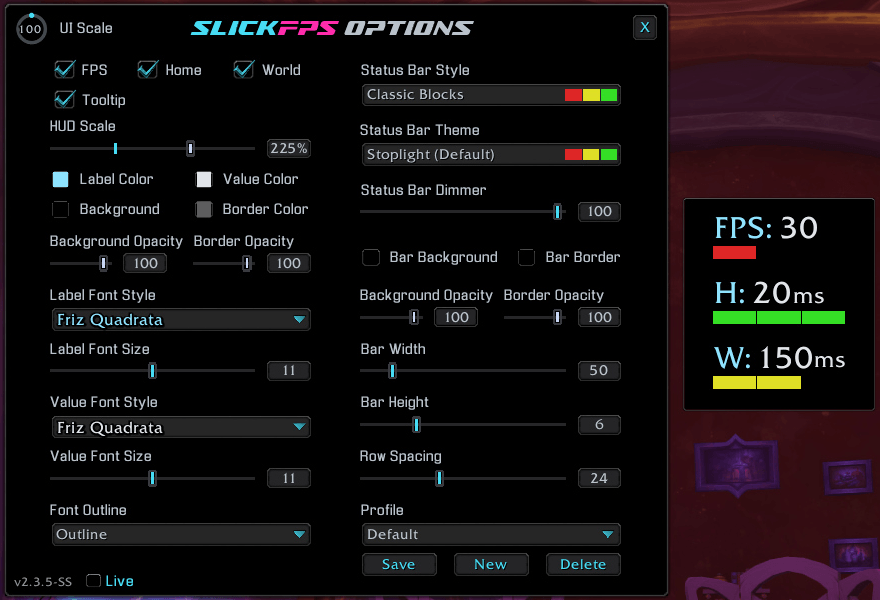
📊 Clear live feedback
- Track FPS, Home latency, and World latency in one compact HUD.
- Let FPS bars follow WoW's configured target while latency bars react to connection quality.
- Show or hide the FPS, Home, and World rows individually.
- Hover over the HUD for its lock status and quick control reminders, or disable the tooltip when you no longer need it.
- Left-drag the unlocked HUD into place, then right-click to lock it.
Rename note: SlickFPS was formerly FPSView. If both FPSView and SlickFPS appear in your AddOns list after updating, disable or remove FPSView to avoid duplicate HUDs.
Make performance data part of your UI
Go clean and minimal, bright and animated, segmented like an audio meter, or remove the bars entirely. SlickFPS separates bar style from color theme so you can mix the look you want instead of settling for a single preset design.
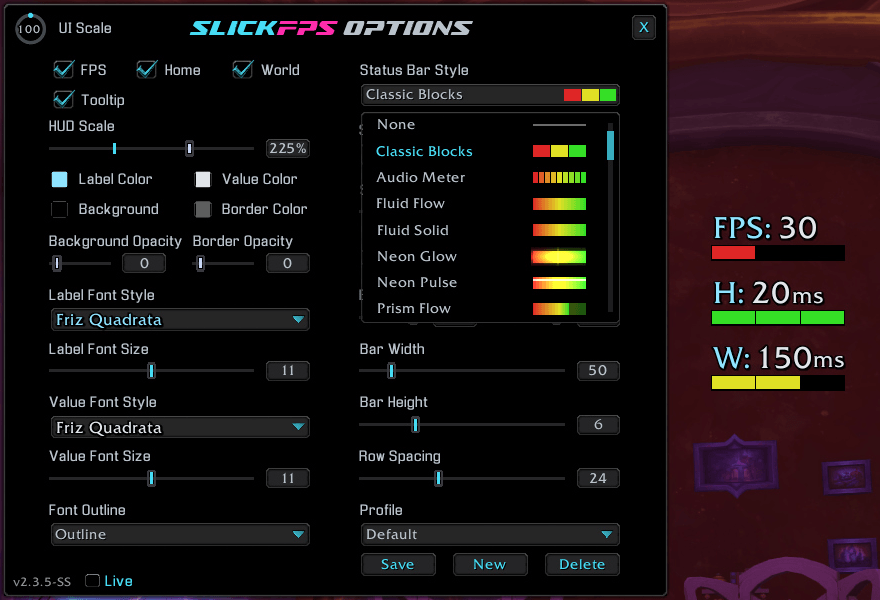
✨ Fourteen bar styles
- Choose Classic Blocks, Audio Meter, Fluid Flow, Fluid Solid, Neon Glow, Neon Pulse, Prism Flow, Pulse Blocks, Scanline Fill, Signal Sweep, Status Marker, Thin Line, Tuner Pulse, or None.
- Pair any style with 55 color themes, from the default Stoplight palette to soft, vivid, neon, earthy, and seasonal combinations.
- Fine-tune bar width, height, spacing, background, border, opacity, and brightness.
- Use separate label and value fonts, sizes, colors, and outline styles.
- Choose from 15 bundled fonts, with additional fonts available through LibSharedMedia.
Keep your favorite looks ready
Appearance profiles let you build different HUD designs and switch between them without recreating every setting. Save a new look, rename it, update it, or remove it while the protected Default profile always gives you a clean starting point.
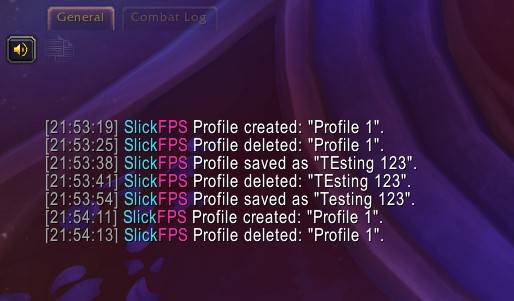
💾 Profiles that travel with your setup
- Save complete HUD appearances, including styles, themes, fonts, colors, sizing, visibility, and position.
- Switch profiles from the options window and keep character-specific placement and appearance choices.
- Create, rename, save, and delete custom profiles with clear chat confirmation.
- Return to the protected Default profile whenever you want the original look.
Make it yours
- Scale the entire HUD and adjust bar width, height, and row spacing.
- Customize frame background, border, opacity, label color, and value color.
- Set bar background and border colors, opacity, and dimmer level independently.
- Choose separate fonts and sizes for labels and values, with None, Outline, or Thick Outline.
- Toggle the FPS, Home, World, and mouseover-tooltip elements individually.
- Keep the options window above the surrounding UI while you tune the result.
Type /slickfps to open the options window. You can also Shift + Right-Click the HUD to open or close it, Left-Drag to move an unlocked HUD, and Right-Click to lock or unlock it.
Commands
| Command | Action |
|---|---|
/slickfps |
Open or close the options window. |
/fpsv |
Open or close the options window with the legacy FPSView shortcut. |
/slickfps reset |
Reset the HUD position and all settings to their defaults, then reload the UI. |
Latest update
2.3.9 - 2026-09-30
- Improved: TOC version is now updated for WoW 12.1.5.
- Fixed: HUD FPS bar now uses WoW's configured Target FPS value when no foreground limit or display refresh value is available and remains full within two FPS of that target without learning a false limit from temporary low FPS.
Support and more from WizardsPotion
Like knobs to turn, buttons to push, and pretty lights on things?
Explore the rest of the Slick Family of World of Warcraft addons from WizardsPotion.
If SlickFPS keeps the performance numbers you care about visible without cluttering your UI, you can help support its continued development by buying me a coffee. Every bit is appreciated, but never expected.

用户评价
暂无 / 5,0 条评价相关推荐
继续看看这些内容
