插件中文资料库
中文说明、玩家点评、适用场景和替代推荐,方便快速判断是否适合你。
- 背包、银行和物品整理
- 拍卖行、交易和金币管理
 LL_Alt小号助手
 Details! Mythic+ Scoreboard
 GearInsight
EzWoW - Bags 插件下载与使用指南
本页整理了 EzWoW - Bags 的功能用途、适用人群、安装方法和常见问题,方便玩家快速判断是否需要安装。
适合谁用
EzWoW - Bags 是一款 拍卖与商业 / 背包与库存 类插件,适合需要优化界面、提升操作效率或补充游戏信息提示的魔兽世界玩家。
基本信息
- 插件作者:EzWoW
- 插件分类:拍卖与商业 / 背包与库存
- 适配版本:1.60.1
- 累计下载:2
安装方法
- 点击上方下载按钮获取 EzWoW - Bags插件文件。
- 解压后将插件文件夹放入 World of Warcraft/_retail_/Interface/AddOns 目录。
- 重启游戏或在角色界面点击插件,确认 EzWoW - Bags 已启用。
- 如果插件不生效,请检查版本是否匹配,或关闭同类冲突插件后重试。
使用建议
EzWoW - Bags 安装后建议先在角色界面确认已启用,进入游戏后根据插件提供的命令、小地图按钮或设置面板进行调整。如遇到报错,可先单独启用该插件排查冲突。
EzWoW - Bags 常见问题
EzWoW - Bags 适合需要 拍卖与商业 / 背包与库存 类功能的玩家,特别是希望提升游戏便利性、界面管理或战斗信息获取效率的用户。
下载后解压到 Interface/AddOns 目录,然后重启游戏并在角色界面启用插件。
常见原因是目录多套一层、游戏版本不匹配、依赖插件缺失或同类插件冲突。
可以查看本页的替代插件推荐和相关插件区域,按下载量和分类选择同类工具。
插件 AI 问答
可以问:这个插件正式服能用吗、和 DBM 冲突吗、怎么设置、有没有替代插件。
English · 한국어
一款适用于 WoW Forever 的背包插件,将背包和银行显示在同一个窗口中,并按类别分组。图标上带有简短的用途标签,你可以查看其他角色的背包和银行,拍卖价格每天记录,并显示在鼠标提示、类别总计和 30 天图表中。在拍卖行,它帮助你发布和购买;在商人处,它会出售灰色垃圾并修理你的装备,已锁定的物品绝不会被误卖或误移动。
插件设置为英文时的游戏内截图。游戏客户端为韩语,因此区域、物品和法术名称等游戏文本保持韩语。角色名、玩家名和聊天文本已模糊处理。
功能
单一背包窗口
背包(和银行)显示在一个窗口中,按类别分组:装备、消耗品、材料、任务物品、配方、垃圾以及你自己的自定义类别。
三种视图:分区、网格和列表;可按名称或品质排序物品,按名称或大小排序类别。
左侧类别列表:单击显示某一类别,右键打开其菜单,将物品拖放到自定义类别即可放入其中。
类别标题可折叠和展开;右键可固定、隐藏或禁用,或将整个类别逐组移动到银行、邮件、交易或商人处。
背包图标带有空位数量(钥匙链、背包 4·3·2·1、背包);将物品拖放到背包图标即可放入该背包。
排序按钮使用游戏自带的背包(和银行)排序。
按 B 键和背包按钮打开(可关闭)。
物品图标
图标上的用途标签:装绑、Q(任务)、配方,以及使用该材料的专业。
装备显示物品等级,新物品显示绿点,已锁定物品显示挂锁,显示冷却时间。
右键使用药水、食物和炉石,不会出现操作被阻止的错误,战斗中也可使用。
搜索
按名称、类型或用途搜索。支持 ilvl>=50、rarity=rare、AND / OR / NOT、括号和引号。× 按钮清除搜索。
将搜索保存为自定义类别。
小号和拍卖价格
在同一服务器上打开另一个角色的背包和银行,只读。
价格标签页:完整扫描拍卖行或仅扫描你背包中的物品。价格显示在鼠标提示中,并作为每个类别的总计(≈)显示。
每次扫描每天增加一个数据点(最低单价和上架数量);历史记录保留 30–120 天(默认 60 天)。
在价格标签页点击物品,可查看其最低价格和上架数量的 30 天图表。
鼠标提示显示与 7 天平均值的变化(▲/▼)、使用该物品的专业,以及每个角色在背包和银行中持有的数量。
拍卖行助手
出售助手:Alt+点击背包物品,将其放入拍卖行出售框,价格略低于最低价(以铜币或百分比压价)。你需要自己按下发布按钮。价格绝不会低于商人价格,当价格远低于 7 天平均值时会发出警告。
出售列表:勾选多个背包物品并逐一发布;在商店出售更划算的物品会被标记,并从“全选”中排除。
拍卖行旁边的购买面板:按名称搜索,按最低价优先列出报价,按最低价优先购买指定数量。每次购买都需要确认,当价格远高于 7 天平均值时会发出警告。
Alt+右键点击背包物品,或右键点击价格标签页中的一行,可在购买面板中查询该物品。
物品锁定
Ctrl+Alt+点击在当前角色上锁定物品,Ctrl+Alt+右键点击为所有角色锁定。
已锁定物品会被自动出售、类别移动到商人、邮件或交易,以及拍卖行发布跳过。
商人(默认开启)
自动出售灰色垃圾:打开商人时,背包中的所有灰色物品都会被出售,金币会在聊天中报告。
自动修理装备:在能修理的商人处修理所有已穿戴和携带的装备(金币不足时跳过)。
打开商人时按住 Shift 可跳过本次两项操作。
金币和交易
聊天中的金币:每次金币收入或支出时,显示金额和原因(出售、购买、修理、飞行、训练师、邮件、拍卖行、交易、任务……)。
交易摘要密语:交易后,将易手的物品和金币密语给另一名玩家。两者均可关闭。
设置(/ezbags settings)
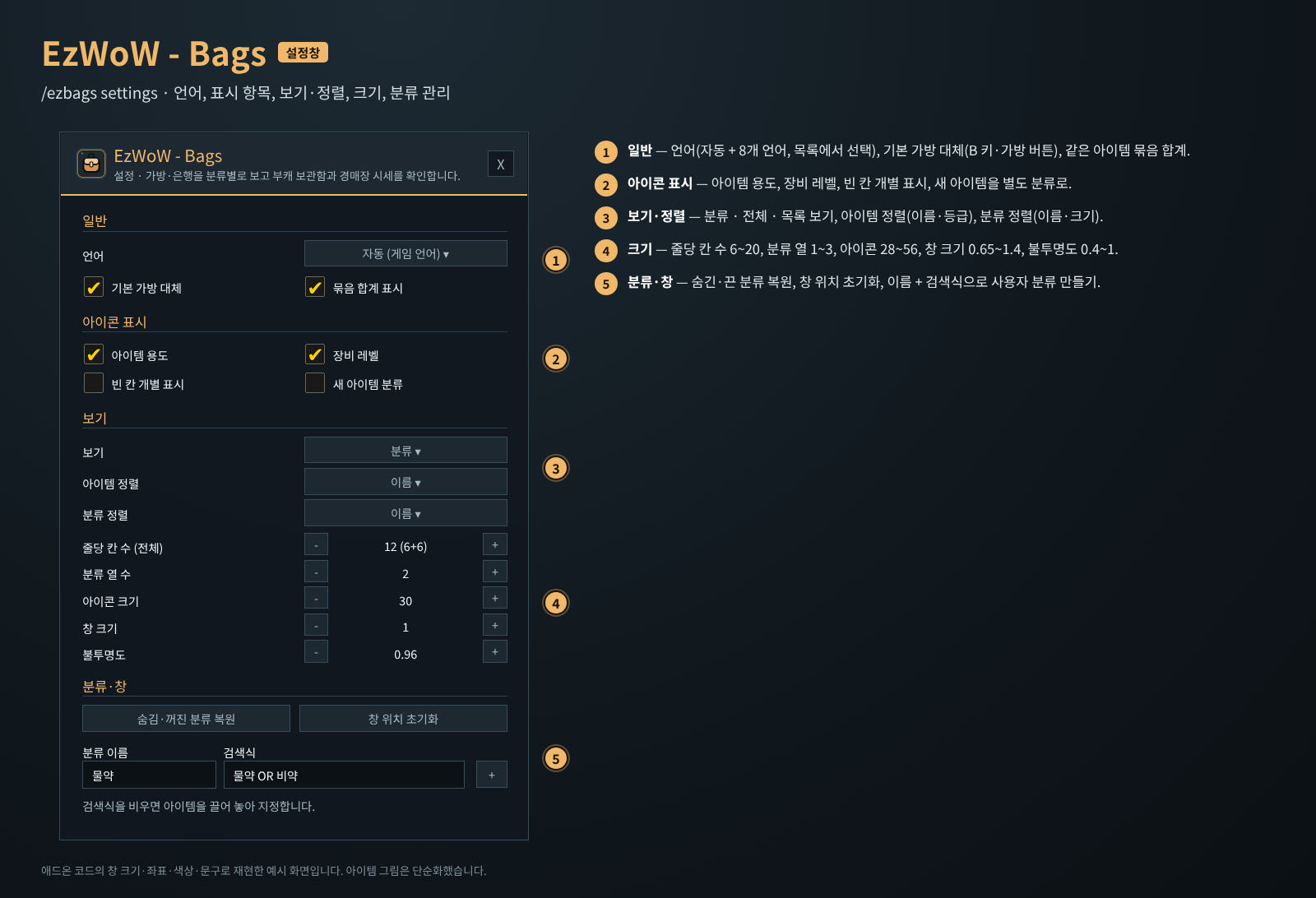
常规:语言(自动 + 8 种语言)、替换默认背包、合并堆叠。
商人:自动出售灰色垃圾、自动修理装备。
物品图标:用途标签、装备等级、单独空位、新物品类别。
视图:视图、物品排序、类别排序、每行物品数、类别列数、图标大小、窗口缩放、不透明度。
类别和窗口:恢复隐藏类别、重置位置、根据名称和搜索创建自定义类别。
拍卖行:出售助手、购买面板、鼠标提示上的价格趋势、压价(铜币或百分比)、保留价格历史天数。
物品锁定:使用物品锁定、全部解锁。
与其他 EzWoW 插件配合使用
自动出售和自动修理已从 EzWoW - Tooltip 移到这里。你在那里的选择会一次性继承;启用 Bags 时,Tooltip 将这些功能交给 Bags。
启用 EzWoW - Tooltip 时,Tooltip 收集拍卖价格,Bags 共享这些价格;7 天趋势会添加到 Tooltip 的价格行中。
手柄
启用手柄 UI 时,EzWoW 窗口支持手柄操作:方向键移动,A(✕)按下,X(□)右键点击,LB/RB 滚动,B(○)关闭。窗口下方会显示与你手柄按钮风格一致的操作指南。
没有打开游戏窗口时,按 View(Back)/ Create 移动到屏幕上的 EzWoW 框架。再次按下或按 B 返回。
要使用其他按钮:按键绑定 > 插件 > EzWoW > “手柄:移动到 / 离开 EzWoW 框架”(需安装 EzWoW-MapFinder)。
记录共享
由所有 EzWoW 插件共享,默认开启:你亲自见过的任务 NPC、稀有怪物目击、物品掉落和采集点会与其他 EzWoW 用户共享。
/ezshare on / off,/ezshare channel on / off,/ezshare status
命令
/ezbags 或 /ezb — 打开或关闭窗口
/ezbags bank — 显示已保存的银行
/ezbags settings — 设置
/ezbags scan — 拍卖行打开时进行完整价格扫描
语言:英语、韩语、德语、法语、西班牙语、俄语、简体中文、繁体中文。
EzWoW - Bags
English · 한국어
A bag addon for WoW Forever that shows your bags and bank in one window, grouped by category. Icons carry a short purpose label, you can look into your other characters' bags and banks, and auction prices are recorded every day and shown in tooltips, category totals and a 30-day graph. At the auction house it helps you post and buy, at a vendor it sells grey junk and repairs your gear, and locked items are never sold or moved by mistake.
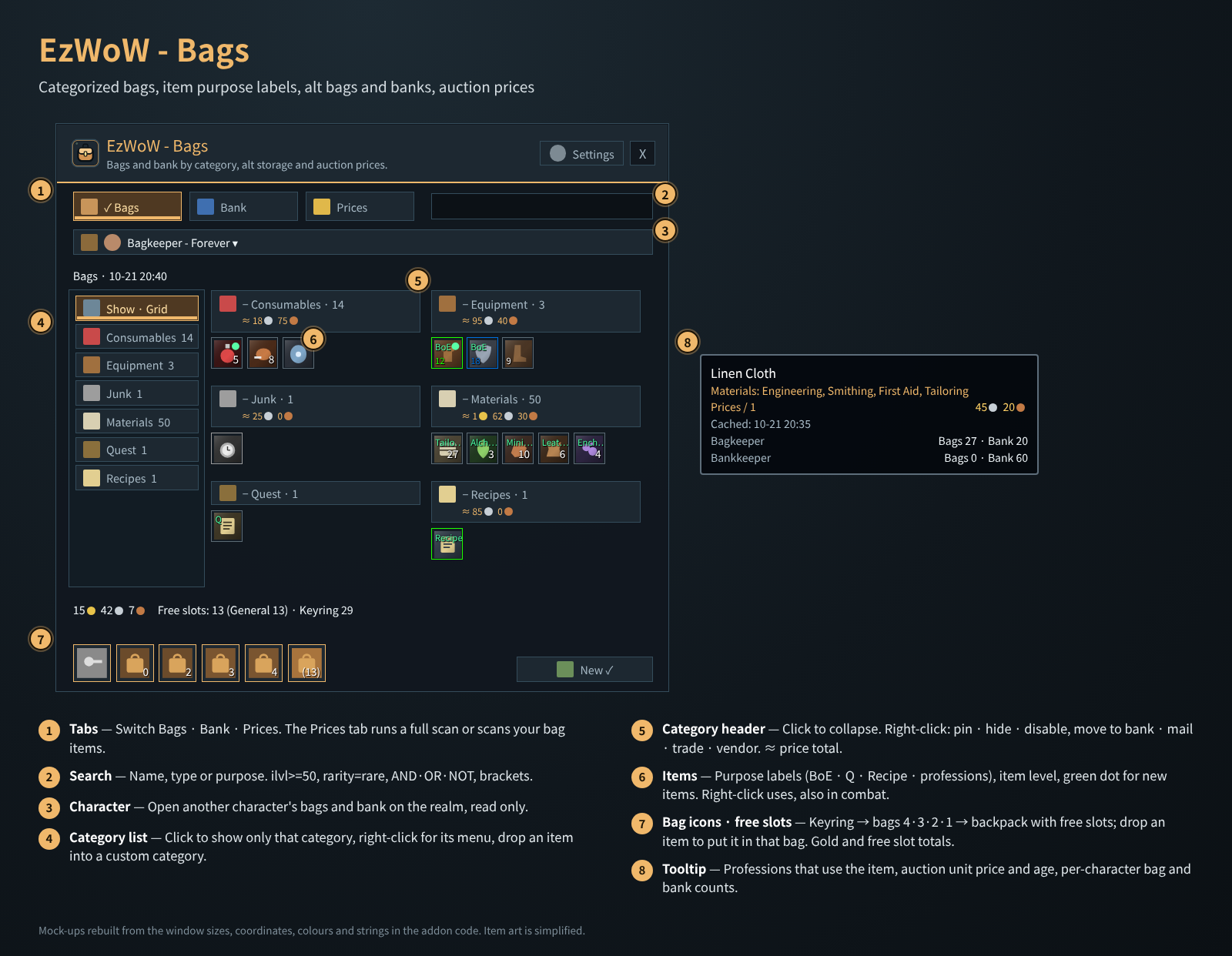
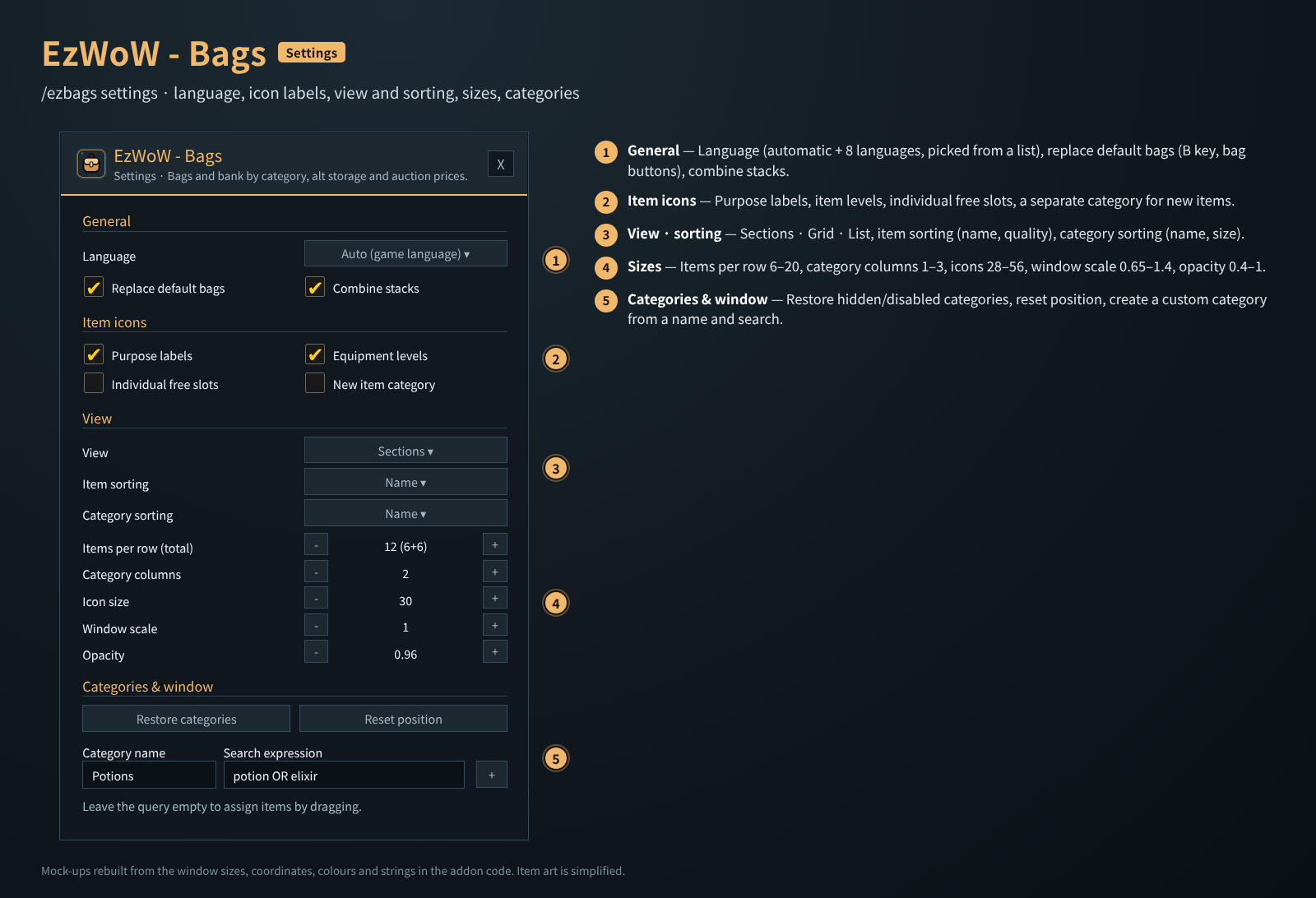
In-game screenshots with the addon set to English. The game client is Korean, so game text such as zone, item and spell names stays Korean. Character and player names and chat text are blurred.
Features
One bag window
- Bags (and the bank) in one window, grouped into categories: equipment, consumables, materials, quest items, recipes, junk and your own custom categories.
- Three views: Sections, Grid and List; sort items by name or quality and categories by name or size.
- Category list on the left: click to show one category, right-click for its menu, drop an item on a custom category to put it there.
- Category headers fold and unfold; right-click to pin, hide or disable, or to move the whole category to the bank, mail, trade or a vendor one stack at a time.
- Bag icons with free slot counts (keyring, bags 4·3·2·1, backpack); drop an item on a bag to put it there.
- Sort button that uses the game's own bag (and bank) sort.
- Opens with B and the bag buttons (can be turned off).
Item icons
- Purpose labels on the icon: BoE, Q (quest), Recipe, and the professions that use a reagent.
- Item level on equipment, a green dot on new items, a padlock on locked items, cooldowns.
- Right-click uses potions, food and the Hearthstone without blocked-action errors, also in combat.
Search
- Search by name, type or purpose. Supports
ilvl>=50,rarity=rare,AND / OR / NOT, brackets and quotes. The × button clears the search. - Save a search as a custom category.
Alts and auction prices
- Open another character's bags and bank on the same realm, read only.
- Prices tab: full auction house scan or a scan of just your bag items. Prices show in tooltips and as a total (≈) on each category.
- Every scan adds one point per day (lowest unit price and listed quantity); history is kept for 30–120 days (default 60).
- Click an item on the Prices tab for a 30-day graph of its lowest price and listed quantity.
- Tooltips show the change against the 7-day average (▲/▼), the professions that use the item and how many each character holds in bags and bank.
Auction house helpers
- Sell helper: Alt+click a bag item to put it into the auction house sell frame with a price just under the lowest (undercut in copper or percent). You press the post button yourself. It never goes below the vendor price and warns when the price is far below the 7-day average.
- Sell list: check several bag items and post them one by one; items that sell better at a shop are marked and left out of "Select all".
- Buy panel beside the auction house: search by name, offers listed cheapest first, buy a quantity cheapest first. Every purchase asks for confirmation, with a warning when the price is far above the 7-day average.
- Alt+right-click a bag item, or right-click a row on the Prices tab, to look it up in the buy panel.
Item lock
- Ctrl+Alt+click locks an item on this character, Ctrl+Alt+right-click for all characters.
- Locked items are skipped by auto-sell, category moves to a vendor, mail or trade, and auction posting.
Vendor (on by default)
- Auto-sell grey junk: every grey item in your bags is sold when a vendor opens, and the gold is reported in chat.
- Auto-repair gear: all worn and carried gear is repaired at a vendor who can repair (skipped when you do not have enough gold).
- Hold Shift while opening the vendor to skip both this time.
Gold and trades
- Money in chat: each time gold comes in or goes out, the amount and the reason (selling, buying, repair, flights, trainers, mail, auction house, trade, quests…).
- Trade summary whisper: after a trade, the items and gold that changed hands are whispered to the other player. Both can be turned off.
Settings (/ezbags settings)
- General: language (automatic + 8 languages), replace default bags, combine stacks.
- Merchant: auto-sell grey junk, auto-repair gear.
- Item icons: purpose labels, equipment levels, individual free slots, new item category.
- View: view, item sorting, category sorting, items per row, category columns, icon size, window scale, opacity.
- Categories & window: restore hidden categories, reset position, create a custom category from a name and a search.
- Auction house: sell helper, buy panel, price trend on tooltips, undercut (copper or %), days of price history to keep.
- Item lock: use item lock, unlock all.
Working with other EzWoW addons
- Auto-sell and auto-repair moved here from EzWoW - Tooltip. Your choices there are carried over once; while Bags is enabled, Tooltip leaves these to Bags.
- With EzWoW - Tooltip enabled, Tooltip collects the auction prices and Bags shares them; the 7-day trend is added to Tooltip's price line.
Gamepad
- With the gamepad UI on, EzWoW windows work with a gamepad: D-pad to move, A (✕) to press, X (□) for right-click, LB/RB to scroll, B (○) to close. A key guide in your pad's button style shows under the window.
- With no game window open, press View (Back) / Create to move to the EzWoW frames on screen. Press it again or B to go back.
- To use another button: Key Bindings > AddOns > EzWoW > "Gamepad: move to / leave the EzWoW frames" (with EzWoW-MapFinder installed).
Record sharing
- Shared by all EzWoW addons and on by default: quest NPCs, rare monster sightings, item drops and gathering spots you have seen yourself are shared with other EzWoW users.
/ezshare on/off,/ezshare channel on/off,/ezshare status
Commands
/ezbagsor/ezb— open or close the window/ezbags bank— show the saved bank/ezbags settings— settings/ezbags scan— full price scan while the auction house is open
Languages: English, 한국어, Deutsch, Français, Español, Русский, 简体中文, 繁體中文.
한국어
WoW Forever용 가방 애드온입니다. 가방·은행을 하나의 창에서 분류별로 보여 주고, 아이콘 위에 아이템 용도를 표시하며, 다른 캐릭터의 가방·은행을 볼 수 있습니다. 경매장 시세를 날마다 기록해 툴팁·분류 합계·30일 그래프로 보여 주고, 경매장에서는 판매·구매를 도와주며, 상점을 열면 회색 잡템을 팔고 장비를 수리해 줍니다. 잠근 아이템은 실수로 팔거나 옮기지 않습니다.
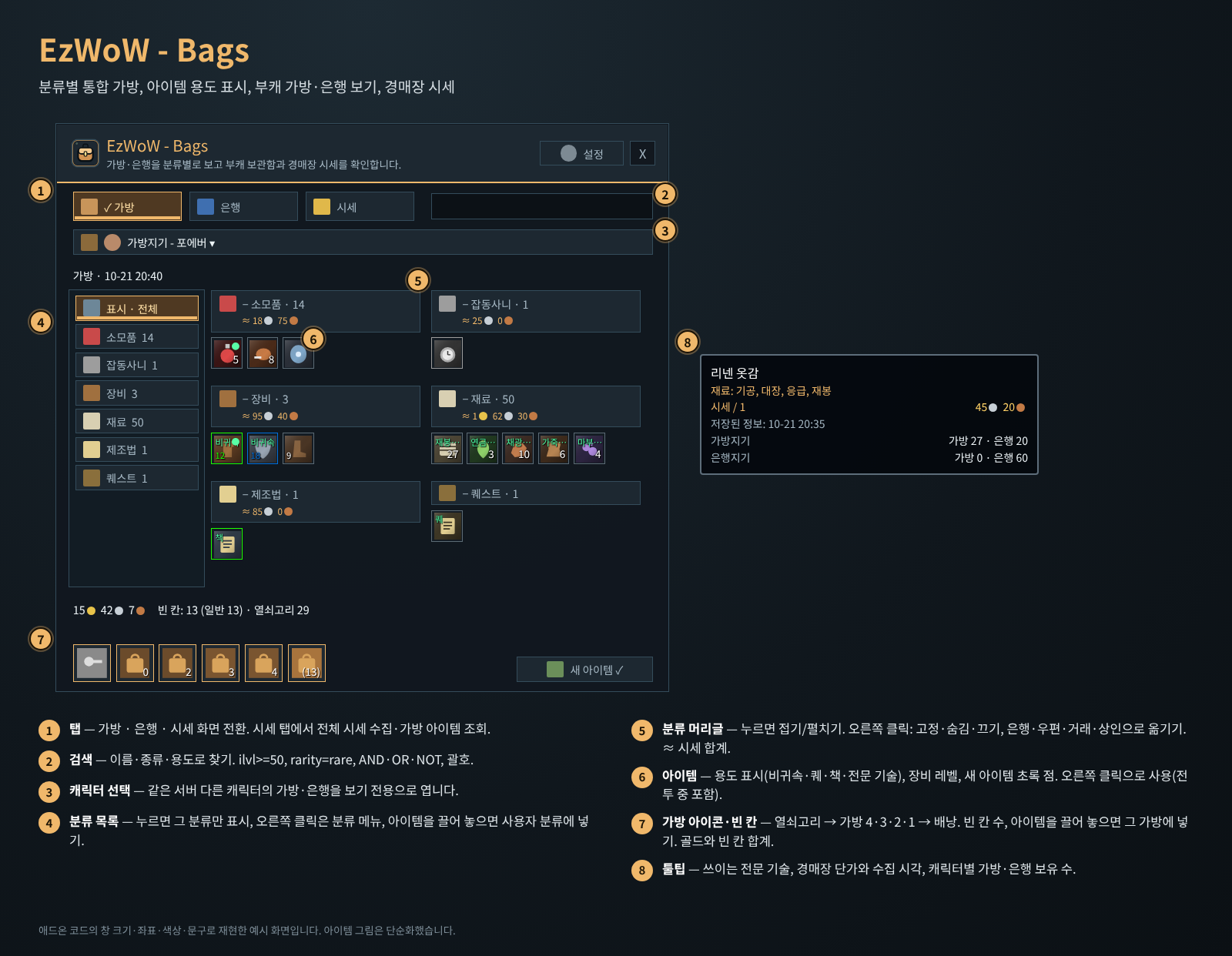
실제 게임 화면입니다(WoW Forever, 한국어 클라이언트). 캐릭터 · 다른 플레이어 이름과 채팅 내용은 가렸습니다.
기능
통합 가방 창
- 가방(과 은행)을 한 창에서 장비·소모품·재료·퀘스트·제조법·잡동사니와 사용자 분류로 나눠 보여 줍니다.
- 분류 · 전체 · 목록 세 가지 보기, 아이템 정렬(이름·등급)과 분류 정렬(이름·크기).
- 왼쪽 분류 목록: 누르면 그 분류만 표시, 오른쪽 클릭은 분류 메뉴, 아이템을 끌어 놓으면 사용자 분류에 넣기.
- 분류 머리글은 접고 펼칠 수 있고, 오른쪽 클릭으로 고정·숨김·끄기, 은행·우편·거래·상인으로 한 묶음씩 옮기기.
- 가방 아이콘과 빈 칸 수(열쇠고리, 가방 4·3·2·1, 배낭). 아이템을 가방 아이콘에 끌어 놓으면 그 가방에 넣습니다.
- 게임의 가방(은행) 정리 기능을 쓰는 정리 버튼.
- B 키와 가방 버튼으로 열립니다(끌 수 있음).
아이콘 표시
- 아이콘 위에 용도 표시: 비귀속, 퀘, 책, 재료를 쓰는 전문 기술.
- 장비 레벨, 새 아이템 초록 점, 잠근 아이템 자물쇠, 재사용 대기시간.
- 오른쪽 클릭으로 사용: 물약·음식·귀환석을 애드온 차단 오류 없이, 전투 중에도 씁니다.
검색
- 이름·종류·용도로 찾습니다.
ilvl>=50,rarity=rare,AND / OR / NOT, 괄호, 따옴표. 검색칸 오른쪽 × 버튼으로 바로 지웁니다. - 검색식을 사용자 분류로 저장할 수 있습니다.
부캐와 경매장 시세
- 같은 서버 다른 캐릭터의 가방·은행을 보기 전용으로 엽니다.
- 시세 탭: 경매장 전체 수집 또는 가방 아이템만 조회. 시세는 툴팁과 분류 합계(≈)에 나옵니다.
- 수집할 때마다 하루 한 점(최저 단가와 등록 수량)씩 쌓이고, 30~120일(기본 60일) 보관합니다.
- 시세 탭에서 아이템을 누르면 최저가와 등록 수량의 30일 그래프를 봅니다.
- 툴팁에 최근 7일 평균 대비 변화(▲/▼), 쓰이는 전문 기술, 캐릭터별 가방·은행 보유 수를 보여 줍니다.
경매장 도우미
- 판매 도우미: 가방 아이템을 Alt+클릭하면 경매장 판매 창에 올리고 최저가보다 조금 낮은 가격(동 또는 %)을 채웁니다. 등록 버튼은 직접 누릅니다. 상점 판매가 아래로는 내리지 않고, 최근 7일 평균보다 많이 낮으면 알려 줍니다.
- 판매 목록: 가방 물건 여러 개를 체크해 하나씩 차례로 올립니다. 상점에 파는 편이 나은 물건은 표시하고 "전체 선택"에서 뺍니다.
- 구매 창(경매장 옆): 이름으로 검색하면 최저가부터 보여 주고, 수량만큼 최저가부터 삽니다. 모든 구매는 확인 창을 거치며, 최근 7일 평균보다 많이 비싸면 경고합니다.
- 가방 아이템 Alt+오른쪽 클릭이나 시세 탭 줄 오른쪽 클릭으로 구매 창에서 찾습니다.
아이템 잠금
- Ctrl+Alt+클릭은 이 캐릭터에서, Ctrl+Alt+오른쪽 클릭은 계정 전체에서 잠급니다.
- 잠근 아이템은 자동 판매, 상인·우편·거래로 분류 이동, 경매장 등록에서 빠집니다.
상인 (처음부터 켜짐)
- 회색 잡템 자동 판매: 상점을 열면 가방의 회색 아이템을 모두 팔고 받은 금액을 채팅창에 알려 줍니다.
- 장비 자동 수리: 수리할 수 있는 상인이면 착용·가방의 모든 장비를 수리합니다(골드가 모자라면 건너뜀).
- 상점을 열 때 Shift를 누르고 있으면 이번에는 둘 다 건너뜁니다.
돈과 거래
- 돈 출입 알림: 돈이 들어오거나 나갈 때마다 금액과 이유(판매·구매·수리·비행·교관·우편·경매장·거래·퀘스트 등)를 채팅창에 알려 줍니다.
- 거래 내역 귓속말: 거래를 마치면 주고받은 물건과 금액을 상대에게 귓속말로 보냅니다. 두 기능 모두 끌 수 있습니다.
설정 (/ezbags settings)
- 일반: 언어(자동 + 8개 언어), 기본 가방 대체, 묶음 합계 표시.
- 상인: 회색 잡템 자동 판매, 장비 자동 수리.
- 아이콘 표시: 아이템 용도, 장비 레벨, 빈 칸 개별 표시, 새 아이템 분류.
- 보기: 보기 방식, 아이템 정렬, 분류 정렬, 줄당 칸 수, 분류 열 수, 아이콘 크기, 창 크기, 불투명도.
- 분류·창: 숨김·꺼진 분류 복원, 창 위치 초기화, 이름 + 검색식으로 사용자 분류 만들기.
- 경매장: 판매 도우미, 경매장 옆 구매 창, 툴팁 시세 추세, 가격 낮추기(동 또는 %), 시세 기록 보관 일수.
- 아이템 잠금: 아이템 잠금 사용, 모든 잠금 해제.
다른 EzWoW 애드온과 함께 쓰기
- 자동 판매·수리는 EzWoW - Tooltip에서 이 애드온으로 옮겨 왔습니다. Tooltip에서 고른 설정을 한 번 가져오고, Bags가 켜져 있으면 Tooltip은 이 기능을 쓰지 않습니다.
- EzWoW - Tooltip이 켜져 있으면 시세 수집은 Tooltip이 맡고 Bags는 그 가격을 함께 씁니다. 7일 추세는 Tooltip의 시세 줄에 붙습니다.
게임패드
- 게임패드 UI를 켜면 EzWoW 창을 패드로 다룰 수 있습니다. 방향키로 이동, A(✕)로 누르기, X(□)로 오른쪽 클릭, LB/RB로 스크롤, B(○)로 닫기입니다. 창 아래에 연결된 패드 모양으로 키 안내가 나옵니다.
- 블리자드 창이 열려 있지 않을 때 보기(Back) / Create 버튼을 누르면 화면의 EzWoW 프레임으로 이동합니다. 다시 누르거나 B를 누르면 돌아갑니다.
- 다른 버튼을 쓰려면: 설정 > 단축키 > 애드온 > EzWoW > "게임패드: EzWoW 창으로 이동/돌아가기" (EzWoW-MapFinder 설치 시)
기록 공유
- 모든 EzWoW 애드온이 함께 쓰며 기본으로 켜져 있습니다. 직접 확인한 퀘스트 NPC, 희귀 몬스터 목격, 아이템 드롭, 채집 위치를 다른 EzWoW 사용자와 나눕니다.
/ezshare on/off(또는/공유),/ezshare channel on/off,/ezshare status
명령어
/ezbags또는/ezb— 창 열기/닫기/ezbags bank— 저장된 은행 보기/ezbags settings— 설정창/ezbags scan— 경매장이 열린 상태에서 전체 시세 수집
지원 언어: English, 한국어, Deutsch, Français, Español, Русский, 简体中文, 繁體中文.
Support: If you find this addon useful, you can support its development. Buy Me a Coffee ☕
후원: 애드온이 도움이 되셨다면 개발 후원으로 응원해 주세요. Buy Me a Coffee ☕
CurseForge: https://www.curseforge.com/wow/addons/ezwow-bags用户评价
暂无 / 5,0 条评价相关推荐
继续看看这些内容