插件中文资料库
中文说明、玩家点评、适用场景和替代推荐,方便快速判断是否适合你。
- 副本、团队本和大秘境战斗提醒
- 界面布局、头像框、姓名板和动作条优化
 Details! Mythic+ Scoreboard
 RightClickSelfCast
 GroupFinder
ViKey 插件下载与使用指南
本页整理了 ViKey 的功能用途、适用人群、安装方法和常见问题,方便玩家快速判断是否需要安装。
适合谁用
ViKey 是一款 聊天与通讯 / 其他插件 类插件,适合需要优化界面、提升操作效率或补充游戏信息提示的魔兽世界玩家。
基本信息
- 插件作者:IggyDarr
- 插件分类:聊天与通讯 / 其他插件
- 适配版本:1.15.8,5.5.3,2.5.5,12.0.5
- 累计下载:46
安装方法
- 点击上方下载按钮获取 ViKey插件文件。
- 解压后将插件文件夹放入 World of Warcraft/_retail_/Interface/AddOns 目录。
- 重启游戏或在角色界面点击插件,确认 ViKey 已启用。
- 如果插件不生效,请检查版本是否匹配,或关闭同类冲突插件后重试。
使用建议
ViKey 安装后建议先在角色界面确认已启用,进入游戏后根据插件提供的命令、小地图按钮或设置面板进行调整。如遇到报错,可先单独启用该插件排查冲突。
ViKey 常见问题
ViKey 适合需要 聊天与通讯 / 其他插件 类功能的玩家,特别是希望提升游戏便利性、界面管理或战斗信息获取效率的用户。
下载后解压到 Interface/AddOns 目录,然后重启游戏并在角色界面启用插件。
常见原因是目录多套一层、游戏版本不匹配、依赖插件缺失或同类插件冲突。
可以查看本页的替代插件推荐和相关插件区域,按下载量和分类选择同类工具。
插件 AI 问答
可以问:这个插件正式服能用吗、和 DBM 冲突吗、怎么设置、有没有替代插件。
ViKey 是一款魔兽世界插件,主要用于副本、团本、大秘境或钥石辅助。建议根据自己的版本和插件环境先测试兼容性。
插件用途
ViKey 主要面向需要聊天与通讯功能的玩家,用来改善游戏体验、减少重复操作或补充默认界面没有直接提供的信息。
适用场景
- 副本、团本、大秘境或钥石辅助
使用建议
安装后建议先在角色选择界面或插件管理器中确认已启用,再进入游戏测试是否与现有整合包、WA 和其他插件冲突。如遇报错,可以先禁用同类插件排查。
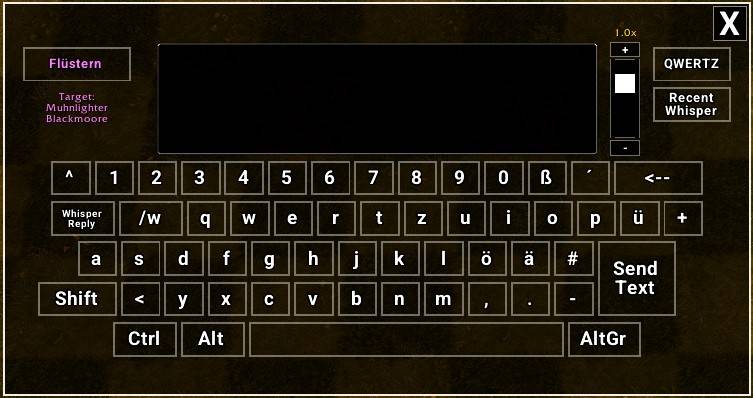
ViKey is an addon that provides an on-screen keyboard for World of Warcraft. It can be opened via /vikey, a minimap button, or by assigning a custom keybind in the game's official keybinding settings.
The keyboard features its own dedicated multi-line edit box, which can also be used with your physical keyboard. This ensures that you always have a full overview of your written text, preventing it from scrolling out of view to the left as it does in the standard WoW chat frame.
Everything is controlled via left-click, making it fully usable with a touchscreen for handheld devices. Furthermore, it is an ideal solution for players who are unable to use a physical keyboard due to physical impairments or disabilities, allowing them to communicate and interact within the game using only their mouse or an alternative pointing device.
You can hide/show the minimap button with /vikey mmbtoggle.
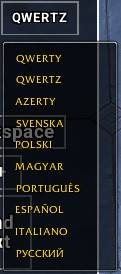
Keyboard layouts – Supports QWERTY (US), QWERTZ (German), AZERTY (French), SVENSKA (Swedish), POLSKI (Polish), MAGYAR (Hungarian), PORTUGUÊS (Brazilian), ESPAÑOL (Spanish), ITALIANO (Italian), and РУССКИЙ (Russian). You can change layouts at any time via a dropdown menu.
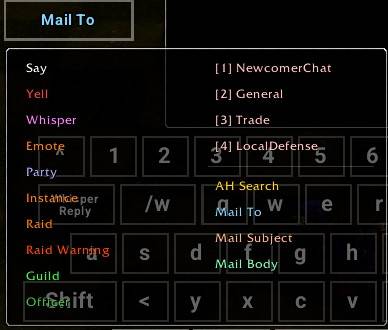
Channel selection – Choose from standard chat channels (Say, Yell, Whisper, Emote, Party, Instance, Raid, Raid Warning, Guild, Officer) and any custom channels you have joined. You can also write in the auction house search field and use the mail system with the correct channel. The current channel is displayed on the button.
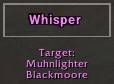
Whisper targeting – Click on any player name in the chat window to automatically set that player as the whisper target. Their name and realm appear below the channel button. Whisper messages will then be sent to that player while the Whisper channel is active.
Switching between whisper targets - Theres a Recent Whisper button where the last 10 names you whispered with are stored for easy switching between them if you have multiple whispers at once.
Modifier keys – Shift, Alt, Ctrl, and AltGr are toggles. Click once to activate, click again to deactivate. When AltGr (or Ctrl+Alt) is active, the corresponding special characters from the keyboard layout are inserted.
Resizing and moving – Drag the window around as you like with holding left click on the background. Use the vertical slider on the right to adjust the scale.

Saving state – The last used channel, keyboard layout, window position, and scale are saved and restored on next login.
Sending messages – Click the “Send Text” button to send the current text to the selected channel (or whisper target). After sending, the edit box is cleared. If the text starts with a slash (/), it is executed as a command.
Alt-codes – While Alt is active, type a number code and release Alt to insert the corresponding special character (CP437 without leading zero, Windows-1252 with leading zero, e.g. 155 or 0248 → ø).
Special Keys – The Whisper Reply key sets the last person that whispered you as target and activates the whisper channel. The /w key writes a /w in the textbox so you only need to add a player name when you want to whisper someone.
-------------------------------------------------
Additionally, the addon fully supports ConsolePort. A, B, X, and Y are set to default actions by ConsolePort. A is left click, B is right click, X is close window and Y is set as context button from ConsolePort. Works the same with ViKey, except i couldn't figured out how to give any button in ViKey a mirrored function of the Y key. You find key bindings in the wow options to give most used buttons with ViKey a gamepad button press. But to make the Y key functional you have to delete the default use by ConsolePort inside the Interface Cursor options or just live with it that is has no function.
The bindings you can make are:
- Toggle Keyboard - to open and close the ViKey window
- Click Current Button - makes a left click / same what A does
- Insert Space - one press one space inserted
- Toggle Channel Menu - for easy channel switching
- Toggle Recent Whisper Menu - for easy whisper target switching (last 10 names)
- Close Keyboard - closes the ViKey window / same what X does
- Backspace - delete 1 character with each press
- Clear All Text - delete everything
- Send Text - makes a right click / same what B does
Important to know:
In Mythic+ and during boss encounters, while you are in combat, sending texts won't work. Due to Blizzard’s combat restrictions on protected UI actions, there is currently no way to make ViKey usable at all in those situations.
I've set up a small Discord Server for my addons https://discord.gg/j3vQVnWUYv Feel free to use it if you have any problems, suggestions or just a simple feedback - I am grateful for everything!
CurseForge: https://www.curseforge.com/wow/addons/vikey用户评价
暂无 / 5,0 条评价相关推荐
继续看看这些内容
