插件中文资料库
中文说明、玩家点评、适用场景和替代推荐,方便快速判断是否适合你。
- 副本、团队本和大秘境战斗提醒
- 界面布局、头像框、姓名板和动作条优化
 Details! Mythic+ Scoreboard
 BagSync
 GroupFinder
Warn Your Raid 插件下载与使用指南
本页整理了 Warn Your Raid 的功能用途、适用人群、安装方法和常见问题,方便玩家快速判断是否需要安装。
适合谁用
Warn Your Raid 是一款 聊天与通讯 / 其他插件 类插件,适合需要优化界面、提升操作效率或补充游戏信息提示的魔兽世界玩家。
基本信息
- 插件作者:IggyDarr
- 插件分类:聊天与通讯 / 其他插件
- 适配版本:12.0.5
- 累计下载:46
安装方法
- 点击上方下载按钮获取 Warn Your Raid插件文件。
- 解压后将插件文件夹放入 World of Warcraft/_retail_/Interface/AddOns 目录。
- 重启游戏或在角色界面点击插件,确认 Warn Your Raid 已启用。
- 如果插件不生效,请检查版本是否匹配,或关闭同类冲突插件后重试。
使用建议
Warn Your Raid 安装后建议先在角色界面确认已启用,进入游戏后根据插件提供的命令、小地图按钮或设置面板进行调整。如遇到报错,可先单独启用该插件排查冲突。
Warn Your Raid 常见问题
Warn Your Raid 适合需要 聊天与通讯 / 其他插件 类功能的玩家,特别是希望提升游戏便利性、界面管理或战斗信息获取效率的用户。
下载后解压到 Interface/AddOns 目录,然后重启游戏并在角色界面启用插件。
常见原因是目录多套一层、游戏版本不匹配、依赖插件缺失或同类插件冲突。
可以查看本页的替代插件推荐和相关插件区域,按下载量和分类选择同类工具。
插件 AI 问答
可以问:这个插件正式服能用吗、和 DBM 冲突吗、怎么设置、有没有替代插件。
Warn Your Raid 是一款魔兽世界插件,主要用于倒计时、提醒和战斗预警、副本、团本、大秘境或钥石辅助。建议根据自己的版本和插件环境先测试兼容性。
插件用途
Warn Your Raid 主要面向需要聊天与通讯功能的玩家,用来改善游戏体验、减少重复操作或补充默认界面没有直接提供的信息。
适用场景
- 倒计时、提醒和战斗预警
- 副本、团本、大秘境或钥石辅助
使用建议
安装后建议先在角色选择界面或插件管理器中确认已启用,再进入游戏测试是否与现有整合包、WA 和其他插件冲突。如遇报错,可以先禁用同类插件排查。
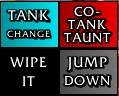
WarnYourRaid is a configurable button addon for sending Raid Warning messages with a single click.
What it does:
- Lets you create clickable buttons that send custom /rw messages.
- Supports up to 10 rows.
- Supports up to 20 buttons per row.
- Lets you assign custom button labels and custom message text to every button.
- Lets you create and use up to 50 different sets.
- Lets you cycle through the sets by left-clicking the set name above the buttons.
- Uses a secure button setup so buttons can still be used during combat as long as they were already created before combat started.
What you can configure in the options:
- Test Mode
- Shows the buttons outside of a raid for setup and testing. - Move Mode
- Lets you drag the button frame to a new position.
- While Move Mode is active, the buttons themselves are not clickable. - Reset Position
- Resets only the frame position. - Reset Everything
- Deletes all button texts and button settings. - Set selection
- Lets you choose which set you are currently editing. - Set Name
- Lets you rename the currently selected set. - Sets
- Sets how many different sets are available, up to 50. - Scale
- Adjustable from 0.5 to 5.0. - Rows
- Sets how many rows are available, up to 10. - Buttons in Row
- Sets how many buttons exist in the currently selected row, up to 20. - Button Width
- Controls the width of all buttons. - Button Height
- Controls the height of all buttons. - Spacing X
- Controls horizontal spacing between buttons. - Spacing Y
- Controls vertical spacing between rows. - Row selection
- Lets you choose which row you are currently editing. - Import Row...
- Import a row to a different set
What you can configure for each button:
- Up to 3 separate label lines shown on the button.
- One Raid Warning message text sent with /rw.
- A custom button color.
- A reset button to restore that single button to its default state.
Color options:
- A custom color can be selected by clicking the color wheel. The background shows the selected color.
Text field behavior:
- All option fields can be confirmed with Enter or by clicking the OK button next to the field.
- Empty buttons stay empty until you configure them.
- Raid Warning text is length-limited in the editor to stay within a safe macro range.
Visibility behavior:
- The frame is shown only when at least one button is configured and one of these is true:
- Test Mode is enabled.
- You are in a raid and have permission to send Raid Warnings. - Outside of Test Mode, the frame stays hidden if you cannot send /rw.
- Raid Warning permission normally requires raid leader or assistant status.
Slash commands:
- /wyr - Main slash command.
- /wyr help - Shows the command list.
- /wyr test - Toggles Test Mode.
- /wyr move - Toggles Move Mode.
- /wyr reset - Resets only the frame position.
- /wyr options - Opens the options panel.
/wyr scale <value> - Sets the frame scale directly from 0.5 to 5.0
I've set up a small Discord Server for my addons https://discord.gg/j3vQVnWUYv Feel free to use it if you have any problems, suggestions or just a simple feedback - I am grateful for everything!
用户评价
暂无 / 5,0 条评价相关推荐
继续看看这些内容
