插件中文资料库
中文说明、玩家点评、适用场景和替代推荐,方便快速判断是否适合你。
- 日常任务、练级和满级玩法辅助
- 界面体验优化和信息展示增强
- 副本前先测试兼容性,确认不报错后再长期使用
 BagSync
 RightClickSelfCast
 GroupFinder
PvP Profile 插件下载与使用指南
本页整理了 PvP Profile 的功能用途、适用人群、安装方法和常见问题,方便玩家快速判断是否需要安装。
适合谁用
PvP Profile 是一款 鼠标提示 / 竞技场 / PVP / 战场 类插件,适合需要优化界面、提升操作效率或补充游戏信息提示的魔兽世界玩家。
基本信息
- 插件作者:Kirom
- 插件分类:鼠标提示 / 竞技场 / PVP / 战场
- 适配版本:5.5.4,12.0.7
- 累计下载:45
安装方法
- 点击上方下载按钮获取 PvP Profile插件文件。
- 解压后将插件文件夹放入 World of Warcraft/_retail_/Interface/AddOns 目录。
- 重启游戏或在角色界面点击插件,确认 PvP Profile 已启用。
- 如果插件不生效,请检查版本是否匹配,或关闭同类冲突插件后重试。
使用建议
PvP Profile 安装后建议先在角色界面确认已启用,进入游戏后根据插件提供的命令、小地图按钮或设置面板进行调整。如遇到报错,可先单独启用该插件排查冲突。
PvP Profile 常见问题
PvP Profile 适合需要 鼠标提示 / 竞技场 / PVP / 战场 类功能的玩家,特别是希望提升游戏便利性、界面管理或战斗信息获取效率的用户。
下载后解压到 Interface/AddOns 目录,然后重启游戏并在角色界面启用插件。
常见原因是目录多套一层、游戏版本不匹配、依赖插件缺失或同类插件冲突。
可以查看本页的替代插件推荐和相关插件区域,按下载量和分类选择同类工具。
插件 AI 问答
可以问:这个插件正式服能用吗、和 DBM 冲突吗、怎么设置、有没有替代插件。
PvP Profile 是一款魔兽世界插件,主要用于PVP相关功能。建议根据自己的版本和插件环境先测试兼容性。
插件用途
PvP Profile 主要面向需要PVP功能的玩家,用来改善游戏体验、减少重复操作或补充默认界面没有直接提供的信息。
适用场景
- PVP相关功能
使用建议
安装后建议先在角色选择界面或插件管理器中确认已启用,再进入游戏测试是否与现有整合包、WA 和其他插件冲突。如遇报错,可以先禁用同类插件排查。
PvP Profile - Multi-Website PvP Integration
🎯 Overview
PvP Profile seamlessly integrates multiple PvP tracking websites directly into your game interface. With just a right-click, you can instantly copy player profiles or name-realm of the selected player and paste it in your browser to check it out.
✨ Key Features
🔗 Multi-Website Support
- Check-PvP.fr - Retail and Classic WoW support
- Drustvar.com - Retail WoW tracking
- Seramate.com - Retail WoW profiles
- Easy Expansion - Modular system for adding new providers
🚀 Want More Websites?
I'm always happy to add more PvP tracking websites! If you know of other great PvP profile sites that should be included, feel free to suggest them. The modular design makes it easy to add new providers, so your favorite PvP tracking site could be just one request away.
🎮 Seamless Game Integration
- Right-click Context Menus - Works on any player interaction
- Individual Website Buttons - Direct access to each enabled provider
- One-Click URL Generation - Instant profile links ready to copy
- Name-Realm Copy - Quick copying for manual searches
🌍 Comprehensive Coverage
- LFG System - Search results and applicants
- Social Features - Guild, community, and friends lists
- Combat Contexts - Targets, party members, raid members
- Cross-Realm Support - Works with players from any realm
- Multi-Region - Automatic US, EU, KR, TW, CN detection
⚙️ User-Friendly Configuration
- Enable/Disable Providers - Choose which websites to use
- Auto-close Dialogs - Streamlined workflow
- Persistent Settings - Your preferences are saved
- Slash Commands - Quick access to all features
📸 Screenshots & Examples
Basic Usage - Right-click Context Menu
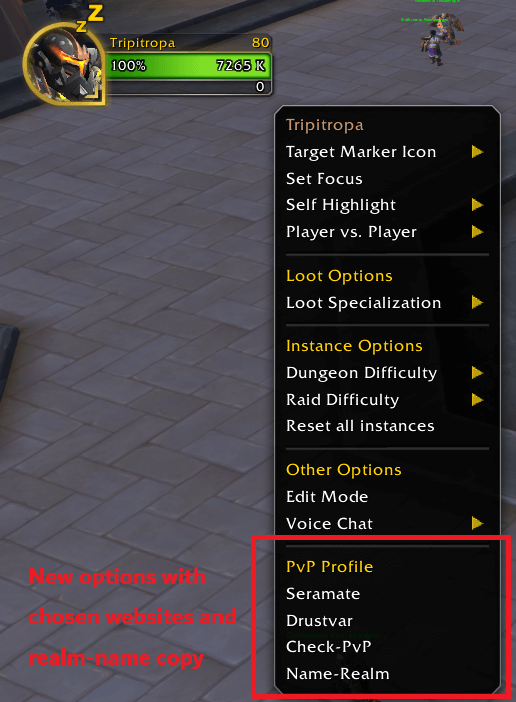
Right-click on any player to see the "PvP Profile" options in the context menu
Name-Realm Copy Dialog
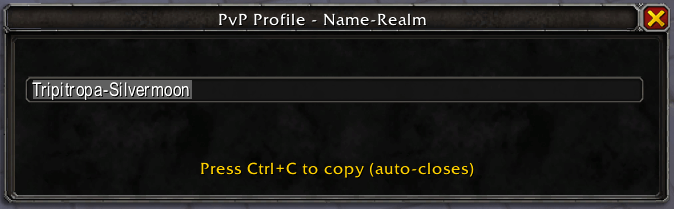
Dialog showing name-realm ready to copy (Press Ctrl+C to copy)
URL Copy Dialog

Dialog showing PvP Profile URL ready to copy (Press Ctrl+C to copy)
Configuration Options
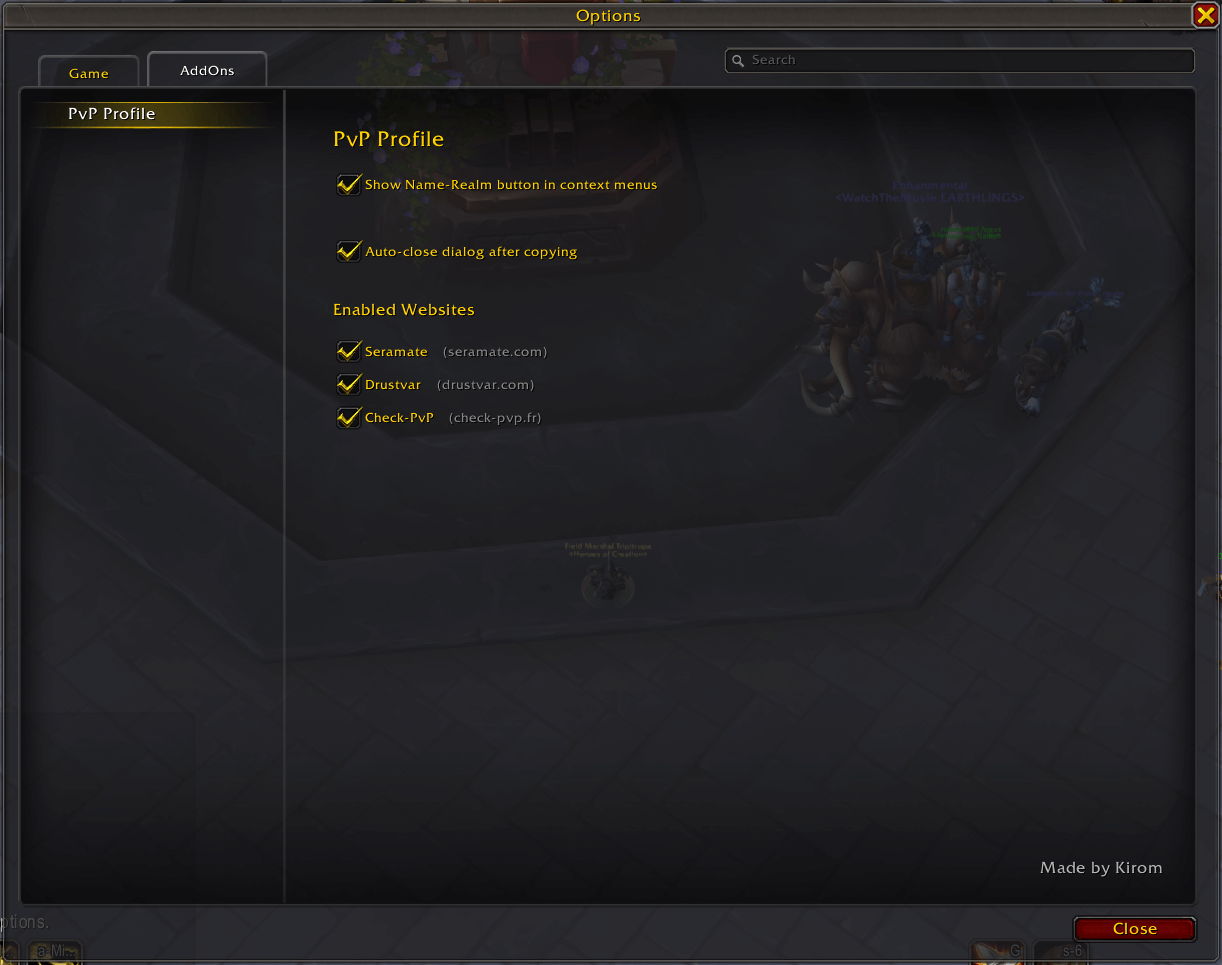
Configure your preferred providers and settings through the options panel
LFG Integration
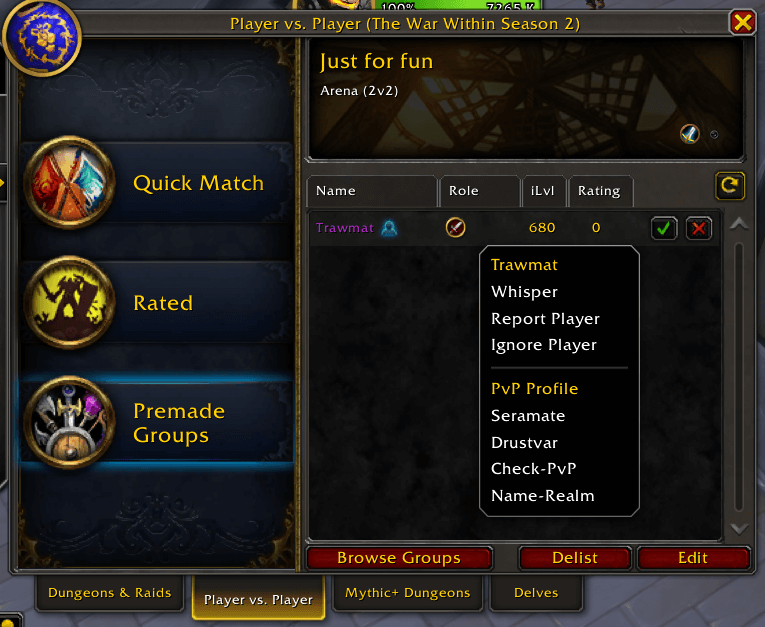
Right-click on LFG group leaders to check their PvP profiles
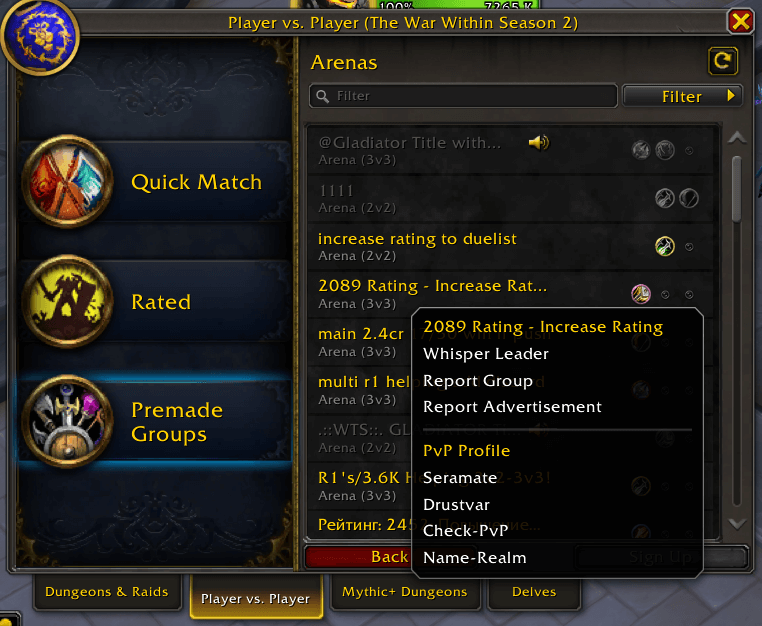
Right-click on players looking for groups to verify their experience
Social Features
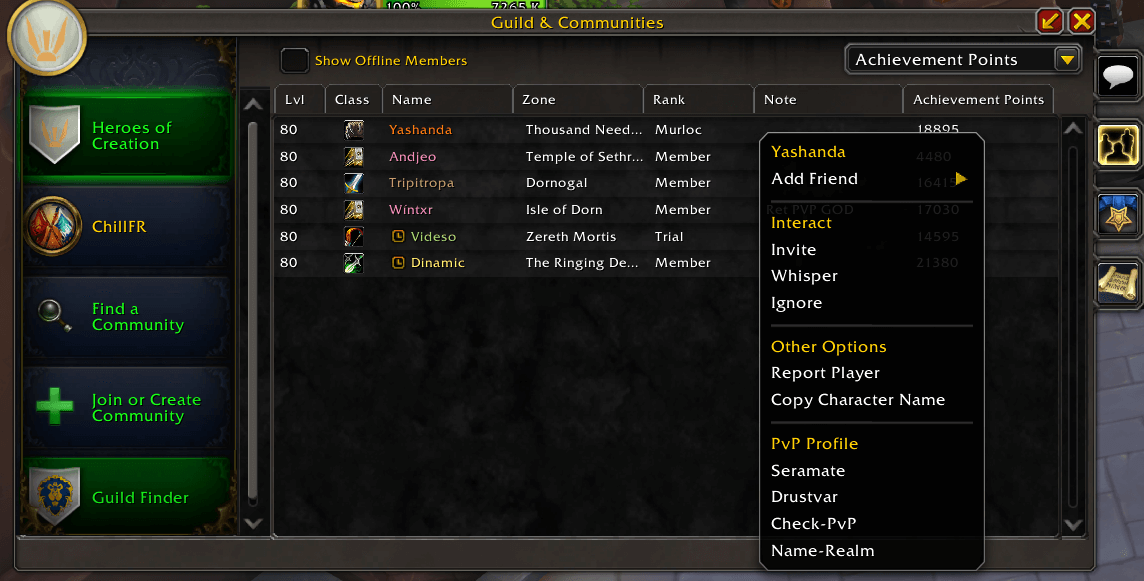
Check guild members' PvP credentials directly from the roster
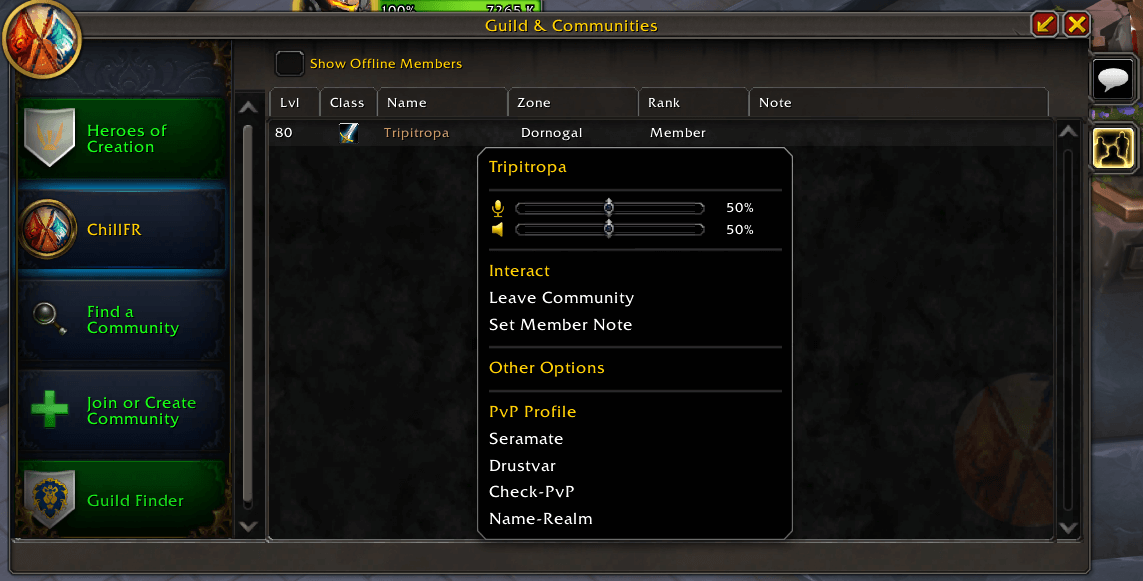
Access community members' PvP profiles with a right-click
🚀 How It Works
- Right-click on any player (target, party member, LFG entry, etc.)
- Select your preferred PvP website from the "PvP Profile" menu
- Copy the generated URL or name-realm with Ctrl+C
- Paste in your browser for instant profile access
🎯 Perfect For
- Arena Players - Quick opponent research before matches
- LFG Leaders - Verify applicant PvP experience
- Guild Officers - Check member PvP credentials
- PvP Enthusiasts - Track your own and others' progress
🔧 Supported Contexts
- ✅ LFG search results and applicants
- ✅ Party and raid members
- ✅ Guild and community members
- ✅ Friends and Battle.net friends
- ✅ Target players and self
- ✅ Enemy players (opposing faction)
- ✅ Chat interactions
🛠️ Configuration & Setup
Configuration
- Interface Options → AddOns → PvP Profile
- Slash Commands:
/pvpprofile options - Enable/Disable individual website providers
- Customize dialog behavior and menu options
📋 Slash Commands
/pvpprofileor/pvp- Show help/pvpprofile options- Open configuration panel/pvpprofile providers- List available providers/pvpprofile enable <provider>- Enable specific provider/pvpprofile disable <provider>- Disable specific provider
🌟 Why Choose PvP Profile?
🎯 Efficiency
- No more alt-tabbing between game and browser
- One-click access to multiple PvP websites
- Streamlined workflow for competitive players
🔧 Flexibility
- Choose which websites work best for you
- Modular design allows easy addition of new providers
- Works with both Retail and Classic WoW
🛡️ Reliability
- Automatic region and realm detection
- Cross-realm compatibility
- Robust error handling and validation
🎮 Integration
- Native WoW interface integration
- Context-aware menu placement
- Consistent with game's UI design
🐛 Troubleshooting
No menu options appear?
- Check that at least one provider is enabled in options
- Ensure you're right-clicking on a valid player context
URLs not working?
- Verify your region is supported (US, EU tested)
- Check that the target player exists on the selected website
📞 Support & Community
- Discord: Join our community for real-time support
- GitHub: Report bugs and request features
🎉 Get Started Today
Transform your PvP experience with instant access to player profiles, ratings, and statistics. Whether you're a competitive arena player, RBG enthusiast, or casual PvPer, PvP Profile streamlines your research and enhances your gameplay.
Happy PvP hunting! 🗡️⚔️
PvP Profile - Your gateway to comprehensive PvP intelligence, seamlessly integrated into World of Warcraft.
CurseForge: https://www.curseforge.com/wow/addons/pvp-profile用户评价
暂无 / 5,0 条评价相关推荐
继续看看这些内容
