插件中文资料库
中文说明、玩家点评、适用场景和替代推荐,方便快速判断是否适合你。
- 界面布局、头像框、姓名板和动作条优化
 Details! Mythic+ Scoreboard
 GroupFinder
 Sleek XP Bubbles
Check-PvP Assistant 插件下载与使用指南
本页整理了 Check-PvP Assistant 的功能用途、适用人群、安装方法和常见问题,方便玩家快速判断是否需要安装。
适合谁用
Check-PvP Assistant 是一款 鼠标提示 / 竞技场 / PVP / 战场 类插件,适合需要优化界面、提升操作效率或补充游戏信息提示的魔兽世界玩家。
基本信息
- 插件作者:Kirom
- 插件分类:鼠标提示 / 竞技场 / PVP / 战场
- 适配版本:5.5.4,12.0.7
- 累计下载:40
安装方法
- 点击上方下载按钮获取 Check-PvP Assistant插件文件。
- 解压后将插件文件夹放入 World of Warcraft/_retail_/Interface/AddOns 目录。
- 重启游戏或在角色界面点击插件,确认 Check-PvP Assistant 已启用。
- 如果插件不生效,请检查版本是否匹配,或关闭同类冲突插件后重试。
使用建议
Check-PvP Assistant 安装后建议先在角色界面确认已启用,进入游戏后根据插件提供的命令、小地图按钮或设置面板进行调整。如遇到报错,可先单独启用该插件排查冲突。
Check-PvP Assistant 常见问题
Check-PvP Assistant 适合需要 鼠标提示 / 竞技场 / PVP / 战场 类功能的玩家,特别是希望提升游戏便利性、界面管理或战斗信息获取效率的用户。
下载后解压到 Interface/AddOns 目录,然后重启游戏并在角色界面启用插件。
常见原因是目录多套一层、游戏版本不匹配、依赖插件缺失或同类插件冲突。
可以查看本页的替代插件推荐和相关插件区域,按下载量和分类选择同类工具。
插件 AI 问答
可以问:这个插件正式服能用吗、和 DBM 冲突吗、怎么设置、有没有替代插件。
Check-PvP Assistant 是一款魔兽世界插件,主要用于战场相关功能。建议根据自己的版本和插件环境先测试兼容性。
插件用途
Check-PvP Assistant 主要面向需要战场功能的玩家,用来改善游戏体验、减少重复操作或补充默认界面没有直接提供的信息。
适用场景
- 战场相关功能
使用建议
安装后建议先在角色选择界面或插件管理器中确认已启用,再进入游戏测试是否与现有整合包、WA 和其他插件冲突。如遇报错,可以先禁用同类插件排查。
Check-PvP Assistant
A World of Warcraft addon that adds convenient access to Check-PvP.fr player profiles through right-click context menus. Supports LFG search results and applicants.
NEW in v1.4.0: In-Game Options Menu! Configure all addon settings directly through the game's Interface Options panel.
🎯 Key Features
- Right-click integration: Access Check-PvP through "Check PvP" context menu option
- Comprehensive coverage: Works on LFG menu, targets, party members, raid members, guild members, friends, enemies, and yourself
- LFG integration: Generate URLs for players in LFG search results and applicants
- Cross-realm support: Properly handles players from different realms
- Region detection: Automatically detects your region (US, EU, KR, TW, CN)
- Realm translation: Converts internal realm names to Check-PvP.fr format
- Dual Copy Modes: Switch between name-realm mode (default) and full URL mode
- Persistent settings: Your copy mode preference is saved between sessions
- Version-Specific URLs: Automatically uses the correct Check-PvP URL for your game version
- In-Game Options Menu: Configure all settings through Interface Options → AddOns → CheckPvP Assistant
Available Slash Commands
/checkpvpor/cpvp- Show available commands/checkpvp usename- Switch to name-realm mode (default)/checkpvp useurl- Switch to URL mode/checkpvp mode- Show current copy mode/checkpvp autoclose- Toggle auto-close dialog after copy
In-Game Options Menu
Access the addon settings through the game's Interface Options:
- Open Interface Options: Press
Esc→Interface - Navigate to AddOns: Click on
AddOnsin the left sidebar - Select CheckPvP Assistant: Find and click on "CheckPvP Assistant" in the addon list
- Configure Settings: Use the options panel to adjust:
- Copy Mode: Choose between "Name-Realm" (default) or "Full URL" mode
- Auto-Close Dialog: Enable/disable automatic dialog closing after copying
- Debug Mode: Enable debug output for troubleshooting
The options panel provides a user-friendly interface for all addon configuration, with changes applied immediately and saved automatically.
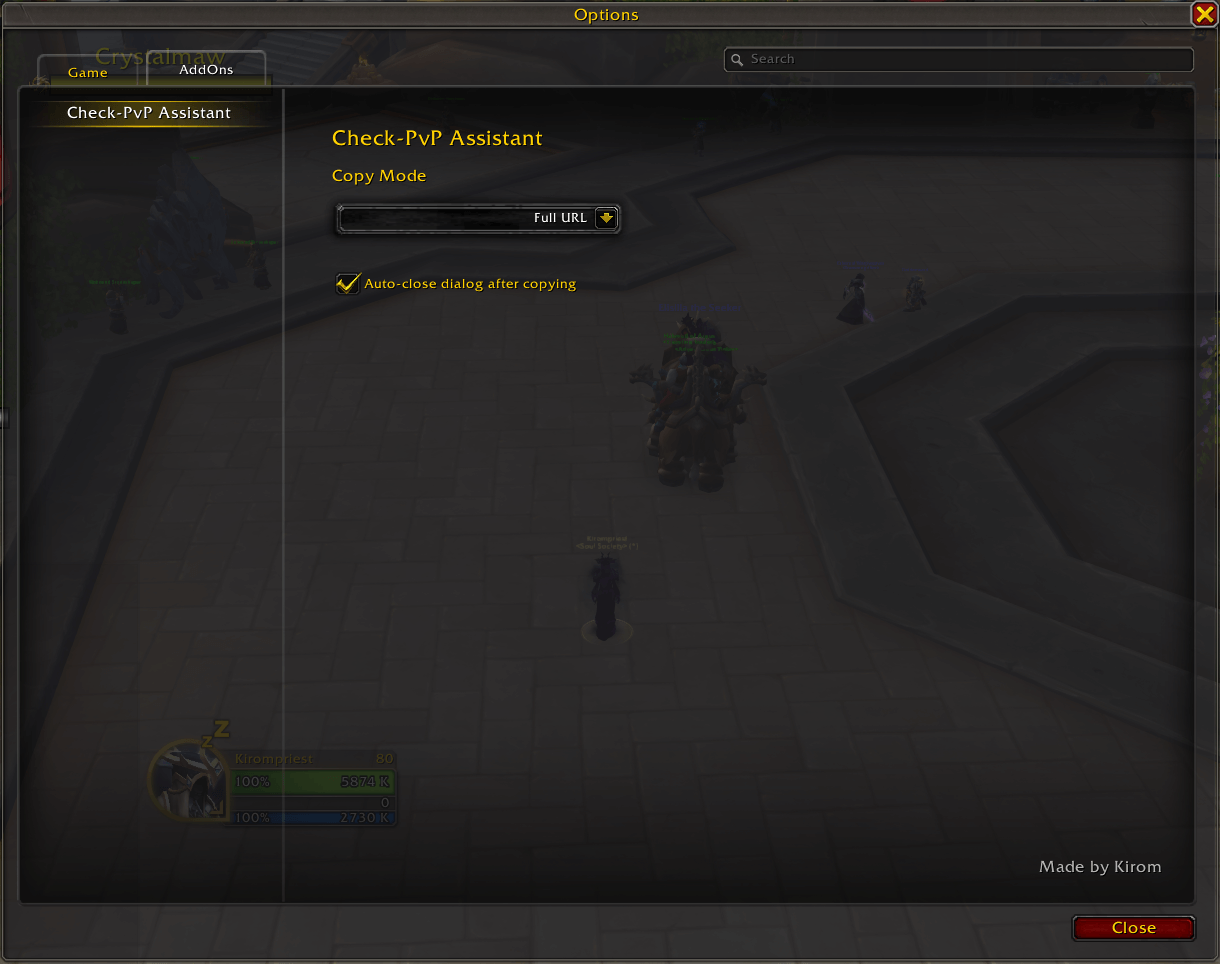
The CheckPvP Assistant options panel in the game's Interface Options menu
Usage
- Right-click on any player (target, party member, raid member, guild member, friend, enemy, or yourself)
- Look for "Check PvP" in the context menu
- Click the option to open a dialog with either name-realm or Check-PvP.fr URL (depending on your copy mode)
- Press Ctrl+C to copy the text to your clipboard (dialog auto-closes by default)
- Press Enter or Escape to close the dialog manually (if auto-close is disabled)
- Use the copied content:
- Name-Realm copy mode: Paste into Check-PvP.fr search bar or use in Discord/chat for example
- URL copy mode: Open directly in your browser
Screenshots & Examples
Basic Usage Example
Step 1: Right-click on your character
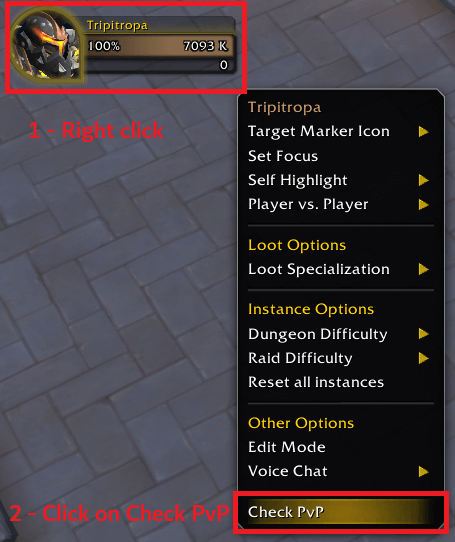
Right-click on your character to see the "Check PvP" option in the context menu
Step 2: Check PvP Dialog appears
The dialog that appears depends on your current copy mode:
Name-Realm (default):
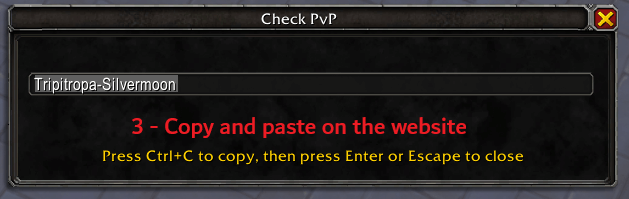
Dialog showing name-realm ready to copy (Press Ctrl+C to copy)
Full URL:
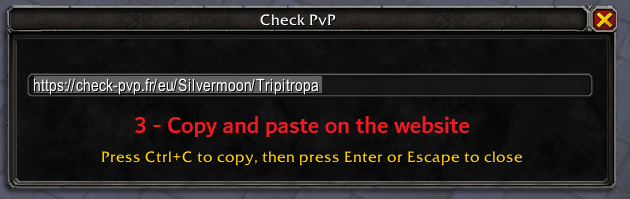
Dialog showing Check-PvP.fr URL ready to copy (Press Ctrl+C to copy)
Step 3: Using the copied content
- If in Name-Realm copy mode: Use the "PlayerName-RealmName" to paste into website search bar and open character profile
- If in Full URL copy mode: Open the URL in your browser to view character profile
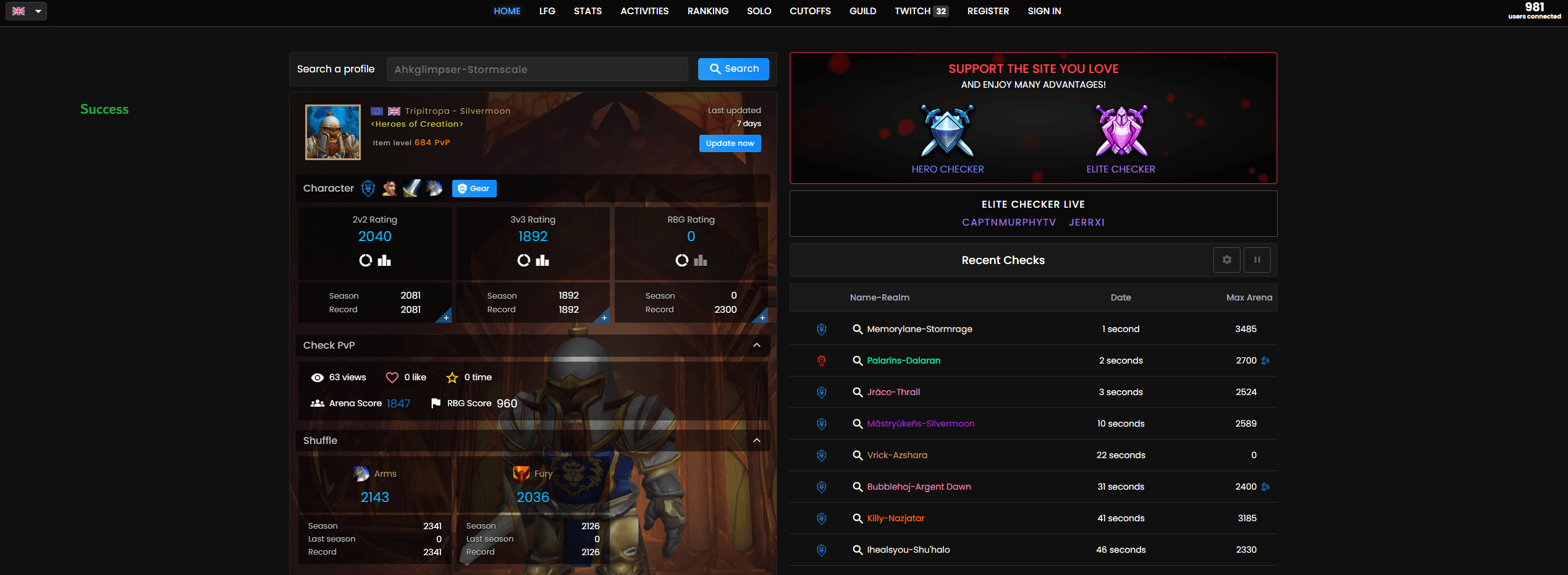 Example of Check-PvP.fr showing player's PvP statistics and profile
Character Not Found - Step by Step Fix
If the website shows "character not found", you can manually search for them (this will fetch the latest data on the website and make the profile appear):
Step 1: Character Not Found Error  The error message when a character is not initially found
Step 2: Copy Character Information  Copy the character name and realm from the error message
Step 3: Manual Search  Paste the information into the search bar and search manually
Step 4: Character Found 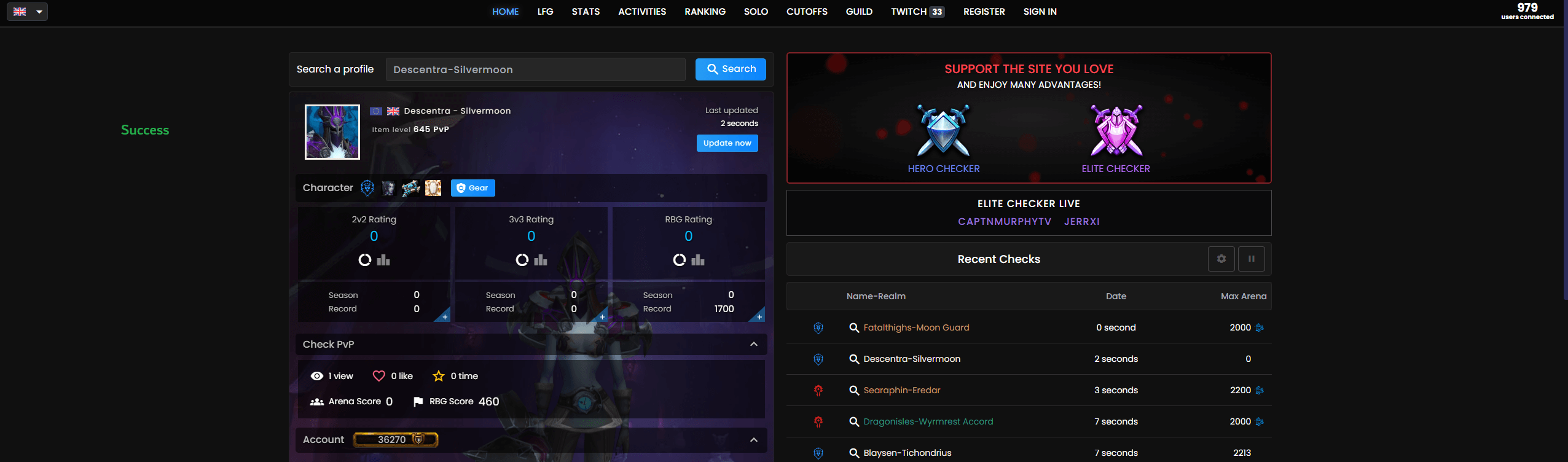 The character profile after manual search (fetches latest data from Blizzard's servers)
Additional Player Sources
The addon works with players from various sources:
| Context | Screenshot |
|---|---|
| LFG Creator | 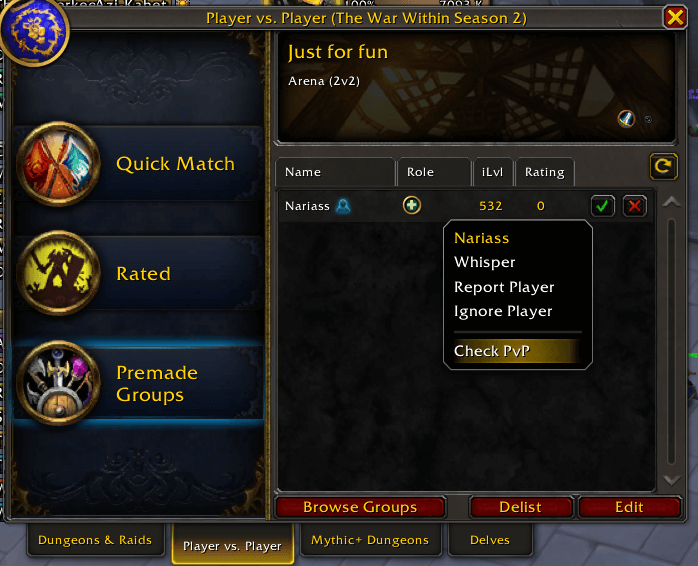 |
| LFG Seeker | 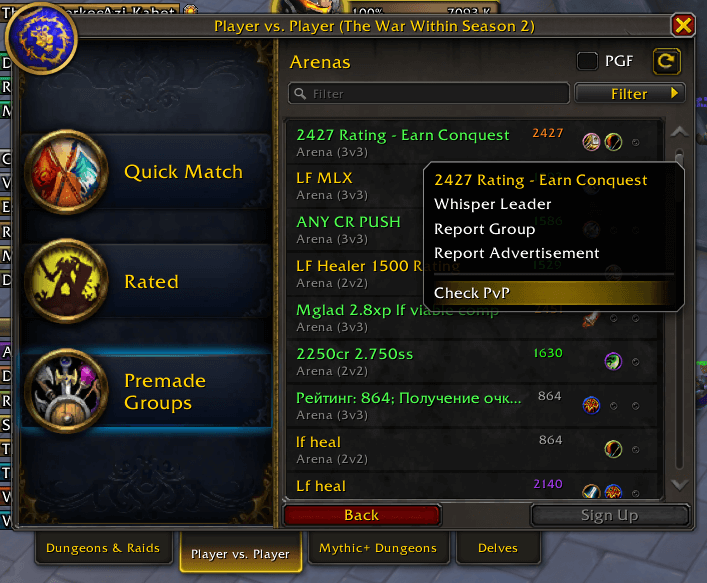 |
| Guild Member | 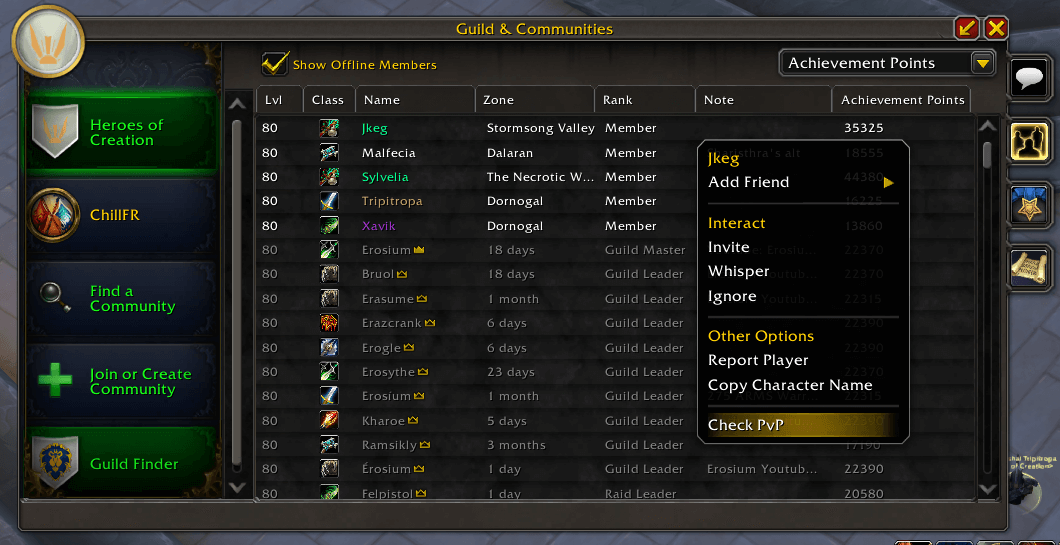 |
| Community Member | 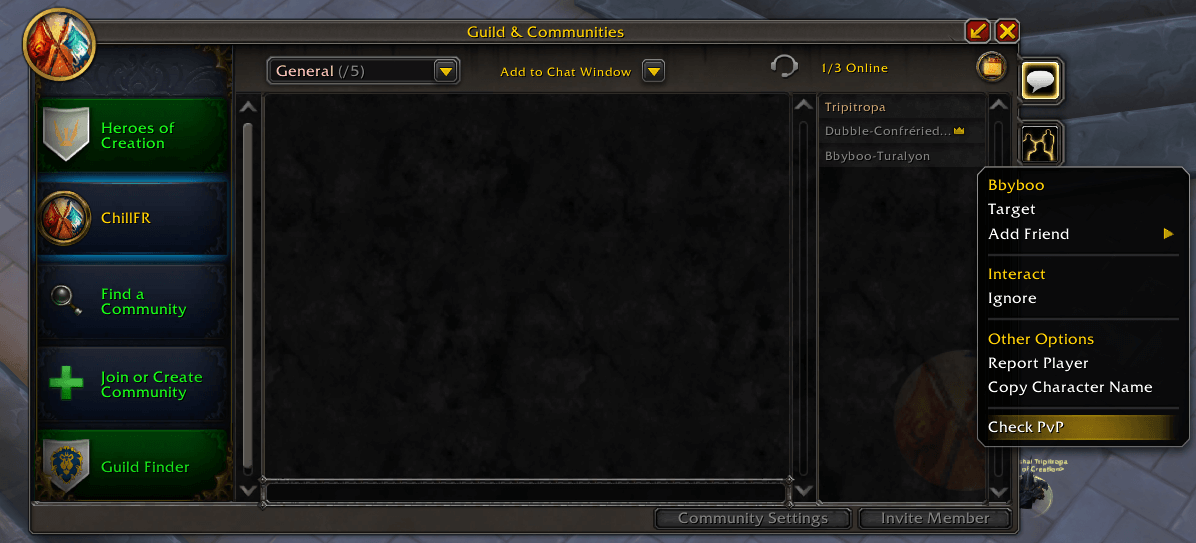 |
Supported Contexts
The addon works in multiple contexts as demonstrated in the screenshots above:
- Guild members - Right-click in guild roster
- Community members - Right-click in community member list
- LFG creators - Right-click on group leaders in LFG browser
- LFG seekers - Right-click on players looking for groups
- Your own character - Right-click on yourself
- Target players - Right-click on any targeted player
- Party members - Right-click in party frames
- Raid members - Right-click in raid frames
- Friends list - Right-click on friends
- Battle.Net friends - Right-click on Battle.Net friends
- Enemy players - Right-click on opposing faction players
📞 Support & Feedback
For bug reports, feature requests, or general feedback:
- Discord Community - Join our Discord server for real-time support and discussions
- GitHub Issues - CheckPvPAssistant Issues
- Documentation - See README.md for detailed usage instructions and screenshots
Discord Community
Join our Discord server to:
- Get real-time help with the addon
- Report bugs and suggest features
- Share screenshots and experiences
- Connect with other PvP players
Happy PvP hunting! 🗡️⚔️
CurseForge: https://www.curseforge.com/wow/addons/check-pvp-assistant用户评价
暂无 / 5,0 条评价相关推荐
继续看看这些内容
