插件中文资料库
中文说明、玩家点评、适用场景和替代推荐,方便快速判断是否适合你。
- 副本、团队本和大秘境战斗提醒
- 界面布局、头像框、姓名板和动作条优化
 Details! Mythic+ Scoreboard
 Copy Anything
 BagSync
asCompactRaidBuff 插件下载与使用指南
本页整理了 asCompactRaidBuff 的功能用途、适用人群、安装方法和常见问题,方便玩家快速判断是否需要安装。
适合谁用
asCompactRaidBuff 是一款 团队框架 类插件,适合需要优化界面、提升操作效率或补充游戏信息提示的魔兽世界玩家。
基本信息
- 插件作者:asMOD_kr
- 插件分类:团队框架
- 适配版本:12.0.5,12.0.7
- 累计下载:0
安装方法
- 点击上方下载按钮获取 asCompactRaidBuff插件文件。
- 解压后将插件文件夹放入 World of Warcraft/_retail_/Interface/AddOns 目录。
- 重启游戏或在角色界面点击插件,确认 asCompactRaidBuff 已启用。
- 如果插件不生效,请检查版本是否匹配,或关闭同类冲突插件后重试。
使用建议
asCompactRaidBuff 安装后建议先在角色界面确认已启用,进入游戏后根据插件提供的命令、小地图按钮或设置面板进行调整。如遇到报错,可先单独启用该插件排查冲突。
asCompactRaidBuff 常见问题
asCompactRaidBuff 适合需要 团队框架 类功能的玩家,特别是希望提升游戏便利性、界面管理或战斗信息获取效率的用户。
下载后解压到 Interface/AddOns 目录,然后重启游戏并在角色界面启用插件。
常见原因是目录多套一层、游戏版本不匹配、依赖插件缺失或同类插件冲突。
可以查看本页的替代插件推荐和相关插件区域,按下载量和分类选择同类工具。
插件 AI 问答
可以问:这个插件正式服能用吗、和 DBM 冲突吗、怎么设置、有没有替代插件。
asCompactRaidBuff 是一款魔兽世界插件,主要用于界面框架、头像、动作条或冷却显示优化、增益、减益、光环或职业状态监控、副本、团本、大秘境或钥石辅助。建议根据自己的版本和插件环境先测试兼容性。
插件用途
asCompactRaidBuff 主要面向需要团队框架功能的玩家,用来改善游戏体验、减少重复操作或补充默认界面没有直接提供的信息。
适用场景
- 界面框架、头像、动作条或冷却显示优化
- 增益、减益、光环或职业状态监控
- 副本、团本、大秘境或钥石辅助
使用建议
安装后建议先在角色选择界面或插件管理器中确认已启用,再进入游戏测试是否与现有整合包、WA 和其他插件冲突。如遇报错,可以先禁用同类插件排查。
asCompactRaidBuff (Midnight)
Raid and Party Frame Enhancements
Changes After Patch 12.0.5
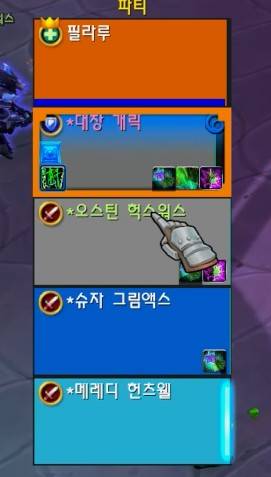
- Following the 12.0.5 patch, it is no longer possible to modify the buff/debuff display on the default raid frames. Consequently, the related features in asCompactRaidBuff have been removed.
- While it is technically possible to implement a separate buff/debuff display, I have concluded that it is impossible to perfectly replicate the default raid frame functionality under the current WoW API structure. Furthermore, I believe it is inefficient to allocate CPU resources to provide a subpar feature, so there are no plans for additional updates regarding this unless the API changes.
- The feature to change healer HoT colors will be disabled in the near future. It has been confirmed to work properly up to version 12.0.7.
Key Features & Configuration
- Accessible via
ESC>Options>AddOns>asCompactRaidBuff. [Bottom] Displays the healer mana bar: (Default: On).[Bottom] Displays the tank power bar: Displays only when the resource is not mana (Default: On).[Left] Displays the marker icon: (Default: On).[Top Left] Displays the party/raid leader icon:(Default: On).[Color] Change health color when HOT buffed: Not supporting to change buff (Default: On).
| Class | Color Change |
|---|---|
| Restoration Druid | Regrowth |
| Holy Paladin | Beacon of Virtue |
| Discipline Priest | Atonement |
| Holy Priest | Renew |
| Preservation Evoker | Echo |
| Restoration Shaman | Riptide |
| Mistweaver Monk | Renewing Mist |
| Augmentation Evoker | Prescience |
How to Set Up Click Casting
ESC > Options > Keybindings > Click Casting
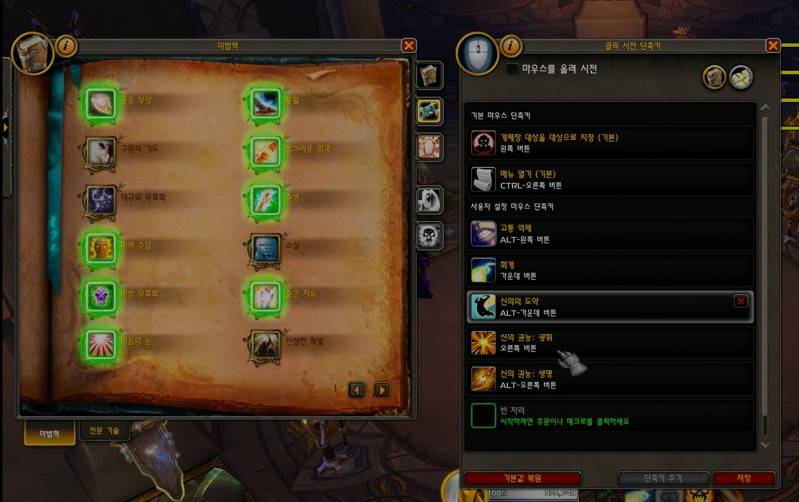
Click casting can be used on Raid, Party, Player, Target, Focus, and Boss unit frames. You can assign spells directly from the "Spellbook" or set up macros. It supports Mouse Left/Right/Middle clicks combined with modifier keys. By default, Left Click targets and Right Click opens the menu. In the example below, Right Click is set to cast Radiance, while CTRL + Right Click is configured to open the menu. Since macros are also supported, you can use click casting for things like Trinket macros.
How to Set Up Mouseover Healing
While click casting cannot be used on nameplates, mouseover casting has the advantage of allowing you to cast spells by simply hovering your mouse over a nameplate or a character.
ESC > Macros
Detailed explanations can be found on community macro boards (e.g., WoW Inven Macro Board). If you create the macro below and assign it to a hotkey like Mouse Wheel Up, it will cast Purge the Wicked on hostile targets, or Power Word: Shield followed by Renew on allies.
#showtooltip
/cast [@mouseover,harm,nodead] Purge the Wicked
/castsequence [@mouseover,help,nodead][]reset=3 Power Word: Shield, Renew, Renew, Renew, Renew, Renew
Contact Information
- Korean Users: Visit the Inven asMOD Forum.
- English Users: Visit the asMOD YouTube Channel or GitHub.
asCompactRaidBuff (한밤)
공격대 및 파티 프레임 강화
12.0.5 패치 이후 변경점
- 12.0.5 패치가 되며 기본 레이드 프레임의 버프/디버프 표시를 변경할 수 없게 변경 되었습니다. asCompactRaidBuff의 관련 기능은 삭제 되었습니다.
- 별도의 버프/디버프를 표시하는 방식으로 구현이 가능하나 현재 와우 API 구조상 기본 레이드 기능을 100% 구현 할 수 없다는 판단이고, 부족한 기능을 CPU 리소스를 투입하여 사용하는 것은 별로라고 판단 되어 API 변경없이 관련된 추가 변경 계획은 없습니다.
- 힐러 HOT 색상변경 기능은 조만간 기능이 막힐 예정입니다. 12.0.7 까지는 정상 동작 확인 하였습니다.
주요 기능 & 설정
ESC>설정>애드온>asCompactRaidBuff에서 설정 가능[하단] 힐러 마나 표시: (기본: On)[하단] 탱커 파워 표시: 마나가 아닌 경우만 표시 (기본: On)[좌측] 징표 아이콘을 표시: (기본: On)[좌상] 파티/공격대 리더 표시: (기본: On)[색상] 힐러 HOT 버프시 색상 변경: 버프 변경은 지원하지 않음 (기본: On)
| 직업 | 색상 변경 |
|---|---|
| 회복 드루이드 | 회복 |
| 신성 기사 | 고결의 봉화 |
| 수양 사제 | 속죄 |
| 신성 사제 | 소생 |
| 보존 기원사 | 메아리 |
| 복원 주술사 | 성난 해일 |
| 운무 수도사 | 소생의 안개 |
| 증강 기원사 | 예지 |
클릭 시전 설정 방법
esc >> 설정 >> 단축키 설정 >> 클릭 시전
클릭 시전 대상은 공격대/파티창/플레이어/대상/주시 대상/보스 유닛 프레임에 사용 가능 하고, 스킬은 "마법책" 또는 매크로를 설정 할 수 있습니다. 마우스 좌/우/중간 + 키보드로 설정 가능합니다. 기본 마우스 단축키 좌클릭은 대상으로 지정, 오른 클릭은 메뉴 열기 인데, 아래 설정은 오른 클릭에 광휘를 설정해 놓고, CTRL + 오른클릭으로 메뉴 열기를 해 놓은 겁니다. 매크로도 사용 가능하기 때문에 장신구 매크로 등을 사용 하신다면 장신구를 클릭 시전 할 수 있습니다.
마우스 오버 힐 설정 방법
클릭 시전은 이름표 등은 사용이 불가 한데, 마우스 오버 시전은 이름표/케릭 위에 마우스를 올려 두고 시전을 하면 마우스 아래 대상에 시전이 가능하다는 장점이 있습니다.
esc >> 매크로 설정
매크로 게시판 (와우 인벤 매크로 게시판 - 월드 오브 워크래프트 인벤 (inven.co.kr)) 등에 설명이 많이 나와 있으니 설명하지 않겠습니다. 아래 매크로를 만들고, 마우스 휠업 등의 단축키에 등록해 놓으시면 적대적 대상에게는 사악의 정화를 아군에는 보호막 > 소생을 시전 합니다.
#showtooltip
/cast [@mouseover,harm,nodead] 사악의 정화
/castsequence [@mouseover,help,nodead][]reset=3 신의 권능: 보호막, 소생, 소생, 소생, 소생
문의처
한글 유저:인벤 asMOD 포럼방문 (https://www.inven.co.kr/board/wow/5288)영문 유저:Youtube asMOD 채널방문 (https://www.youtube.com/@asmod-wow),Github방문 (https://github.com/aspilla/asMOD/)
用户评价
暂无 / 5,0 条评价相关推荐
继续看看这些内容
