插件中文资料库
中文说明、玩家点评、适用场景和替代推荐,方便快速判断是否适合你。
- 界面布局、头像框、姓名板和动作条优化
 GroupFinder
 FollowerLocationInfo
 Sleek XP Bubbles
RandomMountBuddy 插件下载与使用指南
本页整理了 RandomMountBuddy 的功能用途、适用人群、安装方法和常见问题,方便玩家快速判断是否需要安装。
适合谁用
RandomMountBuddy 是一款 伙伴 类插件,适合需要优化界面、提升操作效率或补充游戏信息提示的魔兽世界玩家。
基本信息
- 插件作者:mellow_ayaya
- 插件分类:伙伴
- 适配版本:12.0.7
- 累计下载:34
安装方法
- 点击上方下载按钮获取 RandomMountBuddy插件文件。
- 解压后将插件文件夹放入 World of Warcraft/_retail_/Interface/AddOns 目录。
- 重启游戏或在角色界面点击插件,确认 RandomMountBuddy 已启用。
- 如果插件不生效,请检查版本是否匹配,或关闭同类冲突插件后重试。
使用建议
RandomMountBuddy 安装后建议先在角色界面确认已启用,进入游戏后根据插件提供的命令、小地图按钮或设置面板进行调整。如遇到报错,可先单独启用该插件排查冲突。
RandomMountBuddy 常见问题
RandomMountBuddy 适合需要 伙伴 类功能的玩家,特别是希望提升游戏便利性、界面管理或战斗信息获取效率的用户。
下载后解压到 Interface/AddOns 目录,然后重启游戏并在角色界面启用插件。
常见原因是目录多套一层、游戏版本不匹配、依赖插件缺失或同类插件冲突。
可以查看本页的替代插件推荐和相关插件区域,按下载量和分类选择同类工具。
插件 AI 问答
可以问:这个插件正式服能用吗、和 DBM 冲突吗、怎么设置、有没有替代插件。
RandomMountBuddy 是一款魔兽世界插件,主要用于坐骑、宠物或击杀记录、组队、队伍交流和自动问候。建议根据自己的版本和插件环境先测试兼容性。
插件用途
RandomMountBuddy 主要面向需要伙伴功能的玩家,用来改善游戏体验、减少重复操作或补充默认界面没有直接提供的信息。
适用场景
- 坐骑、宠物或击杀记录
- 组队、队伍交流和自动问候
使用建议
安装后建议先在角色选择界面或插件管理器中确认已启用,再进入游戏测试是否与现有整合包、WA 和其他插件冲突。如遇报错,可以先禁用同类插件排查。
Random Mount Buddy
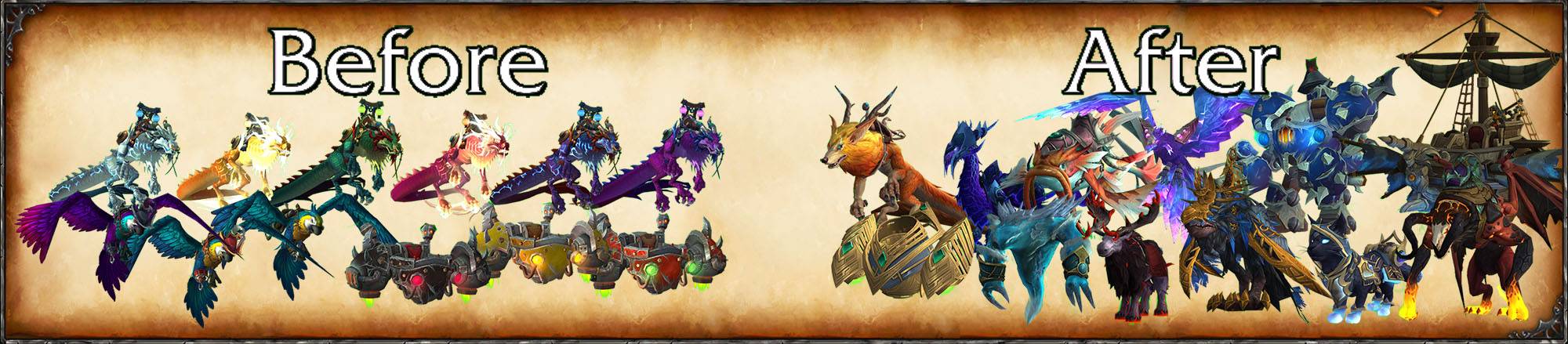
Improve your summon-random-favorite-mount experience with RandomMountBuddy! Minimal setup required: just set up the keybind and you're good to!
About
This addon solves a niche issue with random summoning: if you've favorited multiple recolors or versions of the same mount (like several Cloud Serpent colors), you'll see them much more often compared to mounts with less recolors/variants. Random Mount Buddy picks a random mount type first, then a random color/variant, ensuring better distribution across your favorites.
How It Works
With default random summoning, favoriting multiple variants of the same mount creates heavily skewed odds. Here's a real example from version 1.0.22 with 711 flying mounts:
- Without Random Mount Buddy: Cloud Serpent ~4.36%, Ashes of Al'ar ~0.14%
- With Random Mount Buddy: Cloud Serpent ~1%, Ashes of Al'ar ~0.11% (Ashes now ~3.4x fairer relative to Cloud Serpent)
And that's just one way Random Mount Buddy balances heavily recolored mounts with unique ones!
Technicalities: all Cloud Serpent and Ashes variants favorited; flying mount count includes faction exclusives so the ratio may vary slightly, but should remain similar.
Core features:
- Mounts with recolors are grouped in Families, similar Families are grouped in Groups.
- Instead of summoning an individual mount, the addon summons a random group or ungrouped family/mount.
- If you like seeing unique mounts like Alunira (unique gryphon variant), enable 'Favor Unique Mounts' to give them independent (better) summon chances instead of grouping them.
- Mount browser: see your entire mount collection grouped in Families and Groups and adjust various settings with ease such as weight and uniqueness.
Summoning features:
- Summon target's mount: copy your target's mount if known.
- Contextual Summoning: Automatically filters by flying/ground/swimming based on your location.
- Improved Randomness: Recently used mount families become temporarily unavailable for better variety.
- Weight System: Prioritize your favorites while still getting variety.
- Favorite Sync: Automatically sync with your WoW Mount Journal favorites.
- D.R.I.V.E. support: Automatically summon G-99 Breakneck when in the correct zones.
- Macros: Create macros using /run RMB:SRM(true) or /rmb s. Note: Macros won't automatically use class spells like Travel Form - see Macro examples below.
- Rules: Create rules to summon specific mounts in specific conditions such as player level, zone, instance type, while in party with a friend, when using a specific keybind, and more!
Utility features:
- Press the addon keybind to use class spells such as Flight/Travel/Cat form depending on the situation, or Levitate while falling! Classes supported: Druid, Shaman, Mage, Monk, Priest.
Macro examples:
You can use /rmb s to create macros that will summon using the addon's logic! Due to technical limitations, these macros will not be able to use the class specific settings, but everything else is compatible. If you would like to make macros that also have class functionality similar to the addon, see the below examples.
NOTE: All the macros below can be used while moving, but you will see an error from failing to mount "Can't do that while moving". If you find that annoying, add this to the top of the macro:
/run UIErrorsFrame:SuppressMessagesThisFrame()Druid
/cancelform [noform:4]
/rmb s
/cast [swimming,noform:3,nomounted][outdoors,noform:3,nomounted] Travel Form;[noswimming,indoors,noform:2,nomounted] Cat Form
Explanation:
/cancelform [noform:4] -> This neds to be here because /rmb s does not work while in Bear or Cat form. [noform:4] is optional (recommended for Balance druids)
/cast [swimming,noform:3][outdoors,noform:3] Travel Form;[noswimming,indoors,noform:2] Cat Form -> If moving or unable to mount, summoning a mount will fail and it will instead cast Travel form if available, or Cat form instead.
/rmb s -> Summon random mount with fancy addon logic
Shaman
/rmb s
/cast [noform] Ghost Wolf
Explanation:
/rmb s -> Summon random mount with fancy addon logic
/cast [noform] Ghost Wolf -> If moving or unable to mount, summoning a mount will fail and it will instead cast Ghost Wolf, [noform] makes it so that you can't cancel Ghost Wolf by clicking the macro twice
Mage
/rmb s
/cast [@player] Slowfall
Explanation:
/rmb s -> Summon random mount with fancy addon logic
/cast [@player] Slowfall -> If moving or unable to mount, summoning a mount will fail and it will instead cast Slowfall
Monk
/cancelaura [noflying] Zen Flight
/rmb s
/cast Zen Flight
Explanation:
/cancelaura [noflying] Zen Flight -> Cancels Zen Flight only if you're on the ground
/rmb s -> Summon random mount with fancy addon logic
/cast Zen Flight -> If moving or unable to mount, summoning a mount will fail and it will instead cast Zen Flight
Priest
/rmb s
/cast [@player] Levitate
Explanation:
/rmb s -> Summon random mount with fancy addon logic
/cast [@player] Levitate -> If moving or unable to mount, summoning a mount will fail and it will instead cast Levitate
Installation
- Download the latest release package (
.zipfile) - Extract the
RandomMountBuddyfolder into yourWorld of Warcraft\_retail_\Interface\AddOns\directory - Restart World of Warcraft or Reload your UI (
/reload) - Set up a keybind for the addon in Options -> Keybinds -> Addons -> Random Mount Buddy Summon
Known issues:
- None at the moment
Need Help?
If you have questions or run into issues, post in the Curseforge comments. For bug reports, please enable the Debugging Messages and provide them along with the issue description.
Disclaimer
This addon contains modified UI textures from World of Warcraft (owned by Blizzard Entertainment). These assets are used with the purpose of creating visual consistency with the original interfaces and remain the intellectual property of their respective owners. This addon is not affiliated with or endorsed by Blizzard Entertainment.
World of Warcraft™ and Blizzard Entertainment® are trademarks or registered trademarks of Blizzard Entertainment, Inc. in the U.S. and/or other countries.
License
This project is licensed under the GNU General Public License v3.0
CurseForge: https://www.curseforge.com/wow/addons/randommountbuddy用户评价
暂无 / 5,0 条评价相关推荐
继续看看这些内容
