插件中文资料库
中文说明、玩家点评、适用场景和替代推荐,方便快速判断是否适合你。
- 背包、银行和物品整理
- 界面布局、头像框、姓名板和动作条优化
 Details! Mythic+ Scoreboard
 BagSync
 RightClickSelfCast
Bag Customizer for ElvUI 插件下载与使用指南
本页整理了 Bag Customizer for ElvUI 的功能用途、适用人群、安装方法和常见问题,方便玩家快速判断是否需要安装。
适合谁用
Bag Customizer for ElvUI 是一款 背包与库存 / 界面美化 / 其他插件 / 插件扩展 类插件,适合需要优化界面、提升操作效率或补充游戏信息提示的魔兽世界玩家。
基本信息
- 插件作者:mellow_ayaya
- 插件分类:背包与库存 / 界面美化 / 其他插件 / 插件扩展
- 适配版本:12.0.1
- 累计下载:47
安装方法
- 点击上方下载按钮获取 Bag Customizer for ElvUI插件文件。
- 解压后将插件文件夹放入 World of Warcraft/_retail_/Interface/AddOns 目录。
- 重启游戏或在角色界面点击插件,确认 Bag Customizer for ElvUI 已启用。
- 如果插件不生效,请检查版本是否匹配,或关闭同类冲突插件后重试。
使用建议
Bag Customizer for ElvUI 安装后建议先在角色界面确认已启用,进入游戏后根据插件提供的命令、小地图按钮或设置面板进行调整。如遇到报错,可先单独启用该插件排查冲突。
Bag Customizer for ElvUI 常见问题
Bag Customizer for ElvUI 适合需要 背包与库存 / 界面美化 / 其他插件 / 插件扩展 类功能的玩家,特别是希望提升游戏便利性、界面管理或战斗信息获取效率的用户。
下载后解压到 Interface/AddOns 目录,然后重启游戏并在角色界面启用插件。
常见原因是目录多套一层、游戏版本不匹配、依赖插件缺失或同类插件冲突。
可以查看本页的替代插件推荐和相关插件区域,按下载量和分类选择同类工具。
插件 AI 问答
可以问:这个插件正式服能用吗、和 DBM 冲突吗、怎么设置、有没有替代插件。
Bag Customizer for ElvUI 是一款魔兽世界插件,主要用于界面框架、头像、动作条或冷却显示优化、背包、银行、专业制造或物品整理、插件库、数据接口或依赖支持。建议根据自己的版本和插件环境先测试兼容性。
插件用途
Bag Customizer for ElvUI 主要面向需要背包与库存功能的玩家,用来改善游戏体验、减少重复操作或补充默认界面没有直接提供的信息。
适用场景
- 界面框架、头像、动作条或冷却显示优化
- 背包、银行、专业制造或物品整理
- 插件库、数据接口或依赖支持
使用建议
安装后建议先在角色选择界面或插件管理器中确认已启用,再进入游戏测试是否与现有整合包、WA 和其他插件冲突。如遇报错,可以先禁用同类插件排查。
This addon is no longer actively maintained. I will update the TOC but no support will be provided. Please make your own fork if needed.
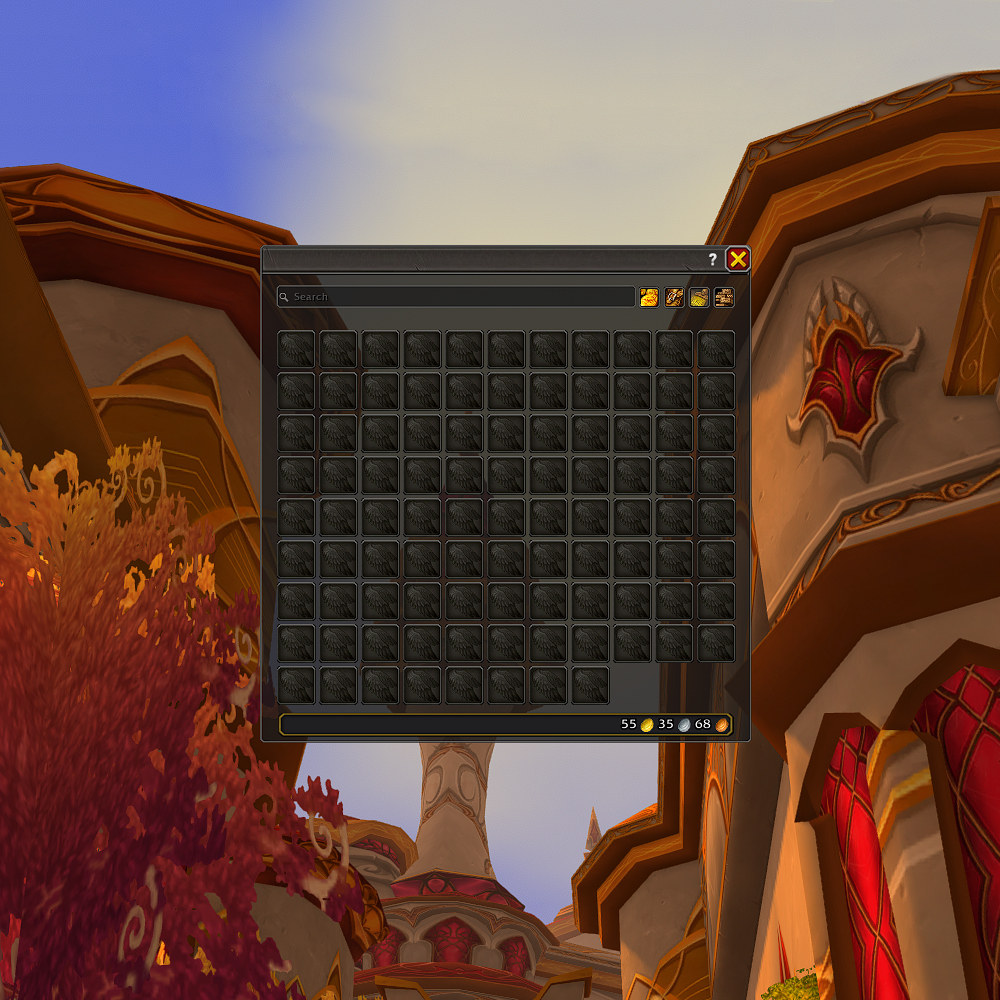
Bag Customizer for ElvUI
Make your ElvUI bags look like the default WoW bags - or create your own awesome custom designs!
About
Do you love the ElvUI bags functionality but would prefer the bags to look more like the default ones, or just be more customizable overall?
This addon is just for you!
Enjoy the default blizz-like theme, the rounded ElvUI theme or the Northrend theme, edit them, or create your own!
Here's what you can expect: a masque-like feature that allows reshaping the inventory slots and adding borders to them, being able to adjust the transparency of the bag window and add textures/background images, move the search bar and buttons, reposition the gold text and more!
You can disable or enable each feature of the addon independently of each other.
Features
Bag appearance features:
- Window Body: Customize the Inventory background color, Top Texture, UI Texture (none by default) and Art Texture (none by default)
- Layout: Customize the bag Close Button Texture, Close Button Position, Extra Bag Height, Search Bar and buttons settings
- Item Slots: Change the look of the inventory slots and their borders
- Gold & Currencies: Style and position gold display and currency frame
- Borders: Add borders to various elements, disable the default ElvUI Bag borders
Utility features:
- Feature toggling: Each feature can be toggled on/off independently
- Preset Themes: The addon comes with 3 presets (possibly more in the future), with "Blizzard Modern" preset enabled by default
- Theme Manager: You can save, load, delete, export or import themes
undefined
Installation
- Download the latest release package (
.zipfile) - Extract the
BagCustomizer_for_ElvUIfolder into yourWorld of Warcraft\_retail_\Interface\AddOns\directory - Restart World of Warcraft or Reload your UI (
/reload) - Ensure both ElvUI and Bag Customizer for ElvUI are enabled in the AddOns list
Getting Started
- Try the Default Theme: It should already be applied to your bags automatically
- Explore More Themes: Type /bcfe in chat and check out the "Themes and Profiles" tab for more pre-made designs
- Customize Everything: Use the "Advanced" tab to fine-tune specific elements
- Save Your Creations: Once you're happy with your settings, save them as a theme
undefined
Good to Know
- To avoid needing to reload, have your bags open when applying themes or changing settings
- Settings are stored in your ElvUI Profile - export them if you want to use across different profiles
- The Bank and Warbank are not supported
- Each feature can be independently enabled/disabled
Recommended ElvUI Settings
For a more authentic default-bag look, consider these ElvUI settings:
- Currency format: Icons only or Icons and Text(short)
- Gold format: Blizzard Style
- Show Coins checkbox Enabled
- Bags Button size 39~44
- Bags Button spacing ~4
- Item Count, Info, Level fonts: Arial Narrow or Friz Quadrata TT
undefined
Custom Files
Want to use your own textures? Add them to the appropriate folder in: \Interface\AddOns\BagCustomizer_for_ElvUI\Media\
Each texture type has specific folder locations and recommended dimensions - check the addon's "Advanced" tab for full details.
Requirements
- ElvUI
undefined
Known issues:
- When switching ElvUI profiles, a reload will be needed to ensure the customizer works properly
Need Help?
If you have questions or run into issues, post in the Curseforge comments. For bug reports, please enable the relevant debugging option in the Debug tab first and provide relevant logs.
undefined
Disclaimer
This addon contains modified UI textures from World of Warcraft (owned by Blizzard Entertainment) and ElvUI. These assets are used with the purpose of creating visual consistency with the original interfaces and remain the intellectual property of their respective owners. This addon is not affiliated with or endorsed by Blizzard Entertainment or the ElvUI team.
World of Warcraft™ and Blizzard Entertainment® are trademarks or registered trademarks of Blizzard Entertainment, Inc. in the U.S. and/or other countries.
License
This project is licensed under the GNU General Public License v3.0
CurseForge: https://www.curseforge.com/wow/addons/bag-customizer-for-elvui用户评价
暂无 / 5,0 条评价相关推荐
继续看看这些内容
