插件中文资料库
中文说明、玩家点评、适用场景和替代推荐,方便快速判断是否适合你。
- 界面布局、头像框、姓名板和动作条优化
 Details! Mythic+ Scoreboard
 BagSync
 RightClickSelfCast
Sippy Cup 插件下载与使用指南
本页整理了 Sippy Cup 的功能用途、适用人群、安装方法和常见问题,方便玩家快速判断是否需要安装。
适合谁用
Sippy Cup 是一款 角色扮演 / 背包与库存 类插件,适合需要优化界面、提升操作效率或补充游戏信息提示的魔兽世界玩家。
基本信息
- 插件作者:Raenore
- 插件分类:角色扮演 / 背包与库存
- 适配版本:12.0.5
- 累计下载:35
安装方法
- 点击上方下载按钮获取 Sippy Cup插件文件。
- 解压后将插件文件夹放入 World of Warcraft/_retail_/Interface/AddOns 目录。
- 重启游戏或在角色界面点击插件,确认 Sippy Cup 已启用。
- 如果插件不生效,请检查版本是否匹配,或关闭同类冲突插件后重试。
使用建议
Sippy Cup 安装后建议先在角色界面确认已启用,进入游戏后根据插件提供的命令、小地图按钮或设置面板进行调整。如遇到报错,可先单独启用该插件排查冲突。
Sippy Cup 常见问题
Sippy Cup 适合需要 角色扮演 / 背包与库存 类功能的玩家,特别是希望提升游戏便利性、界面管理或战斗信息获取效率的用户。
下载后解压到 Interface/AddOns 目录,然后重启游戏并在角色界面启用插件。
常见原因是目录多套一层、游戏版本不匹配、依赖插件缺失或同类插件冲突。
可以查看本页的替代插件推荐和相关插件区域,按下载量和分类选择同类工具。
插件 AI 问答
可以问:这个插件正式服能用吗、和 DBM 冲突吗、怎么设置、有没有替代插件。
Sippy Cup 是一款魔兽世界插件,主要用于角色扮演相关功能。建议根据自己的版本和插件环境先测试兼容性。
插件用途
Sippy Cup 主要面向需要角色扮演功能的玩家,用来改善游戏体验、减少重复操作或补充默认界面没有直接提供的信息。
适用场景
- 角色扮演相关功能
使用建议
安装后建议先在角色选择界面或插件管理器中确认已启用,再进入游戏测试是否与现有整合包、WA 和其他插件冲突。如遇报错,可以先禁用同类插件排查。
Sippy Cup 🥤
Sippy Cup tracks and reminds you of your roleplay consumables and toys, helping keep you focused on what matters most: Roleplay.
Key Features:
- Smart Reminders: Automatic popups when items expire, run low, or are missing from your inventory.
- Roleplay Integration: Optional "In Character" detection to only trigger reminders during active RP.
- Queue System: Manages multiple expiring items by queuing up to 5 active popups at once.
- Visual & Audio Alerts: Customizable screen positioning, sound notifications, and taskbar flashing.
- Extensive Library: Built-in support for character transformations, size modifiers, and world placements.
Available on CurseForge, Wago.io, and WoWInterface!
How It Works
Once enabled, Sippy Cup monitors your tracked items and displays a reminder popup based on the following triggers:
- Expiration: Your consumable runs out (or is about to, if pre-expiration is enabled).
- Low Stock: Your current stack count is below your desired threshold.
- Missing Items: You lack the necessary items required for your next refresh round.
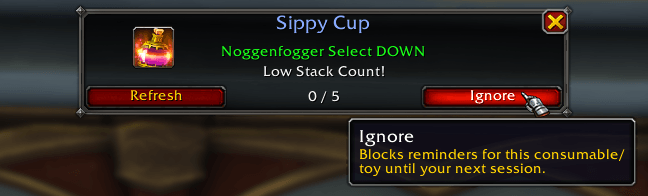
Note: On login, a popup will appear for tracked consumables/toys with active stacks. If the Only when "In Character" option is enabled, it will also remind you about inactive stacks.
Multi-Popup Management
If multiple items expire simultaneously, Sippy Cup displays multiple popups. A maximum of 5 popups are shown at once, additional reminders are queued and appear as you dismiss or resolve the current ones.
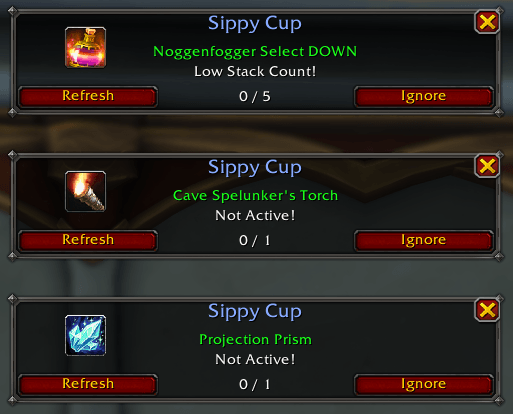
Status Indicators
If an item cannot be refreshed due to missing or insufficient stock, the refresh button displays a warning-colored tooltip.
 |
 |
 |
 |
If the Insufficient Reminder option is enabled (disabled by default), Sippy Cup will remind you if you don't have enough of the item for your next refresh.
 |
 |
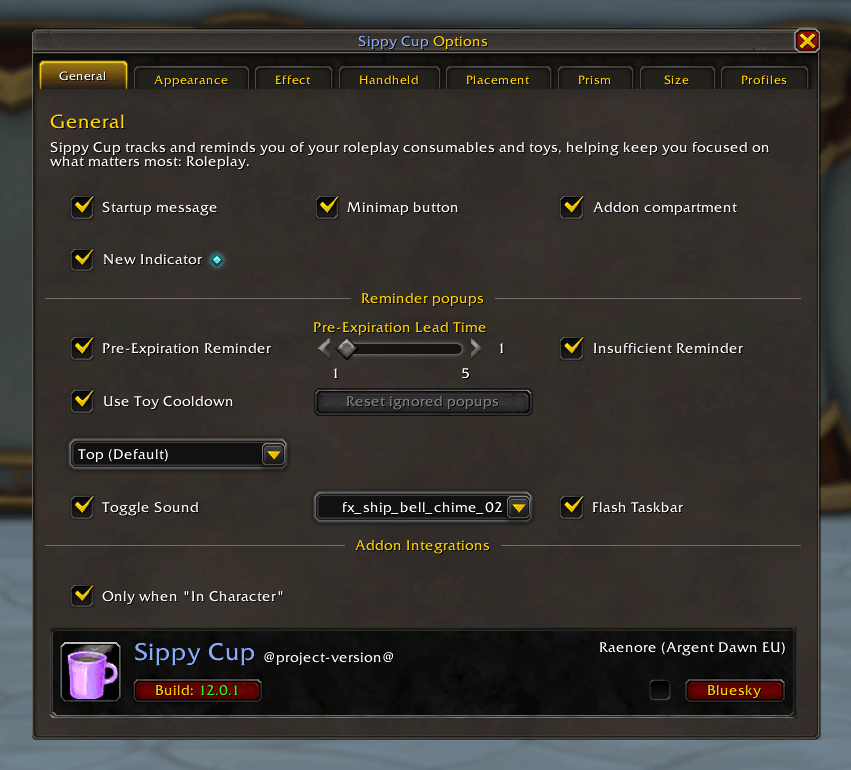
General Settings
Adjust Sippy Cup's settings to match your personal preferences by using /sc or /sippycup.
Here you can:
- Toggle a Startup message at login that displays current profile and version.
- Control the visibility of the Minimap button.
- Configure display of the addon in Blizzard's Addon compartment.
Reminder Customization:
- Alerts: Choose custom sounds and toggle taskbar flashing for urgent reminders.
- Pre-expiration: Get notified before an effect wears off to ensure seamless RP.
- Insufficient Reminder: Enable alerts specifically for when you are low on stock (disabled by default).
- Placement: Position popups at the Top, Center, or Bottom of your screen.
Sippy Cup also offers a special integration:
- Only when "In Character": Limits checks to when your character is flagged as "IC" (Requires TRP3, MRP, or XRP).
At the bottom of this page, you’ll find information about your current version of Sippy Cup.
Reminder Categories
Sippy Cup categorizes items to help you manage specific types of RP effects. You can enable or disable individual items within them.

Available Categories:
- Appearance: Alters your character’s visual appearance.
- Effect: Applies a temporary effect to your character or the environment.
- Handheld: Places an item in your character’s hand(s).
- Placement: Creates objects in the game world.
- Prism: Changes your appearance.
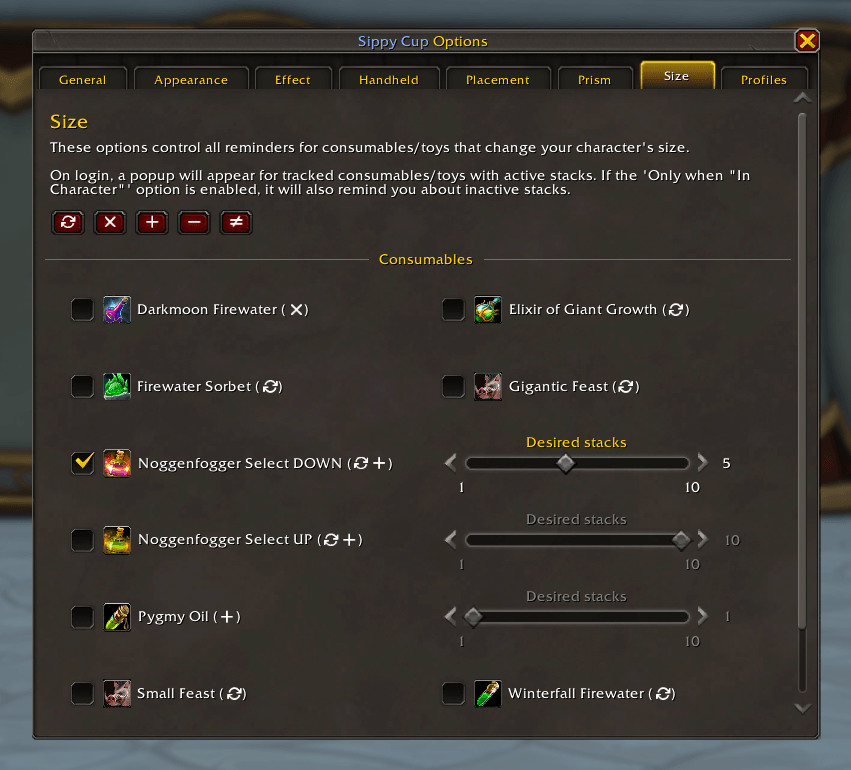
- Size: Alters your character’s size.
Below you can find a screenshot of the Size category for reference.
用户评价
暂无 / 5,0 条评价相关推荐
继续看看这些内容
