插件中文资料库
中文说明、玩家点评、适用场景和替代推荐,方便快速判断是否适合你。
- 副本、团队本和大秘境战斗提醒
 Copy Anything
 BagSync
 GroupFinder
Eavesdropper 插件下载与使用指南
本页整理了 Eavesdropper 的功能用途、适用人群、安装方法和常见问题,方便玩家快速判断是否需要安装。
适合谁用
Eavesdropper 是一款 角色扮演 / 聊天与通讯 类插件,适合需要优化界面、提升操作效率或补充游戏信息提示的魔兽世界玩家。
基本信息
- 插件作者:Raenore
- 插件分类:角色扮演 / 聊天与通讯
- 适配版本:12.0.1
- 累计下载:38
安装方法
- 点击上方下载按钮获取 Eavesdropper插件文件。
- 解压后将插件文件夹放入 World of Warcraft/_retail_/Interface/AddOns 目录。
- 重启游戏或在角色界面点击插件,确认 Eavesdropper 已启用。
- 如果插件不生效,请检查版本是否匹配,或关闭同类冲突插件后重试。
使用建议
Eavesdropper 安装后建议先在角色界面确认已启用,进入游戏后根据插件提供的命令、小地图按钮或设置面板进行调整。如遇到报错,可先单独启用该插件排查冲突。
Eavesdropper 常见问题
Eavesdropper 适合需要 角色扮演 / 聊天与通讯 类功能的玩家,特别是希望提升游戏便利性、界面管理或战斗信息获取效率的用户。
下载后解压到 Interface/AddOns 目录,然后重启游戏并在角色界面启用插件。
常见原因是目录多套一层、游戏版本不匹配、依赖插件缺失或同类插件冲突。
可以查看本页的替代插件推荐和相关插件区域,按下载量和分类选择同类工具。
插件 AI 问答
可以问:这个插件正式服能用吗、和 DBM 冲突吗、怎么设置、有没有替代插件。
Eavesdropper 是一款魔兽世界插件,主要用于倒计时、提醒和战斗预警、副本、团本、大秘境或钥石辅助、组队、队伍交流和自动问候。建议根据自己的版本和插件环境先测试兼容性。
插件用途
Eavesdropper 主要面向需要聊天与通讯功能的玩家,用来改善游戏体验、减少重复操作或补充默认界面没有直接提供的信息。
适用场景
- 倒计时、提醒和战斗预警
- 副本、团本、大秘境或钥石辅助
- 组队、队伍交流和自动问候
使用建议
安装后建议先在角色选择界面或插件管理器中确认已启用,再进入游戏测试是否与现有整合包、WA 和其他插件冲突。如遇报错,可以先禁用同类插件排查。
Eavesdropper 🔍
Eavesdropper helps you stay immersed in busy RP environments by focusing on the interactions that matter most.
Key Features:
- History Window: A focused, real-time feed for your current target or mouseover.
- Dedicated Windows: Create unique, independent windows for specific targets to track multiple conversations simultaneously.
- Group Windows: Combine multiple targets into a single shared window for party or small-group interactions.
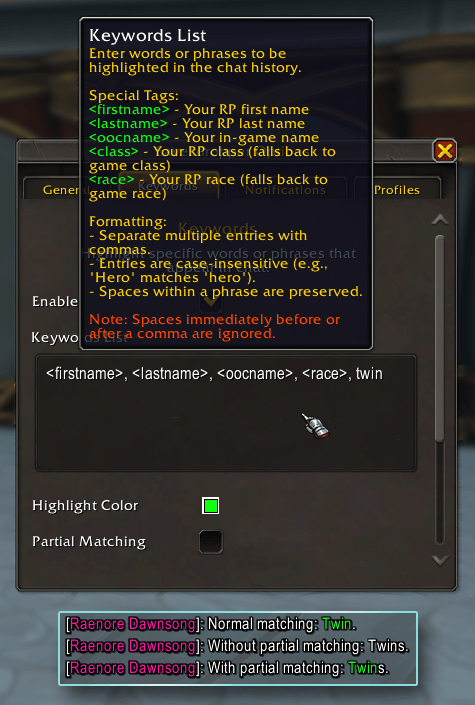
- Keyword Highlights: Custom keywords highlighted in chat with optional sound alerts.
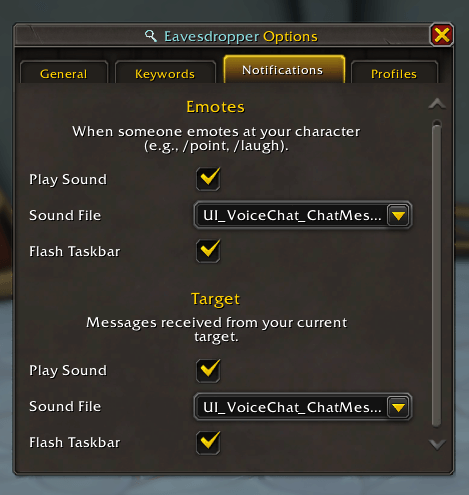
- Notification Support: Play a sound and flash the taskbar when your target performs an action, a Blizzard emote is directed at you, or a Dedicated/Group Window receives a message.
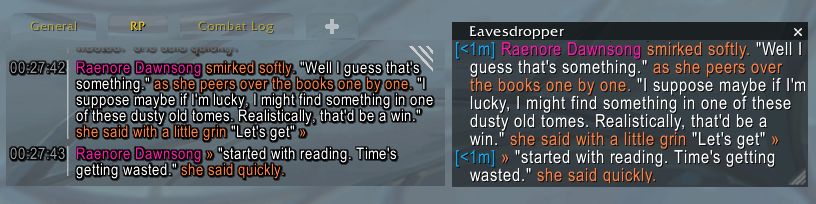
- Seamless Multi-Message Compatibility: Built-in support for multi-message addons like Chattery, EmoteSplitter, and Yapper.
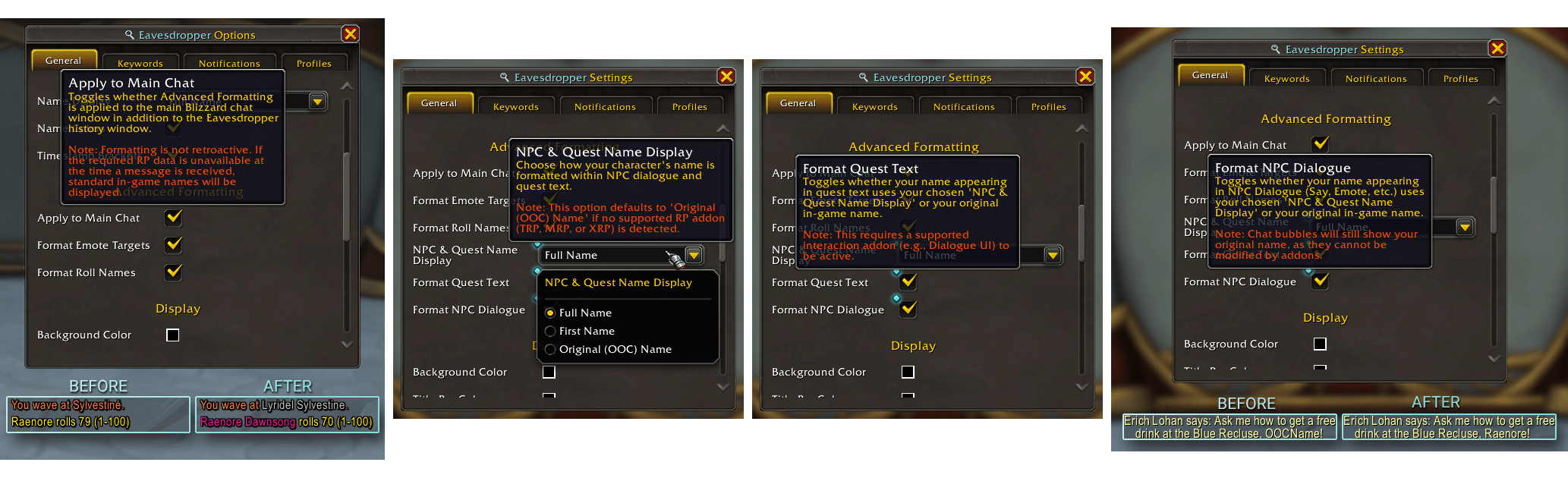
- Advanced RP Name Formatting: Replaces standard names with RP names in rolls, Blizzard emotes, NPC dialogue, and Quest Text (via Dialogue UI).
Available on CurseForge, Wago.io, and WoWInterface!
History Window
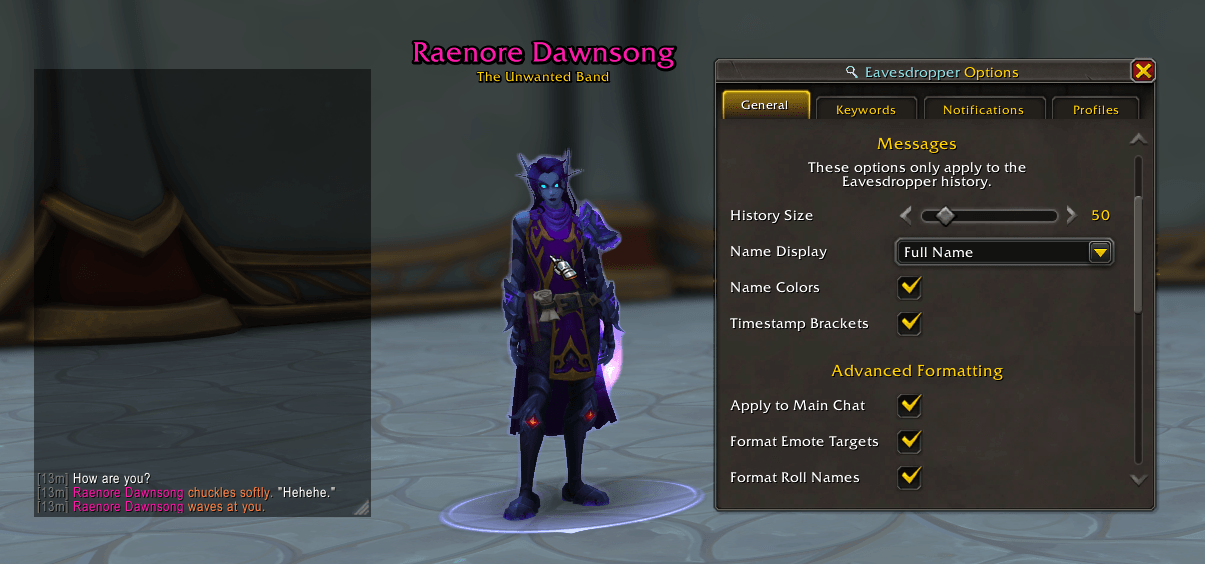
Keep track of the conversation with a customizable frame that displays the recent action history of your target or mouseover.
Customization Options:
- History Size: Change the number of stored actions displayed (default: 50).
- Visuals: Full control over window styling (background colors, opacity) and typography (font, size, etc.).
- Name Formatting: Choose how names appear: Full, First Name Only, or OOC.
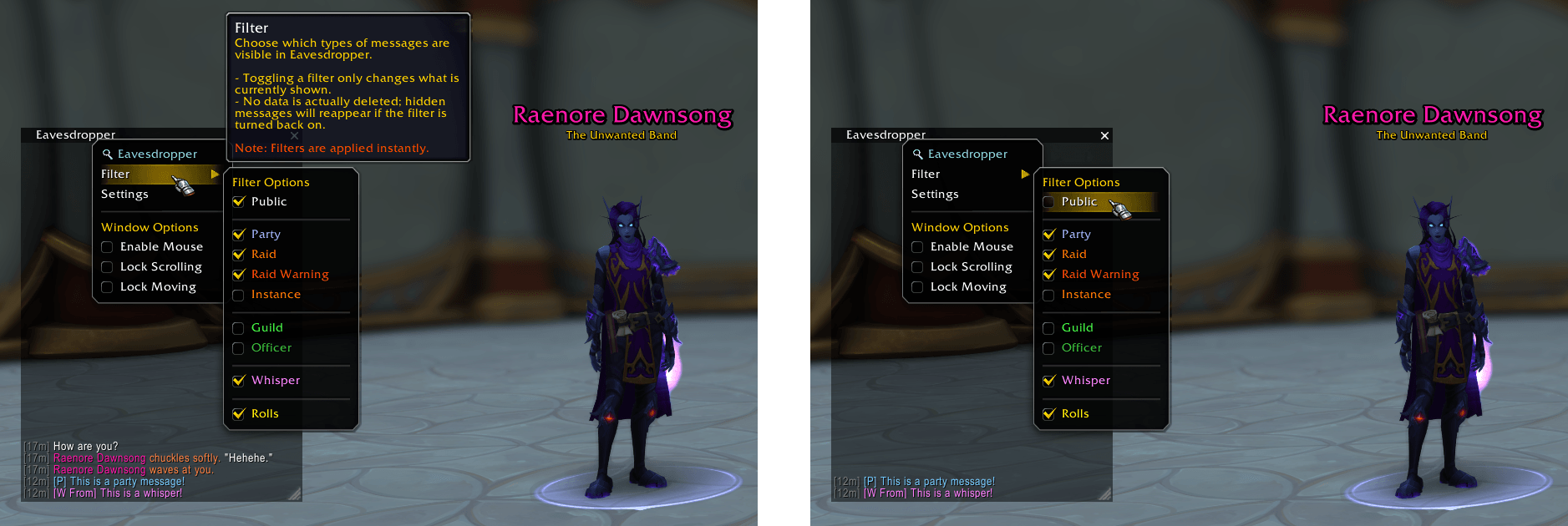
Filters
Toggle visibility on the fly. You can filter the history window to show only specific types of interactions at any time.
Dedicated Windows
Create individual Eavesdropper windows for specific targets by right-clicking a unit portrait or chat name and selecting "Eavesdrop On".
Each Dedicated Window has its own unique:
- Filters
- Font Size
- New Message indicator
- Notifications (Sounds & Flash)
Note: Dedicated Windows are session-based and do not persist through UI reloads or logouts.
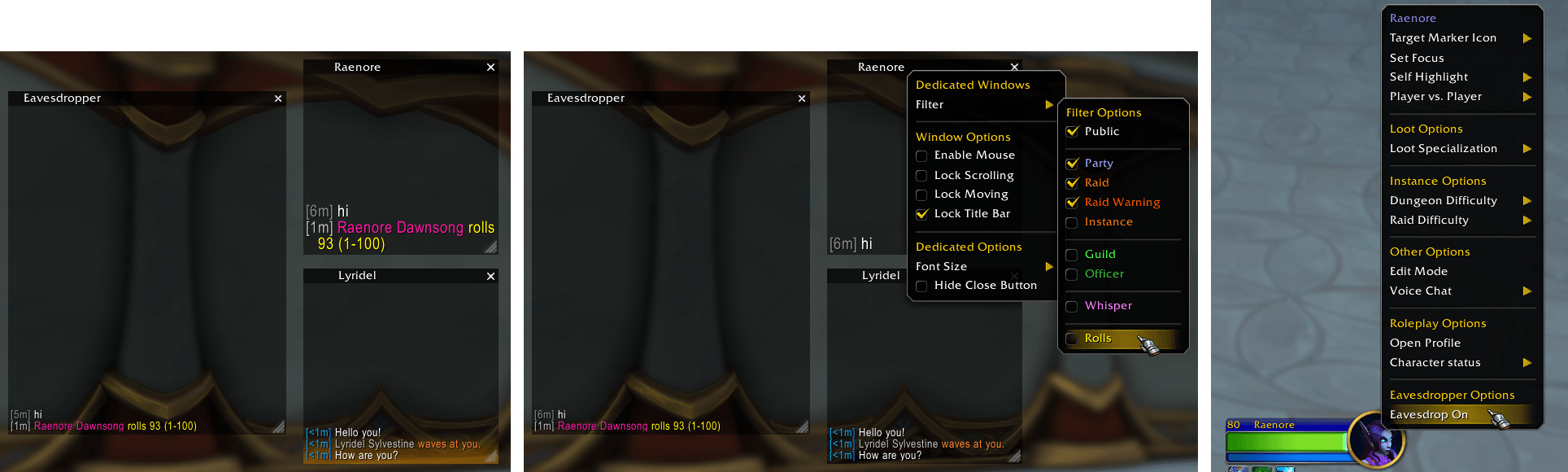 Click the image above to view it in full size.
Group Windows
Consolidate interactions from multiple specific players into a single Eavesdropper window by right-clicking a unit portrait or chat name, selecting "Eavesdrop Group", and either creating a new group or adding the player to an existing one.
Ideal for keeping track of a small party or a specific "circle" of characters within a crowded environment.
Each Group Window has its own unique:
- Filters
- Font Size
- New Message indicator
- Notifications (Sounds & Flash)
Note: Group Windows offer partial persistence: Group Name, Player List, and Display Mode are saved through UI reloads or logouts.
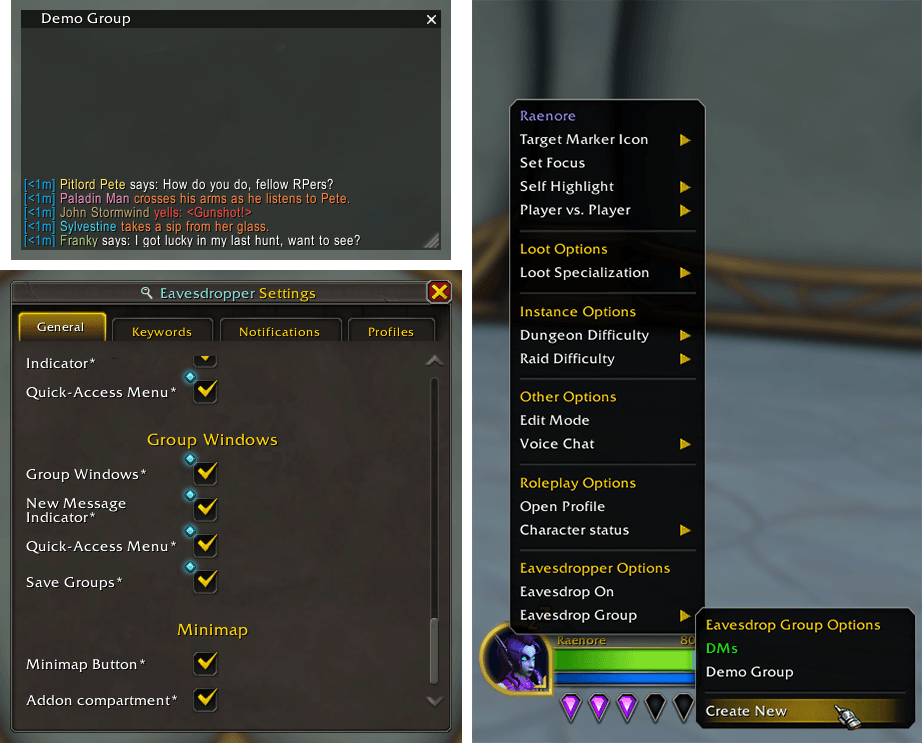
Click the image to view it in full size.
Keywords
Never miss a mention. Define custom keywords to be highlighted in the main chat window and set up optional audio notifications for when they are triggered.
Notifications
Eavesdropper can play a sound notification and flash the taskbar when:
- Your current target takes an action (e.g.,
/say, emotes, etc.). - A Blizzard emote is directed at you (e.g.,
/pointor/wave). - A new message is received in a Dedicated or Group Window.
Multi-Message Support
Eavesdropper intelligently handles long-form RP by detecting split messages from various addons, ensuring your history window stays cohesive even when an emote spans multiple posts.
While Eavesdropper is designed to be broadly compatible, the following addons are explicitly supported:
Advanced RP Name Formatting
Eavesdropper can replace standard character names with their respective RP names across the entire UI.
This formatting applies to all Eavesdropper windows (History, Dedicated, and Group) and can optionally be enabled for the main chat window.
Supported Situations:
- Blizzard Emotes: Replaces names in emotes like
/point,/wave, or/bow. - Rolls: Shows RP names in
/rollresults. - NPC Dialogue: Replaces your name when NPCs speak to you in chat (
/say,/whisper, etc.). - Quest Text: Seamlessly integrates with Dialogue UI to show your RP name during quest interactions.
Note: This feature requires your client to have the player's RP data cached (via MSP) before the replacement can occur.
 Click the image above to view it in full size.
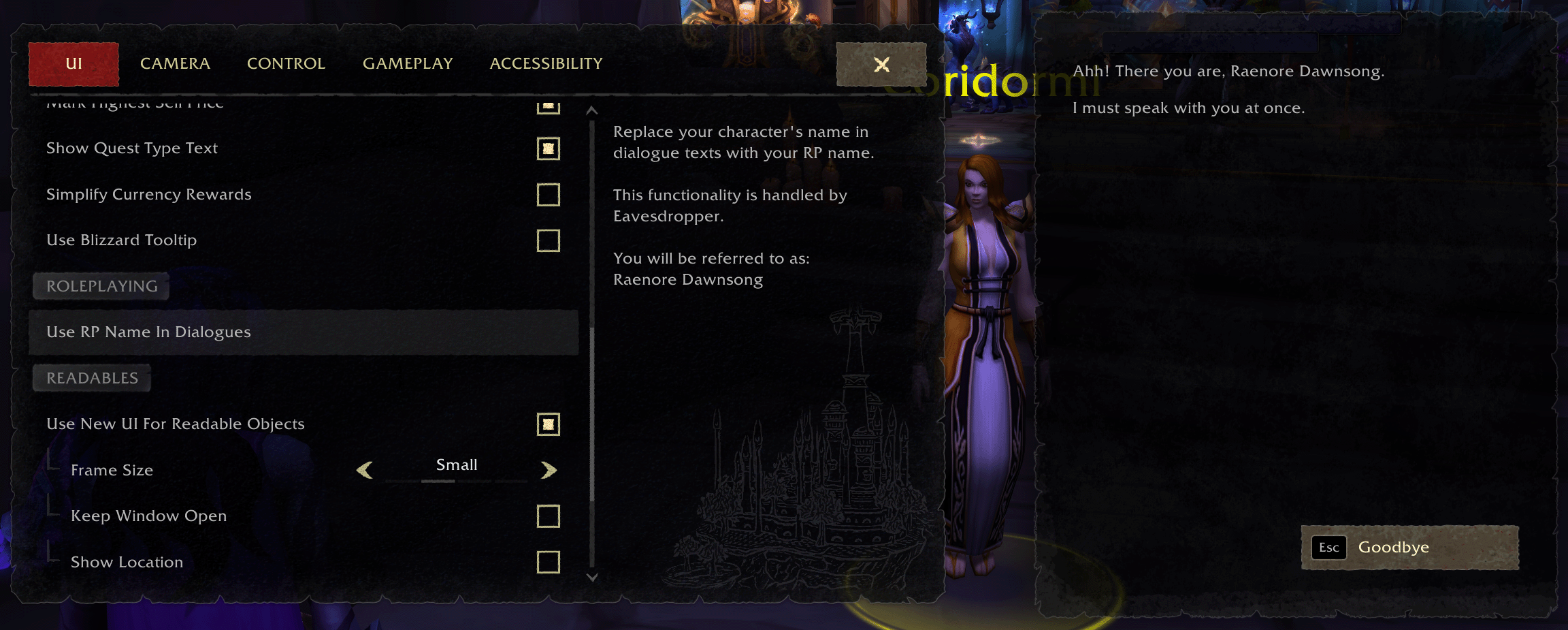 Click the image above to view it in full size.
用户评价
暂无 / 5,0 条评价相关推荐
继续看看这些内容
