插件中文资料库
中文说明、玩家点评、适用场景和替代推荐,方便快速判断是否适合你。
- 日常任务、练级和满级玩法辅助
- 界面体验优化和信息展示增强
- 副本前先测试兼容性,确认不报错后再长期使用
 AmDotMonitor暗牧多目标监控
 Craft Tracker
 Titan Panel [Professions] Multi
Comfy Chatting 插件下载与使用指南
本页整理了 Comfy Chatting 的功能用途、适用人群、安装方法和常见问题,方便玩家快速判断是否需要安装。
适合谁用
Comfy Chatting 是一款 聊天与通讯 / 其他插件 类插件,适合需要优化界面、提升操作效率或补充游戏信息提示的魔兽世界玩家。
基本信息
- 插件作者:IggyDarr
- 插件分类:聊天与通讯 / 其他插件
- 适配版本:1.15.8,2.5.5,12.0.5,5.5.4
- 累计下载:29
安装方法
- 点击上方下载按钮获取 Comfy Chatting插件文件。
- 解压后将插件文件夹放入 World of Warcraft/_retail_/Interface/AddOns 目录。
- 重启游戏或在角色界面点击插件,确认 Comfy Chatting 已启用。
- 如果插件不生效,请检查版本是否匹配,或关闭同类冲突插件后重试。
使用建议
Comfy Chatting 安装后建议先在角色界面确认已启用,进入游戏后根据插件提供的命令、小地图按钮或设置面板进行调整。如遇到报错,可先单独启用该插件排查冲突。
Comfy Chatting 常见问题
Comfy Chatting 适合需要 聊天与通讯 / 其他插件 类功能的玩家,特别是希望提升游戏便利性、界面管理或战斗信息获取效率的用户。
下载后解压到 Interface/AddOns 目录,然后重启游戏并在角色界面启用插件。
常见原因是目录多套一层、游戏版本不匹配、依赖插件缺失或同类插件冲突。
可以查看本页的替代插件推荐和相关插件区域,按下载量和分类选择同类工具。
插件 AI 问答
可以问:这个插件正式服能用吗、和 DBM 冲突吗、怎么设置、有没有替代插件。
Comfy Chatting 是一款魔兽世界插件,主要用于聊天与通讯相关功能。建议根据自己的版本和插件环境先测试兼容性。
插件用途
Comfy Chatting 主要面向需要聊天与通讯功能的玩家,用来改善游戏体验、减少重复操作或补充默认界面没有直接提供的信息。
适用场景
- 聊天与通讯相关功能
使用建议
安装后建议先在角色选择界面或插件管理器中确认已启用,再进入游戏测试是否与现有整合包、WA 和其他插件冲突。如遇报错,可以先禁用同类插件排查。
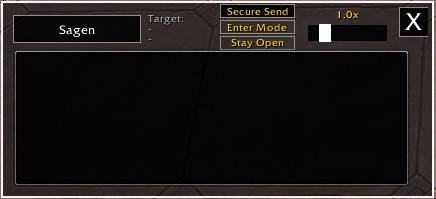
ComfyChatting is a tool designed to make writing in World of Warcraft much more comfortable. Instead of squeezing your text into the tiny default chat line, it provides a multi-line input field - perfect for long messages.
It doesn’t replace your chat window; it simply acts as an addition for a better writing experience.
Key Features
- Write Without Limits: Send up to 5,000 characters at once. The addon automatically splits your text into multiple messages for you. Just press enter to send your text when finished with writing.
- Easy Access: Open the window via Slash command, the Minimap button, by setting a custom Keybinding in the WoW Options or just by pressing Enter in non protected situations so you can start typing when Enter Mode is active. It acts that way like the default chat insert field. If you want the window to stay open after you sent your text just click the Stay Open button.
- Easy Channel Switching: Simply left-click the current channel button (e.g., "Say" or "Guild") to open a menu and quickly switch between channels.
- Quick Whispering: Left-click any player name in the default chat to instantly set them as your target and switch to whisper channel.
- Whisper History: Left-click the "Target:" label at the top of the window to open a dropdown of your 20 most recent whisper targets. Left-click a name from the list to set it as your current target. Right-click puts it in the favorite list.
- Favorite Whisper Targets: Right-click on the "Target:" label opens a dropdown where you can store up to 100 names for quick set as whisper target. Left-click sets it, right-click deletes it from the favorites. Write them by hand or copy them over from the whisper history with a right click.
- Adjustable Scale: Use the built-in slider to resize the window to fit your UI perfectly.
- Persistent State: The addon remembers if the window was set to Stay Open when you log out or reload.
- Secure Sending: The window has a special “Secure Send” button. This allows you to send messages during M+ (only outside of combat), but they are limited to 255 characters per message. However, once the first 255 characters have been sent, the addon cuts them off so that you can send the next block of text with another left-click. Just keep clicking the left mouse button until everything has been sent.
Keyboard Shortcuts
- Enter: Activate the writing box or send your message.
- Alt + Up/Down Arrow: Navigate through your message history to quickly resend or edit previous messages (up to 100 steps).
- Shift + Click (on items/spells): Insert links directly into your text, just like the default chat.
- Tab: Type /w plus one or more letters, then press Tab (Shift+Tab to cycle backward) to cycle through matching whisper names in this order: recent whisper targets, favorites, friends, guild roster.
Slash Commands
/comfychat– Toggles the writing window./comfychat mmbtoggle– Shows or hides the minimap button.
Important to know:
In Mythic+ and during boss fights, the addon window closes automatically so you can use the normal chat instead and won't receive pop-up messages from the game saying that something is blocked. And when the window is closed and you are in combat, normal chat insertion is also used.
I've set up a small Discord Server for my addons https://discord.gg/j3vQVnWUYv Feel free to use it if you have any problems, suggestions or just a simple feedback - I am grateful for everything!
CurseForge: https://www.curseforge.com/wow/addons/comfychatting用户评价
暂无 / 5,0 条评价相关推荐
继续看看这些内容
