插件中文资料库
中文说明、玩家点评、适用场景和替代推荐,方便快速判断是否适合你。
- 界面布局、头像框、姓名板和动作条优化
 YuXuanToolbox
 TooltipRealmInfo
 Ping Alert! LMN
Ka0s Pretty Chat 插件下载与使用指南
本页整理了 Ka0s Pretty Chat 的功能用途、适用人群、安装方法和常见问题,方便玩家快速判断是否需要安装。
适合谁用
Ka0s Pretty Chat 是一款 聊天与通讯 类插件,适合需要优化界面、提升操作效率或补充游戏信息提示的魔兽世界玩家。
基本信息
- 插件作者:aDd1kTeD2Ka0s
- 插件分类:聊天与通讯
- 适配版本:12.0.0,12.0.1,12.0.5
- 累计下载:41
安装方法
- 点击上方下载按钮获取 Ka0s Pretty Chat插件文件。
- 解压后将插件文件夹放入 World of Warcraft/_retail_/Interface/AddOns 目录。
- 重启游戏或在角色界面点击插件,确认 Ka0s Pretty Chat 已启用。
- 如果插件不生效,请检查版本是否匹配,或关闭同类冲突插件后重试。
使用建议
Ka0s Pretty Chat 安装后建议先在角色界面确认已启用,进入游戏后根据插件提供的命令、小地图按钮或设置面板进行调整。如遇到报错,可先单独启用该插件排查冲突。
Ka0s Pretty Chat 常见问题
Ka0s Pretty Chat 适合需要 聊天与通讯 类功能的玩家,特别是希望提升游戏便利性、界面管理或战斗信息获取效率的用户。
下载后解压到 Interface/AddOns 目录,然后重启游戏并在角色界面启用插件。
常见原因是目录多套一层、游戏版本不匹配、依赖插件缺失或同类插件冲突。
可以查看本页的替代插件推荐和相关插件区域,按下载量和分类选择同类工具。
插件 AI 问答
可以问:这个插件正式服能用吗、和 DBM 冲突吗、怎么设置、有没有替代插件。
Ka0s Pretty Chat 是一款魔兽世界插件,主要用于聊天与通讯相关功能。建议根据自己的版本和插件环境先测试兼容性。
插件用途
Ka0s Pretty Chat 主要面向需要聊天与通讯功能的玩家,用来改善游戏体验、减少重复操作或补充默认界面没有直接提供的信息。
适用场景
- 聊天与通讯相关功能
使用建议
安装后建议先在角色选择界面或插件管理器中确认已启用,再进入游戏测试是否与现有整合包、WA 和其他插件冲突。如遇报错,可以先禁用同类插件排查。
Ka0s Pretty Chat



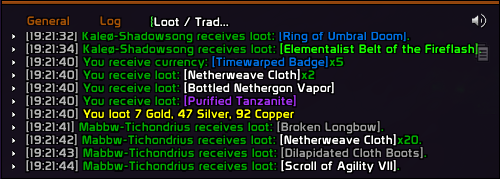
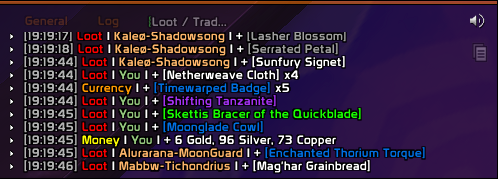
PrettyChat is a lightweight, single-folder WoW addon that reformats system chat messages — loot, currency, money, reputation, experience, honor, tradeskill, and a handful of misc events — into a color-coded, pipe-delimited layout that's easier to scan in a busy chat window.
Rather than parsing chat events, PrettyChat overrides Blizzard's GlobalStrings.lua format strings directly. That means it works with the default Blizzard chat frame and any UI replacement (ElvUI, Glass, etc.) without configuration, and never has to inspect or rewrite messages at runtime.
Everything is configurable through the standard Blizzard Settings panel and through the /pc slash command — every per-string toggle and editable format string in the panel is also addressable from chat by dot path.
Screenshots
Without Pretty Chat
With Pretty Chat
Usage
Slash commands
/pc and /prettychat are aliases for the same dispatcher. All chat output from the addon is prefixed with a cyan [PC] tag.
| Command | Effect |
|---|---|
/pc / /pc help |
Show the slash-command help in chat |
/pc config |
Open the settings panel (refuses during combat — Blizzard's category-switch is protected) |
/pc list |
List every setting (long; ~170 rows). Pass a category name to filter, e.g. /pc list Loot (case-insensitive; accepts an unambiguous prefix like Loo). /pc list category prints just the category names; /pc list formatstring prints every Category.GLOBALNAME pair |
/pc get <path> |
Print one setting's current value (e.g. /pc get Loot.LOOT_ITEM_SELF.enabled) |
/pc set <path> <value> |
Set one setting (e.g. /pc set Loot.enabled false). Bools accept true/false/on/off/yes/no/1/0 |
/pc reset <Category> |
Reset one category to defaults |
/pc resetall |
Reset every category to defaults |
/pc test |
Print a sample-rendered "Original vs Formatted" diff for every format string, grouped by category. Ignores enable toggles, so it works even when the addon is disabled. Filters: /pc test all (same as no-arg), /pc test category <name>, /pc test formatstring <NAME> |
Settings panel
PrettyChat appears in the Blizzard Settings panel under Ka0s Pretty Chat. The parent page is a read-only landing — addon logo, the one-line description, and the slash-command reference. Nine sub-pages hold the actionable controls. Each sub-page is a sibling row in the addon list, so each gets the full right-pane width to itself — no tab strip.
- General — addon-wide controls. Enable PrettyChat master toggle (when off, every Blizzard original is restored regardless of per-category state), a Test button (prints a sample of every format string to chat so you can see what each looks like), and the Reset All to Defaults button.
- Loot — 19 strings covering item pickups, self/group loot, bonus rolls, and currency drops via loot.
- Currency — 4 strings for currency gains and losses (including loss-from-death).
- Money — 8 strings for gold/silver/copper pickups, loot-money splits, guild bank deposits, generic gains, and quest reward money.
- Reputation — 14 strings for faction standing changes (increases, decreases, threshold transitions).
- Experience — 20 strings covering all
COMBATLOG_XPGAIN_*variants (rested, group, raid, …). - Honor — 6 strings for honor and combat-log honor awards.
- Tradeskill — 8 strings for crafted-item creation and lock opening (two of these —
LOOT_ITEM_CREATED_SELF/_MULTIPLE— are also registered under Loot; the last category to apply wins). - Misc — 2 catch-all strings (quest reward XP, zone exploration).
Each category sub-page lists every format string it owns. Each string is laid out as a labeled section heading (the friendly name, e.g. "Battle Pet Loot") followed by a 40/60 two-column grid: left column has an Enable checkbox, the GlobalString key caption (e.g. LOOT_ITEM_SELF), and a per-string Reset button; right column has labeled edit boxes for the Original Blizzard format (read-only), the editable New PrettyChat replacement, and a Preview that always reflects the saved value with sample arguments substituted in. Each category page also has a Defaults button in the page header that resets every string in that category. Disabled strings revert to Blizzard's original at runtime.
Notes
A few user-facing behaviors worth knowing. Implementation details live in ARCHITECTURE.md.
- The master toggle wins.
General → Enable PrettyChat(or/pc set General.enabled false) restores every Blizzard original regardless of per-category and per-string state. Your customizations stay in the database, just unapplied. - Three enable layers, checked in this order: master → category → per-string. A string only renders with your format if all three are on.
- Edit format strings from the panel. It shows raw escape codes (
|cAARRGGBB...|r) and, whenever your value differs from the default, renders a sample line below the edit box on commit (Enter). Editing from chat is supported but you must double|→||(WoW's chat input interprets|c…|ras inline color escapes the moment you press Enter). - Format specifiers must match Blizzard's. Each Blizzard string has a fixed signature (
%s,%d,%.1f,%2$s, etc.). Drop or reorder a%-conversion and the line errors atstring.format. Copy from the panel's left (Original) edit box and only modify the surrounding text and color escapes. - Reset paths. One string back to PrettyChat's default: click the per-string Reset button in the panel (only shown when your value differs from the default), or set the format to its default text via
/pc set— the schema clears overrides that match the default automatically. Whole category: the category page's header Defaults button or/pc reset <Category>. One string back to Blizzard's original: disable its per-string toggle (or/pc set <Category>.<GLOBALNAME>.enabled false). Everything: General → Reset all to defaults (popup-confirmed) or/pc resetall.
FAQ
| Question | Answer |
|---|---|
| Does this work with ElvUI / Glass / other chat replacements? | Yes. PrettyChat overrides Blizzard's GlobalStrings.lua format strings before any chat frame sees them. Any UI that consumes Blizzard's chat events gets the formatted output for free — no hooks, no per-message rewriting. |
| Why do some lines still look like Blizzard's defaults? | Three layers may be off: the master toggle (/pc get General.enabled), the category (/pc get <Category>.enabled), or that specific string (/pc get <Category>.<GLOBALNAME>.enabled). Disabled strings are restored to Blizzard's original at runtime — by design. /pc list <Category> shows every toggle in one place. |
I edited a format string and now it shows raw %s markers or errors. |
The replacement consumes wrong / missing %-conversions. Reset one string: disable it (/pc set <Category>.<GLOBALNAME>.enabled false) or copy Blizzard's exact format from the panel's left edit box. Reset a whole category: /pc reset <Category>. |
| Where are settings stored? Per-character? | In PrettyChatDB via AceDB, on a single shared Default profile — every character on the account uses the same configuration. Per-character / per-class / per-realm profile scoping is not exposed in the panel today; if you want it, file an issue. |
Troubleshooting
| Symptom | Diagnosis & fix |
|---|---|
| Chat looks unchanged after installing | Check in order: /pc get General.enabled → must be true; /pc get <Category>.enabled → must be true; /pc get <Category>.<GLOBALNAME>.enabled → must be true. Run /pc test — if test output is formatted but real chat lines aren't, another addon is overriding the same _G[GLOBALNAME] later in load order. |
| An edited format string breaks the line / errors | The replacement's %-conversions don't match Blizzard's signature. Reset the whole category (/pc reset <Category>), or copy Blizzard's exact string from the panel's left (Original) edit box. |
| Settings panel won't open from chat | /pc config needs the addon fully loaded — try again after the load screen completes. It also refuses during combat (Blizzard's category-switch is protected). If the parent page opens but a sub-category doesn't, click the sub-row in the addon list. |
| Want a clean slate | One category: /pc reset <Category> (e.g. /pc reset Loot). Everything including the master toggle: /pc resetall (or General → Reset All to Defaults). |
Issues and feature requests
All bugs, feature requests, and outstanding work are tracked at https://github.com/tusharsaxena/prettychat/issues. Please file new reports there rather than as comments — the issue tracker is the single source of truth for the project's backlog.
When reporting a bug, the smoke-test suite is a useful template — it lists which invariant each test guards, so a failure can be tied back to a specific area of the addon.
Version History
| Version | Date | Highlights |
|---|---|---|
| 1.3.0 | 2026-05-03 | Settings panel rebuilt on the canvas-layout framework — nine Blizzard sub-pages (one per category) plus a General page (master Enable, Test, Reset All), logo + slash-commands landing, per-string row restyle, atlas-chevron breadcrumb. Schema-driven /pc CLI (help, list, get, set, reset, resetall, test) sharing one write path with the panel; /pc test rendered as a per-category Original-vs-Formatted diff; category / formatstring filters on /pc test and /pc list; cyan [PC] chat prefix. Combat-lockdown guard moved into OpenConfig. MIT LICENSE; ARCHITECTURE.md and modular docs/; review-driven cleanup (dead exports removed, smoke-test suite added); CRLF-on-disk via .gitattributes. |
| 1.2.0 | 2026-04-24 | Code modularization; bundled GlobalStrings database with lookup in the settings panel. |
| 1.1.0 | 2026-02-14 | Ace3 integration; vendored GlobalStrings.lua reference; Blizzard format strings made configurable via the settings panel. |
| 1.0.0 | 2026-02-14 | Updated for WoW Midnight (TOC 120000). |
| 0.0.3 | 2023-10-05 | Initial release. |
用户评价
暂无 / 5,0 条评价相关推荐
继续看看这些内容
