插件中文资料库
中文说明、玩家点评、适用场景和替代推荐,方便快速判断是否适合你。
- 界面布局、头像框、姓名板和动作条优化
- 伤害、治疗、仇恨和战斗数据统计
 Details! Mythic+ Scoreboard
 BagSync
 RightClickSelfCast
Ka0s WhatGroup 插件下载与使用指南
本页整理了 Ka0s WhatGroup 的功能用途、适用人群、安装方法和常见问题,方便玩家快速判断是否需要安装。
适合谁用
Ka0s WhatGroup 是一款 聊天与通讯 类插件,适合需要优化界面、提升操作效率或补充游戏信息提示的魔兽世界玩家。
基本信息
- 插件作者:aDd1kTeD2Ka0s
- 插件分类:聊天与通讯
- 适配版本:12.0.0,12.0.1,12.0.5
- 累计下载:40
安装方法
- 点击上方下载按钮获取 Ka0s WhatGroup插件文件。
- 解压后将插件文件夹放入 World of Warcraft/_retail_/Interface/AddOns 目录。
- 重启游戏或在角色界面点击插件,确认 Ka0s WhatGroup 已启用。
- 如果插件不生效,请检查版本是否匹配,或关闭同类冲突插件后重试。
使用建议
Ka0s WhatGroup 安装后建议先在角色界面确认已启用,进入游戏后根据插件提供的命令、小地图按钮或设置面板进行调整。如遇到报错,可先单独启用该插件排查冲突。
Ka0s WhatGroup 常见问题
Ka0s WhatGroup 适合需要 聊天与通讯 类功能的玩家,特别是希望提升游戏便利性、界面管理或战斗信息获取效率的用户。
下载后解压到 Interface/AddOns 目录,然后重启游戏并在角色界面启用插件。
常见原因是目录多套一层、游戏版本不匹配、依赖插件缺失或同类插件冲突。
可以查看本页的替代插件推荐和相关插件区域,按下载量和分类选择同类工具。
插件 AI 问答
可以问:这个插件正式服能用吗、和 DBM 冲突吗、怎么设置、有没有替代插件。
Ka0s WhatGroup 是一款魔兽世界插件,主要用于伤害统计、输出循环或战斗表现分析、组队、队伍交流和自动问候。建议根据自己的版本和插件环境先测试兼容性。
插件用途
Ka0s WhatGroup 主要面向需要聊天与通讯功能的玩家,用来改善游戏体验、减少重复操作或补充默认界面没有直接提供的信息。
适用场景
- 伤害统计、输出循环或战斗表现分析
- 组队、队伍交流和自动问候
使用建议
安装后建议先在角色选择界面或插件管理器中确认已启用,再进入游戏测试是否与现有整合包、WA 和其他插件冲突。如遇报错,可以先禁用同类插件排查。
Ka0s WhatGroup



WhatGroup is a lightweight, single-folder WoW addon that surfaces the details of any group you join through the Premade Group Finder, so you don't have to keep the LFG window open just to remember what you signed up for. It pairs two pieces of UI:
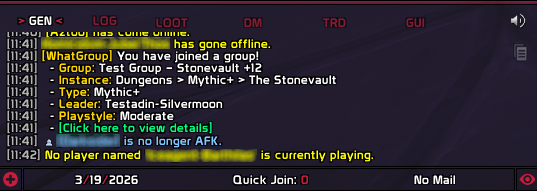
- A chat notification printed a moment after you join: group name, instance, type (Mythic+ / Raid / Dungeon / PvP / …), leader, playstyle (Learning / Fun (Relaxed) / Fun (Serious) / Expert — using the LFG UI's own labels), the dungeon's teleport spell (with a "not learned" tag if you don't have it), and a clickable
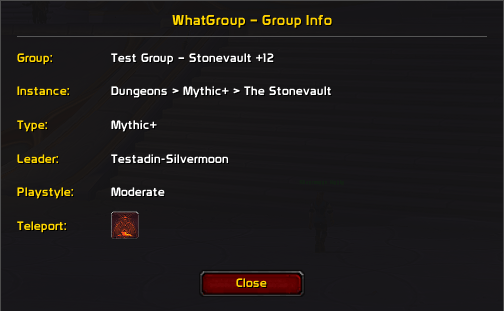
[Click here to view details]link to re-open the popup. - A popup dialog with the same fields plus a teleport button for known dungeon teleport spells (grayed out if not learned). Draggable, closeable with
ESC, and re-openable any time the group is still active via/wg showor the chat link.
Every chat line is prefixed with a cyan [WG] banner. Every option is configurable through the standard Blizzard Settings panel and through the /wg slash command (every panel control has a CLI peer via /wg get / /wg set).
Screenshots
Popup Dialog
Chat Message
Usage
Slash commands
| Command | Description |
|---|---|
/wg or /wg help |
Print the help index |
/wg show |
Re-open the last group info popup (only while you're still in that group) |
/wg test |
Preview the chat notification + popup with synthetic data — also available as a Test button in the Settings panel |
/wg config |
Open the Settings panel on the addon's landing page, with the subcategory tree unfolded |
/wg list |
Print every setting and its current value |
/wg get <path> |
Print one setting's current value |
/wg set <path> <value> |
Update a setting. Bools accept true / false / on / off / 1 / 0 / yes / no / toggle; numbers clamp to the option's min/max |
/wg reset |
Reset every setting to its default |
/wg debug |
Toggle debug logging (persisted across sessions) |
/whatgroup |
Long-form alias for /wg — accepts the same subcommands |
Settings panel
/wg config opens the Blizzard Settings panel on Ka0s WhatGroup's landing page (logo, addon notes, slash-command list) with the subcategory tree unfolded so General is one click away in the sidebar.
The General subcategory holds every setting in a two-column layout with a Notify sub-section further down. The page header carries a Defaults button on the right that resets every setting after a confirm prompt — same code path as /wg reset.
- General — master enable, popup auto-show on group join, chat notification on/off, debug log, and a Test button that runs the full notify + popup flow against synthetic data.
- Notify — notification delay (0–10s) plus per-line gates for the chat notification: Instance, Type, Leader, Playstyle, the "Click here" link, and the dungeon teleport spell line. Each toggle controls chat output only — the popup always shows every field.
How It Works
When you click Apply in the Premade Group Finder, WhatGroup quietly snapshots the group's details from the search-result tile. It tracks the application across the LFG state machine so the right group info ends up paired with the right invite, even when several applications are in flight at once. Once you actually join the group, the chat notification prints and the popup opens — both fired after notify.delay seconds so the zone-in has time to settle.
Capture state is session-only and clears when you leave the group; only your settings persist between sessions. For the full event flow, hooks, and capture-pipeline diagram see ARCHITECTURE.md.
FAQ
| Question | Answer |
|---|---|
| Does this work for cross-realm or cross-faction groups? | Yes — WhatGroup just reads whatever the LFG API hands it. Realm, faction, and category don't matter. |
| Is anything saved between sessions? | Only your settings (in WhatGroupDB). The captured group info is session-only and clears the moment you leave the group, so /wg show only works while you're still grouped. |
| How do I preview the popup without joining a real group? | /wg test, or the Test button in Settings. Both run the full notification + popup flow against synthetic data. |
| Why is the teleport button or chat teleport line grayed / missing? | Either you don't know the spell (popup grays the button, chat tags (not learned)), or the activity has no teleport mapping (popup hides the row, chat skips the line). |
| Can I disable the popup but keep the chat message (or vice versa)? | Yes — toggle Auto Show off to skip the popup, or Print to Chat off to skip the chat summary. The two are independent. |
| Are there profiles? Per-character configs? | Settings live in a single shared profile. There's no Profiles panel exposed in the UI. |
Troubleshooting
| Symptom | Resolution |
|---|---|
| Popup never appears when I join a group | Check /wg get enabled (master switch) and /wg get frame.autoShow — both must be true. If they are, run /wg debug and re-apply to a group; the log will tell you which capture stage didn't fire. |
| Chat notification is missing fields | The per-line notify.show* toggles are independent. The popup always shows every field; the toggles only affect chat output. |
/wg show says "No group info available" |
The captured info clears when you leave the group, so /wg show only works while you're still in that group. Use /wg test if you just want to preview the popup. |
| Teleport button is grayed out for a dungeon I'm in | Either the spell isn't learned on the current character, or the activity has no teleport mapping. The popup always renders the row; the button is disabled when the spell isn't castable. |
| Settings panel opens but I can't find the toggles | /wg config lands on the addon's landing page (logo + slash list) with the subcategory tree unfolded — click General in the sidebar to reach the toggles. |
For contributors
WhatGroup has no automated test suite — validation is manual, in-game. Before opening a PR or tagging a release, run the relevant section of the manual smoke-test checklist (boot health, slash commands, settings panel, /wg test, real LFG flow, regression checks). The Quick reference checklist at the bottom of that file is the minimum 80%-coverage pass.
Issues and feature requests
All bugs, feature requests, and outstanding work are tracked at https://github.com/tusharsaxena/WhatGroup/issues. Please file new reports there rather than as comments — the issue tracker is the single source of truth for the project's backlog.
Version History
| Version | Date | Notes |
|---|---|---|
| 1.2.0 | 2026-05-03 | Adopted Ace3 with a schema-driven Settings panel and /wg config, list, get, set, reset, debug, test slash commandsAdded popup teleport button (mapID-keyed, grayed when not learned) and atlas-chevron breadcrumb separator Fixed Logout taint, stale notify timers, and popup teleport / playstyle on real LFG joins Consolidated playstyle and group-type strings under WhatGroup.Labels; orchestrated Helpers.Set with deterministic refresh orderMoved teleport spell table to data/TeleportSpells.lua and refreshed it against current dungeon dataSplit docs into docs/* topic chunks; added ARCHITECTURE.md and a smoke-test checklist |
| 1.1.0 | 2026-04-24 | Bumped TOC interface for client compatibility |
| 1.0.0 | 2026-03-19 | Initial release: chat notification and popup dialog on LFG join, Playstyle row, gold-unified label colors, MIT license |
用户评价
暂无 / 5,0 条评价相关推荐
继续看看这些内容
