插件中文资料库
中文说明、玩家点评、适用场景和替代推荐,方便快速判断是否适合你。
- 界面布局、头像框、姓名板和动作条优化
 Details! Mythic+ Scoreboard
 BagSync
 TankMD Misdirect
Ka0s KickCD 插件下载与使用指南
本页整理了 Ka0s KickCD 的功能用途、适用人群、安装方法和常见问题,方便玩家快速判断是否需要安装。
适合谁用
Ka0s KickCD 是一款 战斗 / 职业 / 增益与减益 类插件,适合需要优化界面、提升操作效率或补充游戏信息提示的魔兽世界玩家。
基本信息
- 插件作者:aDd1kTeD2Ka0s
- 插件分类:战斗 / 职业 / 增益与减益
- 适配版本:12.0.0,12.0.1,12.0.5
- 累计下载:46
安装方法
- 点击上方下载按钮获取 Ka0s KickCD插件文件。
- 解压后将插件文件夹放入 World of Warcraft/_retail_/Interface/AddOns 目录。
- 重启游戏或在角色界面点击插件,确认 Ka0s KickCD 已启用。
- 如果插件不生效,请检查版本是否匹配,或关闭同类冲突插件后重试。
使用建议
Ka0s KickCD 安装后建议先在角色界面确认已启用,进入游戏后根据插件提供的命令、小地图按钮或设置面板进行调整。如遇到报错,可先单独启用该插件排查冲突。
Ka0s KickCD 常见问题
Ka0s KickCD 适合需要 战斗 / 职业 / 增益与减益 类功能的玩家,特别是希望提升游戏便利性、界面管理或战斗信息获取效率的用户。
下载后解压到 Interface/AddOns 目录,然后重启游戏并在角色界面启用插件。
常见原因是目录多套一层、游戏版本不匹配、依赖插件缺失或同类插件冲突。
可以查看本页的替代插件推荐和相关插件区域,按下载量和分类选择同类工具。
插件 AI 问答
可以问:这个插件正式服能用吗、和 DBM 冲突吗、怎么设置、有没有替代插件。
Ka0s KickCD 是一款魔兽世界插件,主要用于增益、减益、光环或职业状态监控。建议根据自己的版本和插件环境先测试兼容性。
插件用途
Ka0s KickCD 主要面向需要增益与减益功能的玩家,用来改善游戏体验、减少重复操作或补充默认界面没有直接提供的信息。
适用场景
- 增益、减益、光环或职业状态监控
使用建议
安装后建议先在角色选择界面或插件管理器中确认已启用,再进入游戏测试是否与现有整合包、WA 和其他插件冲突。如遇报错,可以先禁用同类插件排查。
Ka0s KickCD



KickCD is a lightweight, single-folder WoW addon that helps the player make informed interrupt decisions in real time. It pairs two pieces of UI:
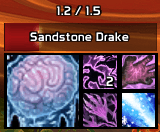
- A movable, persistently-visible icon grid of the player's interrupt + cast-stopping CC abilities, with cooldown swipes and a clear ready / not-ready state. Sensible defaults per class and spec; the secondary block can be anchored to any of 13 points on the primary icon and filled in any of 8 grow directions.
- An independently-anchored target cast bar that mirrors the current target's cast or channel — spell icon, name, and remaining time. Bar fill color, background, border style, and font are configurable per interruptibility state (interruptible vs. uninterruptible). The bar can free-float, anchor to the icon grid's primary icon, and auto-size to the grid's actual visible footprint.
Both panels share a single addon-wide visibility mode and a single drag lock. The addon is fully compatible with WoW 12.0's "secret value" protection on protected-interrupt cooldowns and casting info.
Everything is configurable through the standard Blizzard Settings panel and through the /kcd slash command (every panel control has a CLI peer via /kcd get / /kcd set).
Screenshots
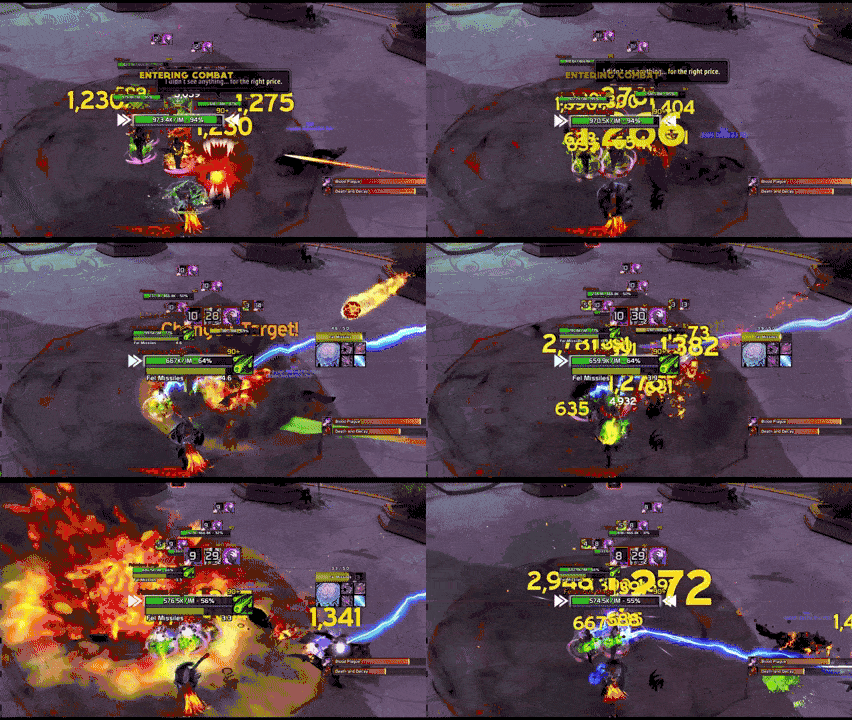
Addon in action
Zoomed in view of the icon grid and cast bar
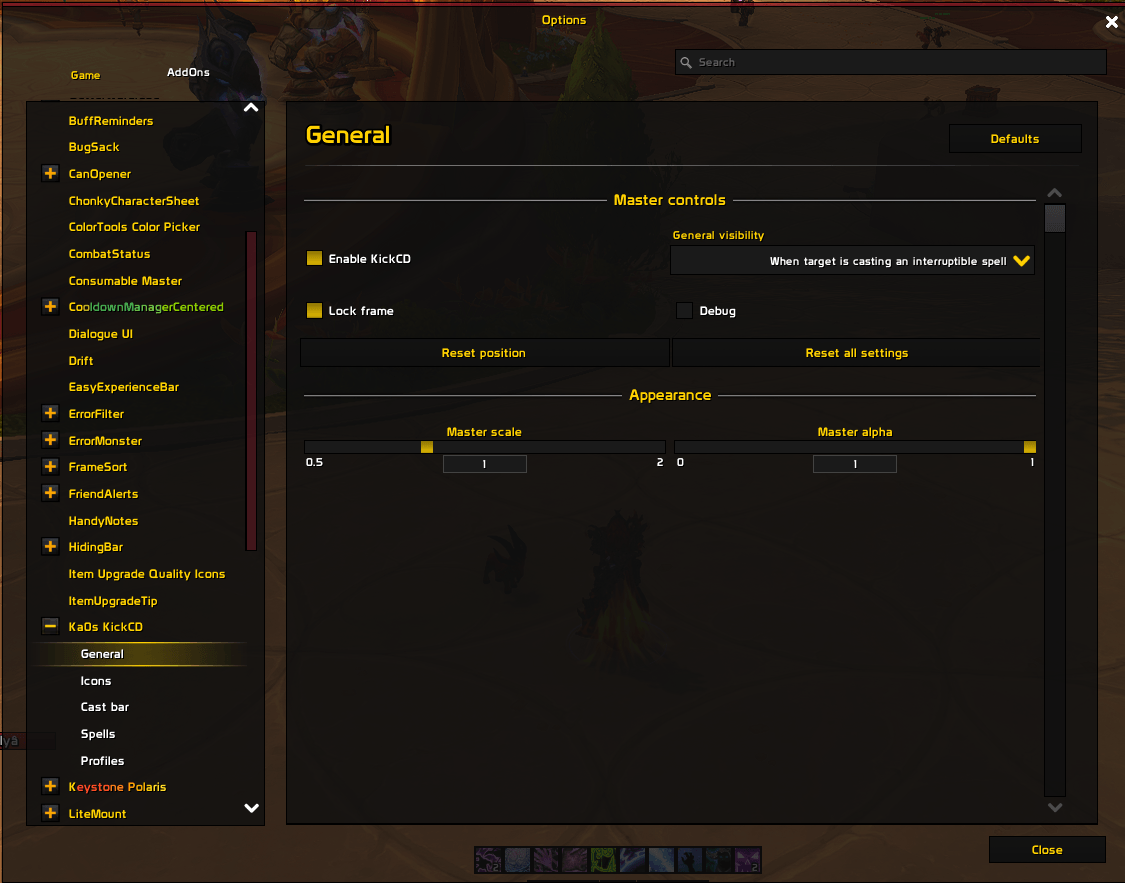
General settings panel
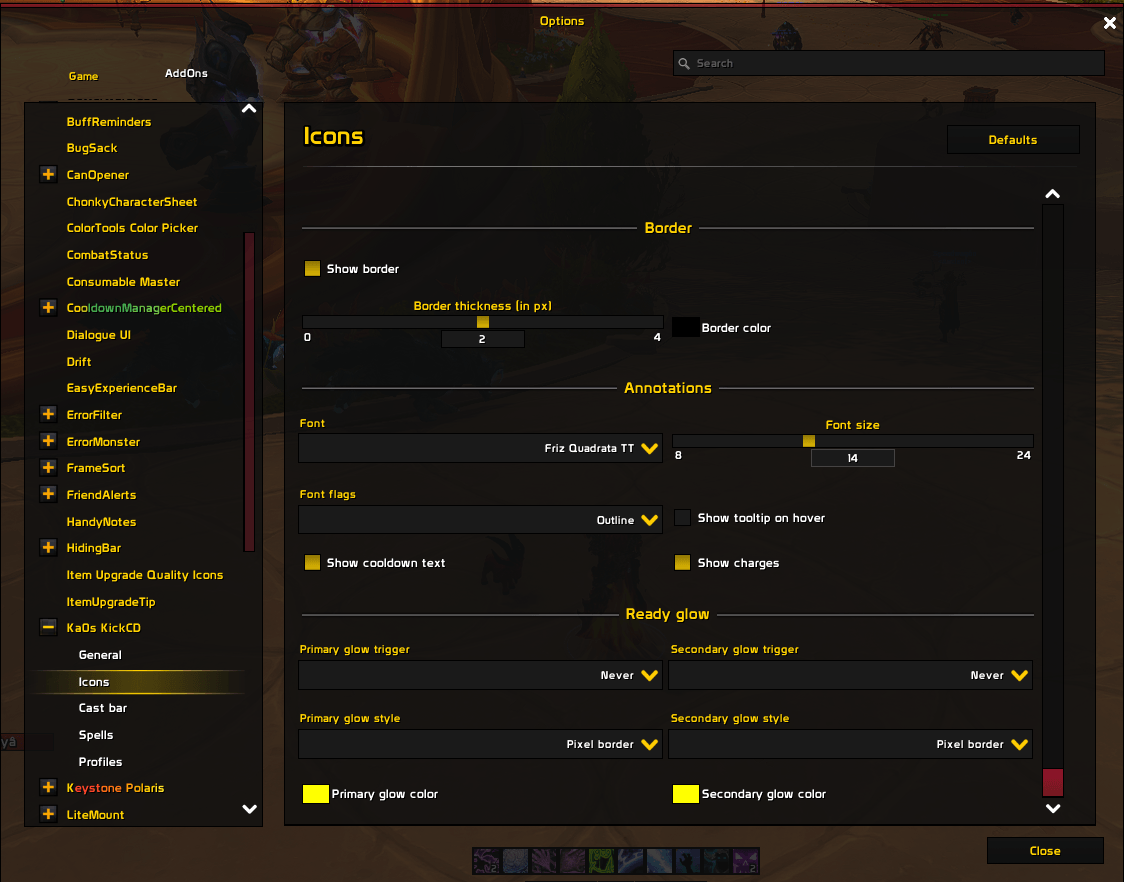
Icons setting panel
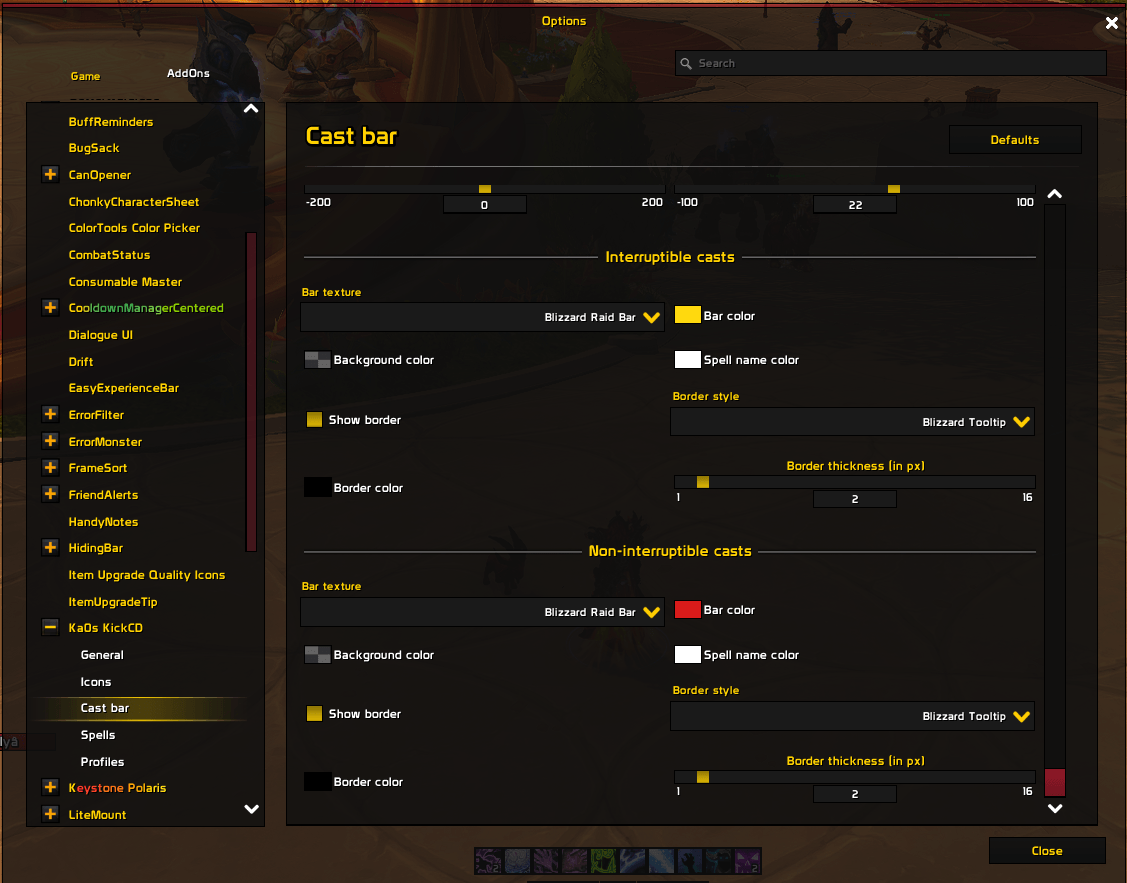
Castbar settings panel
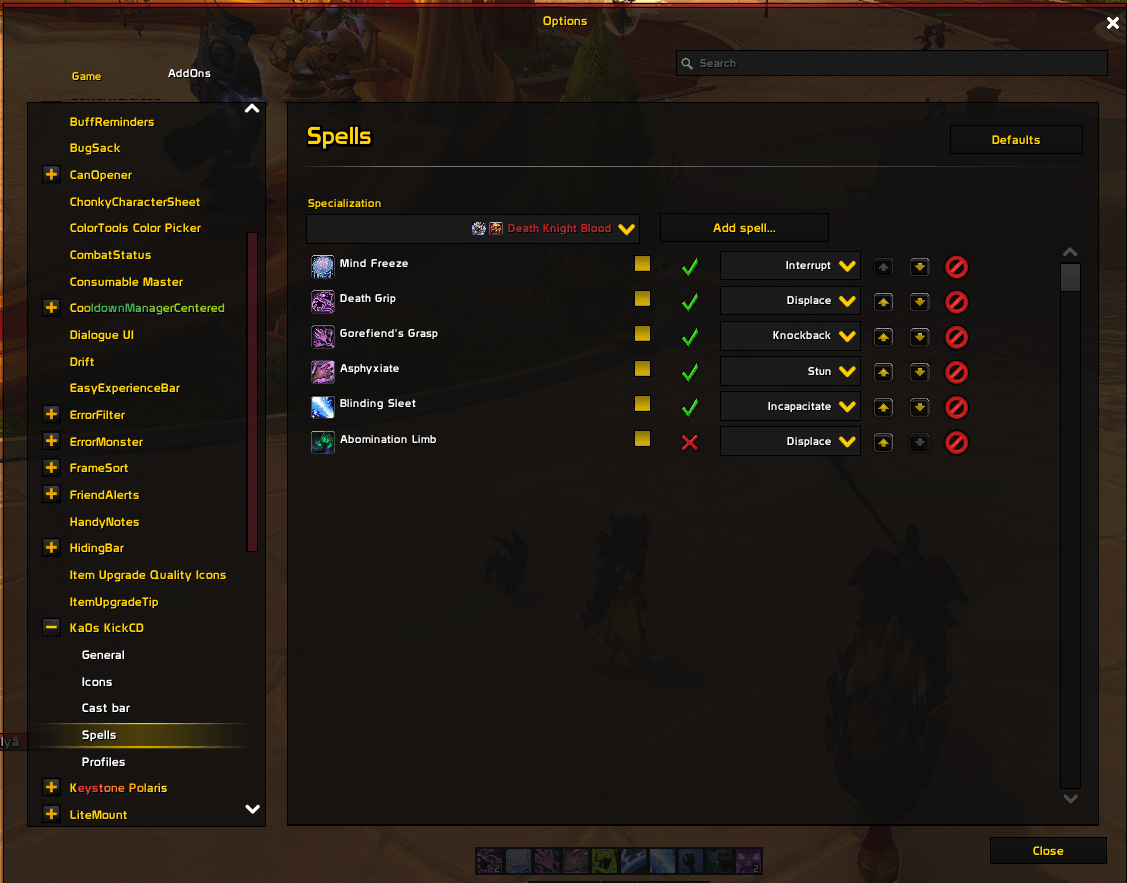
Spells settings panel
Usage
Slash commands
/kcd is the short form; /kickcd is a long-form alias for the same handler. Every chat line is prefixed with a cyan [KCD] banner.
| Command | Purpose |
|---|---|
/kcd |
Print the help index. |
/kcd config |
Open the settings panel. Refuses during combat (Blizzard's category-switch is protected). Aliased as /kcd options. |
/kcd lock / unlock / toggle |
Set / clear / flip the shared drag lock for the icon grid and the cast bar. |
/kcd list |
Dump every settings option grouped by panel, with current values. |
/kcd get <path> |
Print one setting's current value (e.g. /kcd get icons.primarySize). |
/kcd set <path> <value> |
Type-aware write. Numbers clamp to range, dropdowns validate against the option list, colors take r g b [a] (e.g. /kcd set castbar.interruptible.barColor 0.2 0.8 0.2 1). |
/kcd reset <general|icons|castbar|spells> |
Reset one panel to defaults. spells rebuilds every spec's list. |
/kcd resetall |
Reset every schema-driven panel and every spec's spell list. Mirrors the General → "Reset all settings" popup; no CLI confirmation. |
/kcd resetposition |
Restore the icon grid to its default screen position. |
/kcd spells <subcmd> |
Per-class+spec spell-list editor: list / add / remove / enable / disable / category / reset. CLASS+SPEC default to the player's current spec when omitted. |
/kcd debug spells |
Dump the watched cooldown list. |
/kcd debug castbar |
Print current target cast state plus configured / live per-state colors. |
/kcd debug interrupt |
Dump UnitCastingInfo / UnitChannelInfo positions plus what the visibility logic decided. Use to diagnose 12.0 secret-value handling. |
/kcd debug log |
Toggle internal-message logging (mirrors General → Debug). |
Settings panel
Five subcategories under Ka0s KickCD:
| Tab | Covers |
|---|---|
| General | Master enable, addon-wide visibility mode, lock, master scale / alpha, debug log. "Reset position" and "Reset all settings" buttons sit under Master controls. |
| Icons | Sizing, layout (anchor + grow + rows × cols), visual states (alpha / tint / GCD swipe suppression), border, annotations (cooldown text font / size / flags, charges, hover tooltip), per-slot ready glow (independent trigger and style for primary vs. secondary icons). |
| Cast bar | Enable, position (free-float or anchored to the primary icon), orientation / growth direction, auto-size to icon grid, sizing, font, per-element text anchors and offsets, per-state appearance for interruptible vs. uninterruptible casts. |
| Spells | Per-class+spec spell-list editor. Class/spec dropdown shows class+spec icons and class-colored entries; rows show known/unknown glyph + spell icon + name + category + enable/move/remove. Header "Defaults" button resets the currently-selected spec only. The grid only renders entries the player can actually cast (talent choice nodes, pet spells while the pet is summoned, etc.). |
| Profiles | Standard AceDB profile management (default / per-character / per-class / per-realm). |
Use /kcd unlock to drag the icon grid (and the cast bar, if it's in FREE anchor mode) into position, then /kcd lock to fix them.
Critical settings
A few options change the addon's behavior more than any others.
Visibility modes (General → Master controls → General visibility)
A single visibility selector governs both the icon grid and the cast bar. The master enable toggle still wins — disabled hides everything regardless of mode.
Value (/kcd set visibility …) |
When the UI shows |
|---|---|
always |
Always. |
in_combat |
Only while combat is active. |
target_casting |
Only while the current target has a cast or channel in progress. |
target_casting_interruptible |
Only while a hostile target is casting and the cast is interruptible. Uninterruptible casts hide. (Default.) |
The per-icon glow trigger (Icons → Ready glow → Trigger) reuses three of these values — always, target_casting, target_casting_interruptible — plus a never option to disable the glow entirely. (in_combat is intentionally absent; the glow is a per-cast cue, not a combat-state indicator.) Primary and secondary icons each carry their own trigger.
Cast bar anchoring (Cast bar → Position)
Two modes:
- Free (drag to move) — the cast bar is a free-floating frame. Unlock with
/kcd unlock, drag, lock again with/kcd lock. Position is saved per-profile. - Anchored to primary icon — the cast bar attaches to the icon grid's primary icon via three settings: an attach point on the primary icon (one of 13), the matching point on the cast bar (same 13-option set), and an X / Y offset. The cast bar follows the grid for free; the bar itself is not draggable.
Defaults: Anchor mode = PRIMARY, attach point TOP_LEFT ↔ BOTTOM_LEFT, offset (0, 1) — bar sits 1 px above the primary icon, left-aligned.
Cast bar orientation, growth, and auto-size (Cast bar → Orientation)
- Orientation —
HORIZONTAL(default) orVERTICAL. Vertical rotates the whole frame 90°; spark, fill, name, time, and icon layouts all follow. - Growth direction — pairs with orientation. Horizontal accepts
RIGHT/LEFT; vertical acceptsUP/DOWN. Switching orientation auto-resets growth to the canonical default for the new axis. - Auto-size to icon grid — when on, the bar's long axis matches the icon grid's actual rendered size in that direction (horizontal → bar width, vertical → bar height). Tracks the grid's visible footprint, so adding/removing/disabling icons resizes the bar in place. The orthogonal dimension stays as configured.
Icon grid anchoring (Icons → Layout)
Primary anchor places the secondary block on the primary icon (12 <SIDE>_<ALIGN> tokens + a 13th CENTER that stacks the block on the primary). Grow direction picks the fill order inside the block (8 combinations of right / left / down / up). Rows × Cols is the block's capacity. Anchor and grow are independent — any anchor pairs with any grow direction.
If more spells are enabled than the block holds, the extras are dropped — the addon prints a one-time chat warning per (class, spec, capacity) tuple so you know to bump rows × cols or remove spells.
FAQ
| Question | Answer |
|---|---|
| Does this replace Blizzard's default cast bars? | No. The cast bar is a brand-new frame; Blizzard's player and target cast bars are untouched. Disable Blizzard's target cast bar in Edit Mode if you don't want both visible. |
| How do I move the icon grid / cast bar? | /kcd unlock, drag, /kcd lock. The icon grid is always draggable when unlocked. The cast bar is draggable only in Free anchor mode — in Anchored mode it follows the primary icon. /kcd resetposition snaps the grid back to its default screen position. |
| Where do my spell defaults come from? Why doesn't every class spell I expect show up? | Defaults are per-class+spec and only seeded once, on first profile creation, from defaults/Spells.lua. The grid then renders only the spells the player can actually cast — wrong-talent choice-node spells, unlearned spells, and pet abilities while no pet is summoned are filtered out at render time. To restore defaults later, /kcd reset spells (every spec) or /kcd spells reset [CLASS SPEC] (one spec). |
| Can I add my own spells? | Yes — Settings → Spells, or /kcd spells add SPELL_ID category. When editing your own active spec, only spells already tracked by the Cooldown Manager validate; the editor shows an error if not. |
| Does the addon track items / trinkets? | Not yet. Spells only. |
| Why does the settings panel refuse to open during a pull? | Blizzard's category-switching is protected in combat, so opening any settings subcategory mid-fight would taint the panel. /kcd config errors out cleanly until combat ends. |
| Are there profiles? Per-character configs? | Yes — full AceDB profiles under Settings → Profiles. Every character on the account starts on the shared Default profile; opt into per-character / per-class / per-realm scope from the Profiles panel if you want a character (or group of characters) to diverge. |
| What does "secret value" mean and why does it matter? | WoW 12.0 marks certain protected-interrupt cooldown timings and notInterruptible flags as opaque tokens that error if an addon tries to compare them in Lua. KickCD never compares them; the visibility / glow / interruptibility decisions are routed through C-side Blizzard methods that accept the protected values directly. Run /kcd debug interrupt to see what the gate decided for the current target. |
| Does the bar fill direction affect channels? | Channels drain in the same direction the equivalent cast would fill — a HORIZONTAL + RIGHT bar drains right-to-left during a channel. |
Troubleshooting
| Symptom | What to check |
|---|---|
| The icon grid never appears. | (1) Master enable: /kcd get enabled must be true. (2) Visibility mode: /kcd get visibility — in_combat requires combat, target_casting* requires an actively-casting target. (3) The active spec has at least one enabled spell the player knows. /kcd debug spells lists the watched cooldowns. |
| The icon grid won't drag. | It's locked. /kcd unlock, drag, /kcd lock. If /kcd unlock doesn't visibly flip the lock state, run /kcd toggle. |
| The cast bar shows on uninterruptible casts even though I picked "interruptible only". | A bar that visually fades to alpha 0 during an uninterruptible cast is the gate working as intended (the frame still exists; only its alpha changes). For other cases, run /kcd debug interrupt while the offending unit is casting and report the output. |
Cooldown text is stuck at 0.0 for a few seconds after a spell finishes. |
Should not happen since the 1.0.0 fix. If you see it, capture /kcd debug spells output during the stuck window and report it. Make sure Icons → Annotations → Show cooldown text is enabled. |
| Glow on secondary icons looks janky / restarts every ~0.1s. | Should not happen since the 1.0.0 fix. If you see it, confirm the trigger is set to one of the target casting options and capture the cast bar / icon configuration plus a video. |
| Settings panel won't open mid-pull. | Intentional — Blizzard's settings category-switch is protected in combat; KickCD refuses rather than silently tainting the panel. /kcd config works the moment combat ends. |
| Cast bar doesn't auto-size to the grid. | Toggle Auto-size off and on, or run /kcd resetposition to force a layout pass. Auto-size only governs the long axis; the orthogonal dimension stays at the configured Width / Height. |
| I want a clean slate. | One panel: /kcd reset general / icons / castbar / spells. Everything except profiles: /kcd resetall (or General → Reset all settings). Just the icon grid's screen position: /kcd resetposition. A specific spec's spell list: /kcd spells reset CLASS SPEC or the Spells panel's per-spec Defaults button. |
Issues and feature requests
All bugs, feature requests, and outstanding work are tracked at https://github.com/tusharsaxena/kickcd/issues. Please file new reports there rather than as comments — the issue tracker is the single source of truth for the project's backlog.
Testing
There is no automated test harness — verification is manual, in-game. The end-to-end smoke-test suite covering install, visibility modes, lock/drag, cast bar, spec/talent/pet rebuilds, profiles, and 12.0 secret-value safety lives at docs/smoke-tests.md. Run it before tagging a release or after refreshing libs / bumping ## Interface:.
Version History
| Version | Date | Notes |
|---|---|---|
| 1.1.0 | 2026-05-03 | Vendored LibSharedMedia dropdown widgets with texture/font/border previews and first-run defaults. Added KickCD_COMBAT_STATE bus message, consolidating PLAYER_REGEN_* in core/State.lua. Filtered UNIT_SPELLCAST_* events to the target unit via private dispatch frames. Settings panel: parent page now renders logo + slash-command list, sub-pages get breadcrumb headers with an atlas-chevron separator, and OpenSettings is combat-lockdown-gated at the function. Unified cyan [KCD] chat prefix across all slash output. Docs collapsed into a single root CLAUDE.md / ARCHITECTURE.md with expanded docs/ index, comprehensive smoke-test suite, and review artifact conventions. Internal cleanup: dropped dead Settings/Util exports and unused record fields; codified no-auto-commit / no-version-bump workflow; CRLF normalized via .gitattributes. |
| 1.0.1 | 2026-05-02 | Build retrigger; no functional changes. |
| 1.0.0 | 2026-05-02 | Initial release. Interrupt/CC cooldown icon grid (12-anchor + 8-way grow) and target cast bar with interruptibility coloring and auto-size. Schema-driven five-tab settings panel with full /kcd slash parity, two-column layout, and per-tab Defaults. 12.0 secret-value-safe pipeline for cooldowns, cast info, glow, and dimming. Visibility modes (always / in_combat / target_casting / target_casting_interruptible) with per-icon ready glow via LibCustomGlow. Per-spec spell lists seeded from Baratus's Midnight class-info sheet, with hover tooltips and known/unknown glyphs. AceDB profiles defaulting to Shared. Ace3 + LibSharedMedia + LibCustomGlow vendored. |
用户评价
暂无 / 5,0 条评价相关推荐
继续看看这些内容
