插件中文资料库
中文说明、玩家点评、适用场景和替代推荐,方便快速判断是否适合你。
- 界面布局、头像框、姓名板和动作条优化
 Details! Mythic+ Scoreboard
 BagSync
 Sleek XP Bubbles
Ka0s Absorb Tracker 插件下载与使用指南
本页整理了 Ka0s Absorb Tracker 的功能用途、适用人群、安装方法和常见问题,方便玩家快速判断是否需要安装。
适合谁用
Ka0s Absorb Tracker 是一款 战斗 / 增益与减益 类插件,适合需要优化界面、提升操作效率或补充游戏信息提示的魔兽世界玩家。
基本信息
- 插件作者:aDd1kTeD2Ka0s
- 插件分类:战斗 / 增益与减益
- 适配版本:12.0.0,12.0.1,12.0.5
- 累计下载:44
安装方法
- 点击上方下载按钮获取 Ka0s Absorb Tracker插件文件。
- 解压后将插件文件夹放入 World of Warcraft/_retail_/Interface/AddOns 目录。
- 重启游戏或在角色界面点击插件,确认 Ka0s Absorb Tracker 已启用。
- 如果插件不生效,请检查版本是否匹配,或关闭同类冲突插件后重试。
使用建议
Ka0s Absorb Tracker 安装后建议先在角色界面确认已启用,进入游戏后根据插件提供的命令、小地图按钮或设置面板进行调整。如遇到报错,可先单独启用该插件排查冲突。
Ka0s Absorb Tracker 常见问题
Ka0s Absorb Tracker 适合需要 战斗 / 增益与减益 类功能的玩家,特别是希望提升游戏便利性、界面管理或战斗信息获取效率的用户。
下载后解压到 Interface/AddOns 目录,然后重启游戏并在角色界面启用插件。
常见原因是目录多套一层、游戏版本不匹配、依赖插件缺失或同类插件冲突。
可以查看本页的替代插件推荐和相关插件区域,按下载量和分类选择同类工具。
插件 AI 问答
可以问:这个插件正式服能用吗、和 DBM 冲突吗、怎么设置、有没有替代插件。
Ka0s Absorb Tracker 是一款魔兽世界插件,主要用于界面框架、头像、动作条或冷却显示优化、增益、减益、光环或职业状态监控。建议根据自己的版本和插件环境先测试兼容性。
插件用途
Ka0s Absorb Tracker 主要面向需要增益与减益功能的玩家,用来改善游戏体验、减少重复操作或补充默认界面没有直接提供的信息。
适用场景
- 界面框架、头像、动作条或冷却显示优化
- 增益、减益、光环或职业状态监控
使用建议
安装后建议先在角色选择界面或插件管理器中确认已启用,再进入游戏测试是否与现有整合包、WA 和其他插件冲突。如遇报错,可以先禁用同类插件排查。
Ka0s Absorb Tracker



AbsorbTracker is a lightweight, single-folder WoW addon that displays your total absorb shield value as a movable status bar. Bar size, fill texture and color, background texture and color, border style / size / color, and font face / size / outline are all independently configurable through LibSharedMedia-backed pickers. Bar fill, background, and border each have an opt-in class-color override, and the bar position is saved per-profile.
Everything is configurable through the standard Blizzard Settings panel and through the /at slash command (every panel control has a CLI peer via /at get / /at set).
Screenshots
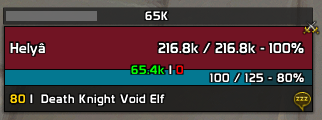
Absorb tracker bar in action — see the bar above the unit frame
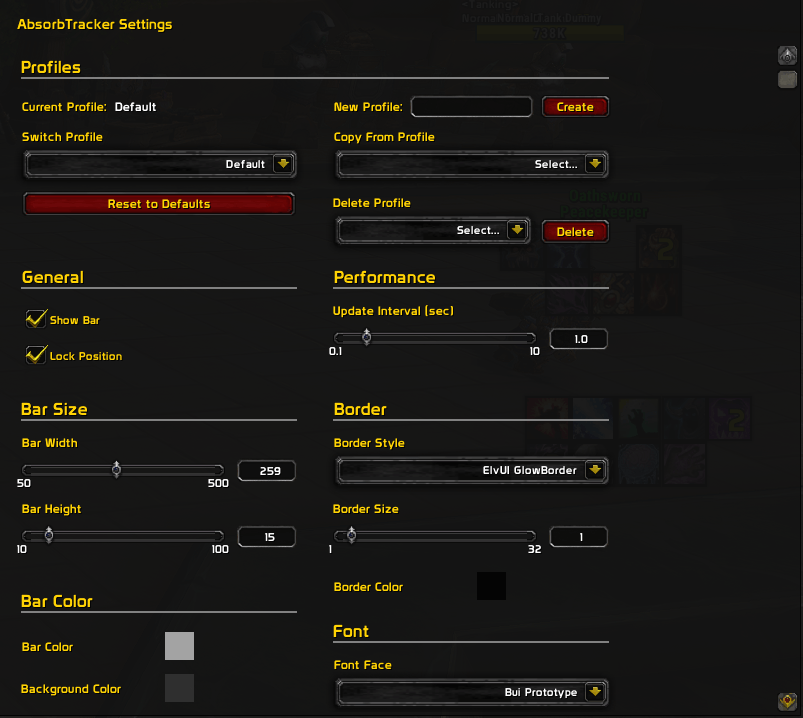
Settings panel — invoked by /at config
Usage
Slash commands
Both /at and the long form /absorbtracker work for every command below. All chat output from the addon is prefixed with a cyan [AT]; in the help dump, each command renders in yellow and its description in white.
| Command | Description |
|---|---|
/at or /at help |
Print the help index |
/at config |
Open the settings panel (lands on the parent Ka0s Absorb Tracker about page with the sub-page tree expanded). Also routed by /at options |
/at list |
List every schema-driven setting grouped by panel, with current values |
/at get <path> |
Print one setting's current value |
/at set <path> <value> |
Set one setting (typed: bool / number / string / color). Examples: /at set barWidth 250, /at set barColor 0.4 0.7 1.0 0.8, /at set useClassColorBar true |
/at reset <general|bar|border|font> |
Reset one panel to defaults |
/at resetall |
Reset every setting to defaults and clear the saved bar position |
/at resetposition |
Return the bar to the screen center |
/at lock / /at unlock |
Flip the drag lock |
/at toggle |
Flip bar visibility |
/at update |
Force a bar refresh |
/at test [value] [hold-secs] |
Paint the bar with a fake value (default 50000) for the given duration (default 5 s) for visual tweaking |
/at debug |
Toggle verbose [AT] chat output |
/at profile <subcmd> |
Profile management. Subcommands: list, current, use <name>, new <name>, copy <name>, delete <name>, reset. Requires AceDB-3.0 |
Settings panel
Five subcategories under Ka0s Absorb Tracker:
- General — Show Bar, drag lock, update interval (0.1–10s), Reset Position + Reset All Settings buttons.
- Bar — width (50–500), height (10–100), fill texture and color, background texture and color (each color has a class-color override).
- Border — border style, thickness (1–32), color (with class-color override).
- Font — face, size (6–32), outline style.
- Profiles — AceDBOptions UI. Requires AceDB-3.0.
Use /at unlock to drag the bar into position, then /at lock to fix it.
Critical settings
Class color overrides
Three independent toggles drive whether the bar fill, background, and border use your class color instead of a configured RGB:
useClassColorBar— bar fill uses your class color.useClassColorBg— background uses a darkened class-color variant.useClassColorBorder— border uses your class color.
When a toggle is on, the matching color picker greys out — flip the toggle off to re-enable manual color editing.
Optional dependencies
- LibSharedMedia-3.0 — when present, the texture / border / font dropdowns offer the full SharedMedia catalog rendered as inline-preview swatches. Without it, the dropdowns fall back to a small set of Blizzard built-in constants.
- AceDB-3.0 — when present, full profile management via the
/at profilesubcommands and the Profiles sub-page. Without it, settings still persist but profile management is disabled.
Both libs ship in-tree under libs/, so the addon is fully self-contained.
FAQ
| Question | Answer |
|---|---|
| Does this replace Blizzard's absorb shield display on unit frames? | No. AbsorbTracker is a brand-new movable bar; Blizzard's overlay on the player and target unit frames is untouched. Disable it in Edit Mode if you don't want both visible. |
| How do I move the bar? | /at unlock, drag, /at lock. The position saves per-profile. /at resetposition snaps the bar back to the screen center. |
| Are there profiles? Per-character configs? | Yes — full AceDB profiles under Settings → Profiles. Every character on the account starts on the shared Default profile, so changes carry over to every other character out of the box. Opt into per-character / per-class / per-realm scope from the Profiles panel if you want a character to diverge. |
| Why is my bar empty? | You need an active absorb effect (Power Word: Shield, Ice Barrier, trinket procs, …) for the value to be non-zero. With no absorb up, the bar reads 0 and is effectively invisible against the background. |
| Why does the settings panel refuse to open during a pull? | Blizzard's category-switching is protected, so opening any settings subcategory during combat would taint the panel. /at config errors out cleanly until combat ends. |
Troubleshooting
| Problem | Resolution |
|---|---|
| The bar never appears | Check that /at get hidden is false, the addon is enabled at character-select, and you have an active absorb effect (without one the bar reads 0 and is effectively invisible). |
| Class color isn't applying | The bar must be visible and have an active absorb effect for the color to be observed. Confirm the toggle is on: /at set useClassColorBar true (or useClassColorBg true / useClassColorBorder true). The matching RGB picker greys out when the toggle is on — that's intentional, not a bug. |
| Custom textures or fonts don't show in the dropdowns | Install LibSharedMedia-3.0 (or any addon that bundles it). Without LSM, the dropdowns fall back to a short list of Blizzard constants. |
| Bar position resets after logout | WoW only writes SavedVariables on a clean logout — force-quitting the client (Alt-F4 mid-fight, crash, etc.) drops anything that hadn't been flushed. Log out via the menu and the position will persist. |
/at profile errors or the Profiles sub-page is missing |
AceDB-3.0 isn't loaded. The addon ships its own copy under libs/Ace3/AceDB-3.0/, so this should only happen if libs/ was tampered with. Reinstall or restore. |
| Want verbose logging? | /at debug toggles a [AT] chat dump on every absorb-amount update. |
Issues and feature requests
All bugs, feature requests, and outstanding work are tracked at https://github.com/tusharsaxena/absorbtracker/issues. Please file new reports there rather than as comments — the issue tracker is the single source of truth for the project's backlog.
If you're filing a regression, the manual QA recipe at docs/smoke-tests.md is the same checklist used before each release — its "Failure-mode quick reference" table maps symptoms to the likely subsystem.
Version History
| Version | Date | Changes |
|---|---|---|
| 1.8.0 | 2026-05-03 | Overhauled the Settings panel onto a canvas + AceGUI stack with breadcrumb headers and an About page Refactored OptionsPanel.lua into a Panel/ toolkit and routed all writes through a single SetByPath seamVendored upstream AceGUI-3.0-SharedMediaWidgets; /at config now opens the parent unfoldedAdded a [hold-secs] argument to /at test; reshaped the Bar and Border panels; breadcrumb separator switched to an atlas chevronCorrectness fixes (API order, fallback deep-copy, color-picker throttle) and dead-code cleanup |
| 1.7.0 | 2026-04-24 | Rebranded to Ka0s Absorb Tracker with new LICENSE and media assets Made the settings schema-driven and split into multi-page Blizzard subcategories; rewrote the slash dispatcher around the schema Centralized chat output through a cyan [AT] prefix helperNormalized on-disk line endings to CRLF; added ARCHITECTURE.md |
| 1.6.0 | 2026-02-14 | Added /at slash-command coverage for the class-color options |
| 1.5.0 | 2026-02-14 | Added class-color overrides for bar fill, background, and border Updated bundled libs |
| 1.4.0 | 2026-02-05 | Replaced Settings-panel dropdowns with scrollable variants Dropdowns with 10+ items get a scrollbar and auto-scroll to the current selection |
| 1.3.0 | 2026-01-31 | Embedded libs directly in-tree (dropped pkgmeta)Rewrote README.md with screenshots for the public release |
| 1.1.0 | 2026-01-31 | Added pkgmeta.yaml to install dependencies automatically |
| 1.0.0 | 2026-01-31 | Initial release: movable absorb bar, configurable size / textures / colors / border / font, AceDB profile support, in-combat settings-panel guard |
用户评价
暂无 / 5,0 条评价相关推荐
继续看看这些内容
