插件中文资料库
中文说明、玩家点评、适用场景和替代推荐,方便快速判断是否适合你。
- 界面布局、头像框、姓名板和动作条优化
 GearInsight
 Yapi
Yapi WOWRN
WOWRNWick's Combat Log 插件下载与使用指南
本页整理了 Wick's Combat Log 的功能用途、适用人群、安装方法和常见问题,方便玩家快速判断是否需要安装。
适合谁用
Wick's Combat Log 是一款 战斗 / 首领战斗 / 聊天与通讯 类插件,适合需要优化界面、提升操作效率或补充游戏信息提示的魔兽世界玩家。
基本信息
- 插件作者:Wicksmods
- 插件分类:战斗 / 首领战斗 / 聊天与通讯
- 适配版本:2.5.5
- 累计下载:41
安装方法
- 点击上方下载按钮获取 Wick's Combat Log插件文件。
- 解压后将插件文件夹放入 World of Warcraft/_retail_/Interface/AddOns 目录。
- 重启游戏或在角色界面点击插件,确认 Wick's Combat Log 已启用。
- 如果插件不生效,请检查版本是否匹配,或关闭同类冲突插件后重试。
使用建议
Wick's Combat Log 安装后建议先在角色界面确认已启用,进入游戏后根据插件提供的命令、小地图按钮或设置面板进行调整。如遇到报错,可先单独启用该插件排查冲突。
Wick's Combat Log 常见问题
Wick's Combat Log 适合需要 战斗 / 首领战斗 / 聊天与通讯 类功能的玩家,特别是希望提升游戏便利性、界面管理或战斗信息获取效率的用户。
下载后解压到 Interface/AddOns 目录,然后重启游戏并在角色界面启用插件。
常见原因是目录多套一层、游戏版本不匹配、依赖插件缺失或同类插件冲突。
可以查看本页的替代插件推荐和相关插件区域,按下载量和分类选择同类工具。
插件 AI 问答
可以问:这个插件正式服能用吗、和 DBM 冲突吗、怎么设置、有没有替代插件。
Wick's Combat Log 是一款魔兽世界插件,主要用于聊天与通讯相关功能。建议根据自己的版本和插件环境先测试兼容性。
插件用途
Wick's Combat Log 主要面向需要聊天与通讯功能的玩家,用来改善游戏体验、减少重复操作或补充默认界面没有直接提供的信息。
适用场景
- 聊天与通讯相关功能
使用建议
安装后建议先在角色选择界面或插件管理器中确认已启用,再进入游戏测试是否与现有整合包、WA 和其他插件冲突。如遇报错,可以先禁用同类插件排查。
Wick's Combat Log
Raw
COMBAT_LOG_EVENT_UNFILTEREDviewer. Every subevent, every arg — the fields Blizzard's default chat log strips out.
Part of the Wick suite — a small family of TBC Classic addons built around a single dark-purple, fel-green aesthetic. Clean information density, no fantasy scroll texture, no Blizzard dialog chrome.
A diagnostic tool, not a damage meter. Built for theorycrafters, addon developers, and anyone who needs to see what CombatLogGetCurrentEventInfo() actually returns.
What it does
- Live event list — every CLEU subevent, newest at top. Columns: timestamp · subevent · source → dest · spell · amount.
- Class colors + hostile reds — players show in their class color (Mage = blue, Druid = orange, etc.); hostile NPCs in red. Class wins over hostility, so PvP enemies still show in their class color.
- Click-to-inspect side panel — click any row to pop a detail panel listing every raw arg from
CombatLogGetCurrentEventInfo()with its proper field name. Flag-style integers also rendered in hex. - Display filters — subevent family checkboxes (Damage / Heal / Aura / Cast / Misc), source dropdown (Anyone / Mine / My Pet / Hostile / Target), spell-name substring search.
- Pause / resume — capture a snapshot during a busy fight without the list scrolling.
- 5,000-event ring buffer — bounded memory, no SavedVariables bloat.
Why it feels different
- Capture is always running; filters only change what's drawn. Flip a filter mid-fight and old events re-reveal.
- Subevent labels are prettified (
SPELL_AURA_APPLIED_DOSE→aura +stack) and dim, so they don't shout at you. - Brand chrome — flat dark panel, thin 1px purple border, fel-green L-bracket corners.
- Resizable; column widths scale proportionally with the panel.
- Position and size remembered per-character.
Slash commands
/wcl              toggle the panel
/wcl pause        stop capturing events
/wcl resume       resume capturing
/wcl clear        drop the buffer
/wcl reset        recenter the panel
Compatibility
- TBC Classic (Burning Crusade Classic / Anniversary) — Interface 20505.
- Pure CLEU consumer — works in any group size, any content.
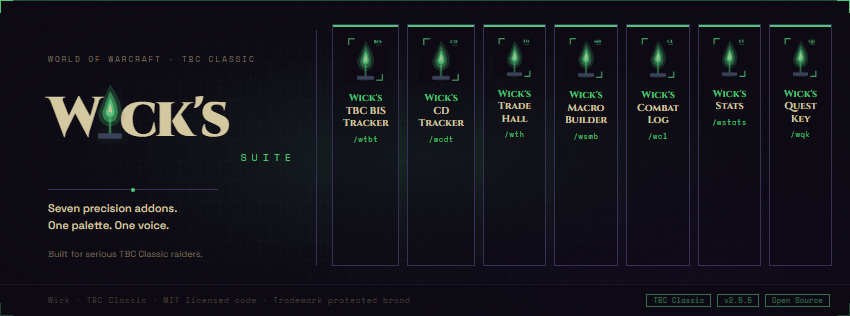
Part of the Wick suite
- Wick's BIS Tracker — best-in-slot gear tracker for every class, every spec, every TBC phase
- Wick's CD Tracker — live party/raid cooldown tracker
- Wick's Trade Hall — trade channel scanner and bulletin board
- Wick's Macro Builder — clean macro editor with chip-based composition
- Wick's Combat Log ← you are here
#4FC778 · Wick · TBC Classic
用户评价
暂无 / 5,0 条评价相关推荐
继续看看这些内容
