插件中文资料库
中文说明、玩家点评、适用场景和替代推荐,方便快速判断是否适合你。
- 界面布局、头像框、姓名板和动作条优化
- 伤害、治疗、仇恨和战斗数据统计
 Details! Mythic+ Scoreboard
 BagSync
 GroupFinder
asInterruptHelper 插件下载与使用指南
本页整理了 asInterruptHelper 的功能用途、适用人群、安装方法和常见问题,方便玩家快速判断是否需要安装。
适合谁用
asInterruptHelper 是一款 战斗 类插件,适合需要优化界面、提升操作效率或补充游戏信息提示的魔兽世界玩家。
基本信息
- 插件作者:asMOD_kr
- 插件分类:战斗
- 适配版本:12.1.0,12.1.5
- 累计下载:0
安装方法
- 点击上方下载按钮获取 asInterruptHelper插件文件。
- 解压后将插件文件夹放入 World of Warcraft/_retail_/Interface/AddOns 目录。
- 重启游戏或在角色界面点击插件,确认 asInterruptHelper 已启用。
- 如果插件不生效,请检查版本是否匹配,或关闭同类冲突插件后重试。
使用建议
asInterruptHelper 安装后建议先在角色界面确认已启用,进入游戏后根据插件提供的命令、小地图按钮或设置面板进行调整。如遇到报错,可先单独启用该插件排查冲突。
asInterruptHelper 常见问题
asInterruptHelper 适合需要 战斗 类功能的玩家,特别是希望提升游戏便利性、界面管理或战斗信息获取效率的用户。
下载后解压到 Interface/AddOns 目录,然后重启游戏并在角色界面启用插件。
常见原因是目录多套一层、游戏版本不匹配、依赖插件缺失或同类插件冲突。
可以查看本页的替代插件推荐和相关插件区域,按下载量和分类选择同类工具。
插件 AI 问答
可以问:这个插件正式服能用吗、和 DBM 冲突吗、怎么设置、有没有替代插件。
asInterruptHelper 是一款魔兽世界插件,主要用于伤害统计、输出循环或战斗表现分析、坐骑、宠物或击杀记录。建议根据自己的版本和插件环境先测试兼容性。
插件用途
asInterruptHelper 主要面向需要战斗功能的玩家,用来改善游戏体验、减少重复操作或补充默认界面没有直接提供的信息。
适用场景
- 伤害统计、输出循环或战斗表现分析
- 坐骑、宠物或击杀记录
使用建议
安装后建议先在角色选择界面或插件管理器中确认已启用,再进入游戏测试是否与现有整合包、WA 和其他插件冲突。如遇报错,可以先禁用同类插件排查。
asInterruptHelper (Midnight)
Displays cooldowns for Interrupt and Stun skills.
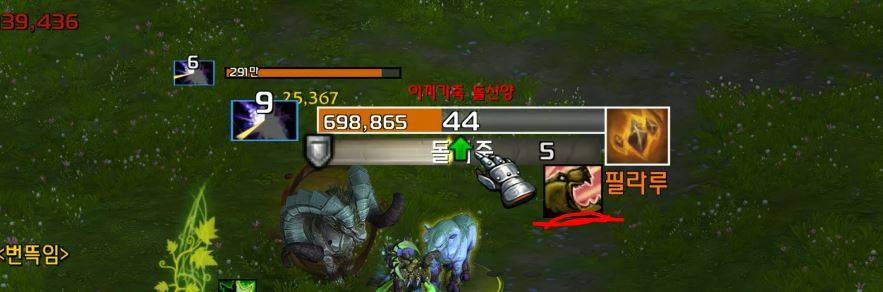
<For Target/Focus>
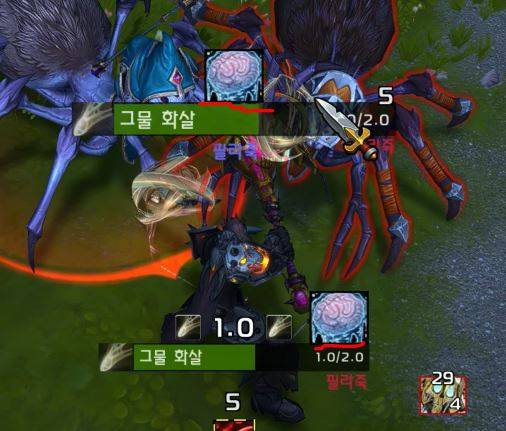
<For Mouseover Target>
Key Features
- Recommended to use alongside
asTargetCastBar
Displays interruptible skills right above the cast bars of your target or focus target. If a mouseover target exists, the icon will display directly over your mouse cursor.
When an Interruptible Skill is Cast
Displays your primary interrupt skill. If your interrupt is currently on cooldown, it displays a stun skill instead, provided the enemy unit is stunnable (i.e., non-boss units of equivalent level).
When an Uninterruptible Skill is Cast
Displays a stun skill if the enemy unit is stunnable (i.e., non-boss units of equivalent level).
Skill Display Priority
Skills with shorter cooldowns take higher priority. (If cooldowns are identical, the skill with the lower Spell ID is prioritized.)
Skill Range Indicator
When a skill is available, its icon turns red if the target is out of range.
Configuration
Settings can be modified via ESC > Options > AddOns > asInterruptHelper:
Display Target Interrupt Skill: Default: On.
Display Focus Target Interrupt Skill: Default: On.
Display Mouseover Target Interrupt Skill: Default: On.
Display in Red When Out of Range: Default: On.
Display Stun Skill When Interrupt is on Cooldown: Default: On.
Repositioning: Enter the
/asconfigcommand in the chat window.Reset Position: Enter the
/asclearcommand in the chat window to reset to default settings.
Contact Information
- Korean Users: Visit the Inven asMOD Forum.
- English Users: Visit the asMOD YouTube Channel or GitHub.
asInterruptHelper (한밤)
차단/스턴 스킬 쿨다운 표시
<주시/대상의 경우>
<마우스 오버 대상의 경우>
주요 기능
- asTargetCastBar 와 같이 사용 추천
주시대상, 대상 케스팅바 위에 차단 가능 스킬을 표시. 마우스 오버 대상이 있는 경우 마우스 커서 위에 표시.
- 차단 가능 스킬 시전 시
주 차단 스킬을 표시, 차단 스킬이 없는 경우 쿨일 경우 스턴이 가능한 몹 (Level이 동등한 몹) 인 경우 스턴 스킬을 표시.
- 차단 불가 스킬 시전 시
스턴이 가능한 몹 (Level이 동등한 몹) 인 경우 스턴 스킬을 표시.
- 스킬 표시 우선 순위
쿨이 짧은 스킬이 우선순위를 가짐. (쿨이 같은경우 ID 가 작은수 인 경우)
- 스킬의 유효 거리 표시
스킬이 사용 가능할 경우 유효 거리에 따라서 사거리 밖일 경우 붉은색으로 표시.
설정
ESC > 설정 > 애드온 > asInterruptHelper 에서 다음 설정 변경 가능
대상 차단 스킬 표시 여부 : 기본 On
주시 대상의 차단 스킬 표시 여부 : 기본 On
마우스 오버 대상의 차단 스킬 표시 여부 : 기본 On
사거리 밖이면 붉은색으로 표시 : 기본 On
차단 스킬이 쿨일 경우 스턴 스킬로 표시 : 기본 On
위치 이동 :
/asConfig명령어 채팅창에 입력위치 초기화 :
/asClear명령어 채팅창에 입력, 기본 설정으로 초기화
문의처
한글 유저:인벤 asMOD 포럼방문 (https://www.inven.co.kr/board/wow/5288)영문 유저:Youtube asMOD 채널방문 (https://www.youtube.com/@asmod-wow),Github방문 (https://github.com/aspilla/asMOD/)
用户评价
暂无 / 5,0 条评价相关推荐
继续看看这些内容
